AutoMate - Car Dashboard
Güncellendi
Mevcut Sürüm
1612997377
Sunan

Cep telefonunda AutoMate - Car Dashboard kullanırken fazla şarjlardan endişelenme, kendini küçük ekrandan kurtar ve uygulamayı çok daha büyük bir ekranda kullanmanın tadını çıkar. Şu andan itibaren, klavye ve fare ile uygulamayı tam ekran da kullanmayı dene. MEmu, beklediğin tüm şaşırtıcı özellikleri sunar: hızlı ve kolay kurulum, sezgisel kontroller, bunun dışında pil sınırı, mobil veri ve rahatsız edici aramalar artık yok. Yepyeni MEmu 9, bilgisayarında AutoMate - Car Dashboard kullanmanın en iyi seçimidir. Emilimimizle kodlanan çok örnekli yönetici, aynı anda 2 veya daha fazla hesap açmayı mümkün kılar. Ve en önemlisi, özel emülasyon motorumuz PC'nin tüm potansiyelini serbest bırakabilir, her şeyi pürüzsüz ve eğlenceli hale getirebilir.
Daha fazla göster
AutoMate - Car Dashboard’i MEmu Android Emülatör ile PC’ye indirin. Büyük ekranda oynamanın keyfini çıkarın. AutoMate makes common services available to while you're driving.
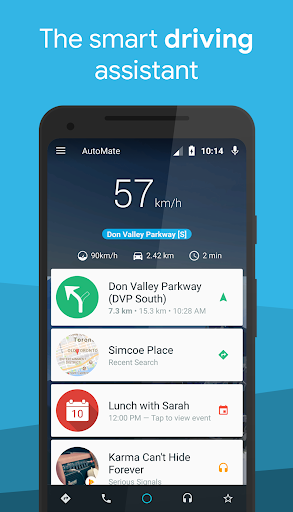
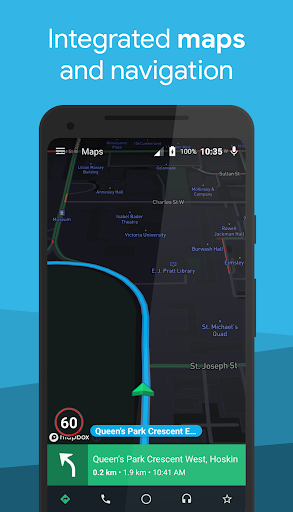
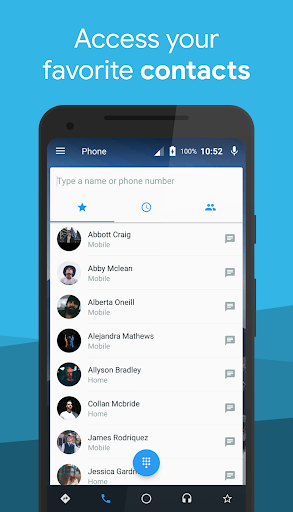
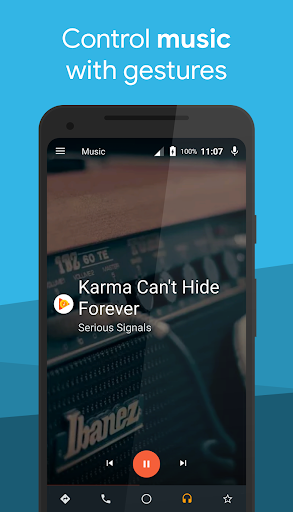
AutoMate makes common services available to while you're driving. With AutoMate, you get the right information at the right time, so you can focus on the road.
Basic features
• Maps – Search for directions and launch your favorite navigation app for turn-by-turn directions.
• Places – Search for nearby places such as gas stations and restaurants, with one click.
• Phone – Call your favorite contacts, see call log, and easily dial a number
• Messaging – Send and reply to SMS messages, hands free replying available for many popular messaging apps
• Voice – Take control of the app through voice commands for navigation, music, and more
• Contextual Information - Receive weather updates, see recent searches, receive speed limit alerts, and more
• Media Control – Control many popular media apps using buttons or gestures
• Shortcuts – Keep your favorite apps and Android shortcuts at your fingertips. Includes quick settings toggles.
• Data – View real-time engine data from an OBDII adapter with Torque integration.
Premium Features
• Set AutoMate as a launcher while it is running
• Hands free gestures! Wave your hand over the device to perform different actions
• Traffic camera alerts, never get a red light or speed camera ticket again!
• Customize wallpapers for day and night themes
• Startup options to make AutoMate even more effortless to use
Links
• About: http://www.bitspice.net/automate/
• FAQ: https://support.bitspice.net/portal/kb/automate
• Join the beta: https://play.google.com/apps/testing/com.bitspice.automate
Permissions:
• This app uses the Device Administrator permission. It is used to automatically lock the screen, if that option is enabled. Otherwise, we do not request this permission.
• This app uses Accessibility services. We request this permission on devices older than Android 4.4 to mirror certain notifications on AutoMate's home screen.
• Other permissions used explained in more detail here: https://support.bitspice.net/portal/kb/articles/automate-permissions-explained
Daha fazla göster

1. MEmu yükleyicisini indirin ve kurulumu tamamlayın

2. MEmu'yu başlatın ve ana sayfada Google Play'i açın

3. Google Play'de AutoMate - Car Dashboard arayın
Install
4. AutoMate - Car Dashboard indirin ve yükleyin
5. Kurulum tamamlandığında başlamak için simgeye tıklayın

6. AutoMate - Car Dashboard'i PC'de için MEmu'yu kullanın
MEmu Play, 50 milyon kullanıcısıyla en iyi ücretsiz Android emülatörüdür ve en üst düzey Android uygulama deneyiminin keyfini çıkarır. MEmu'nun sanallaştırma teknolojisi, en zorlu uygulamalar da dahil olmak üzere binlerce uygulamayı bilgisayarınızda sorunsuz bir şekilde çalıştırmanızı sağlar.
Daha büyük ekranla daha iyi grafiklere sahip; Pil veya mobil veri sınırlaması olmaksızın uzun süre.
Keymapping klavye ve fare veya gamepad'in hassas kontrolü için destek verir.
Multi-Instance yöneticisi ile tek bir bilgisayarda aynı anda birden fazla oyun hesabı veya görev gerçekleşilebilir.
Use AutoMate - Car Dashboard on PC by following steps: