Car TV : M3U IPTV Player
Güncellendi
Mevcut Sürüm
5
Sunan

Cep telefonunda Car TV : M3U IPTV Player kullanırken fazla şarjlardan endişelenme, kendini küçük ekrandan kurtar ve uygulamayı çok daha büyük bir ekranda kullanmanın tadını çıkar. Şu andan itibaren, klavye ve fare ile uygulamayı tam ekran da kullanmayı dene. MEmu, beklediğin tüm şaşırtıcı özellikleri sunar: hızlı ve kolay kurulum, sezgisel kontroller, bunun dışında pil sınırı, mobil veri ve rahatsız edici aramalar artık yok. Yepyeni MEmu 9, bilgisayarında Car TV : M3U IPTV Player kullanmanın en iyi seçimidir. Emilimimizle kodlanan çok örnekli yönetici, aynı anda 2 veya daha fazla hesap açmayı mümkün kılar. Ve en önemlisi, özel emülasyon motorumuz PC'nin tüm potansiyelini serbest bırakabilir, her şeyi pürüzsüz ve eğlenceli hale getirebilir.
Daha fazla göster
MEmu Play ile bilgisayarınızda Car Cast : Car TV Player kullanmanın mükemmel deneyimini yaşayın. Masaüstü sürümleri için binlerce Android uygulaması sunan güçlü ve ücretsiz bir Android emülatörüdür. Arkadaşlarınızla bağlantı kurmanın ve çalışmalarınızı daha verimli bir şekilde geliştirmenin keyfini çıkarın! Enjoy your own videos on your car's big screen while parked.
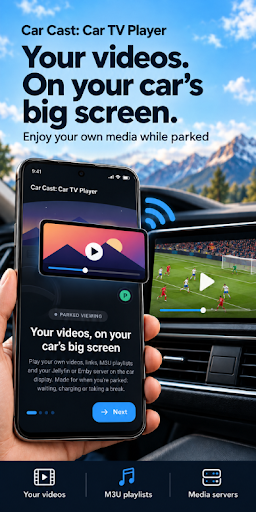
Enjoy your own videos on your car's big screen while parked. Car TV M3U IPTV Player brings local videos, media links and personal playlists together for playback on a compatible cartv.
Whether you're taking a break, waiting or stopping to charge your EV, keep your entertainment ready in one library. Add your content, choose a supported connection and enjoy a car TV experience using media you already own or have permission to access.
CAR CAST & VIDEO PLAYBACK
Play videos stored on your device or add a supported media link. Use a compatible car screen to enjoy your content on a larger display, with playback controls close at hand.
CAR SCREEN MIRROR & Mirrorlink
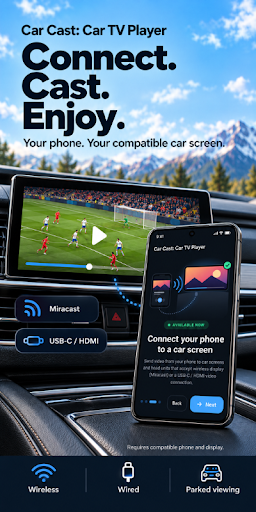
To screen mirror your phone, use a supported wireless display connection such as Miracast. Car screen mirror availability depends on both your phone and the receiving display. A compatible USB-C / HDMI video connection offers another way to show media on a car monitor, where supported by your hardware.
For car screen cast setup, check the connection options in the app and the capabilities of your head unit. A USB port or Bluetooth pairing alone does not guarantee video output.
M3U PLAYLISTS & STREAMING MEDIA
Bring your own M3U, M3U8 or Xtream playlists and access supported content from your provider. As an M3U player for car use, the app helps you browse your personal media collection and select what to play while parked. Available content and playback depend on your source and its supported formats.
YOUR MEDIA LIBRARY
Keep local videos, links and playlists in one place. Search your library, save favorites and browse playlist categories to find the content you want. Connect to your Jellyfin or Emby server to access your own media collection.
CAR DISPLAY & DASH INTEGRATION
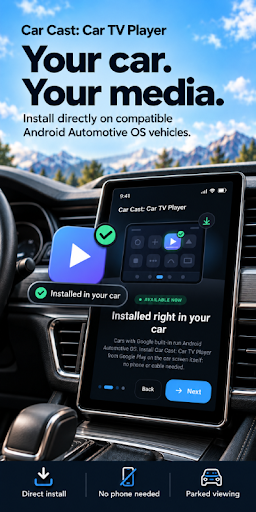
On supported Android Automotive OS vehicles, install the app directly on the car display through the vehicle's app store. For phone-based playback, your car monitor or head unit must support the selected display connection.
When parked, switch from your maps and music apps to video entertainment. Car Cast focuses on media playback; it does not replace your navigation app or control your vehicle's driving mode.
PLAY & CONNECT
1. Add your own video, media link, playlist or supported media server.
2. Choose a connection supported by your phone and car screen, or open the app on a supported Android Automotive OS vehicle.
3. Start playback only when the vehicle is safely parked.
ANDROID AUTO COMPATIBILITY
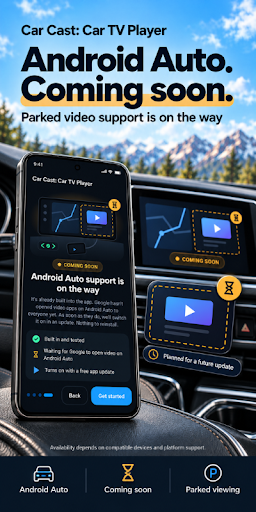
Direct video playback through Android Auto is not available in this version. Support is planned for a future update, subject to platform availability and compatible devices. Android Auto and Android Automotive OS are different platforms; support for one does not guarantee support for the other.
CONTENT & SAFETY
Car Cast: Car TV Player does not provide, host or sell IPTV subscriptions, Live TV streams, movies or other media. Users must supply their own content and have permission to access it.
Video playback and phone mirroring on a car display are intended only for use while safely parked. Do not watch videos or interact with the app while driving.
This is an independent application, not affiliated with or endorsed by Android Auto, Apple CarPlay or any car manufacturer.
Daha fazla göster

1. MEmu yükleyicisini indirin ve kurulumu tamamlayın

2. MEmu'yu başlatın ve ana sayfada Google Play'i açın

3. Google Play'de Car TV : M3U IPTV Player arayın
Install
4. Car TV : M3U IPTV Player indirin ve yükleyin
5. Kurulum tamamlandığında başlamak için simgeye tıklayın

6. Car TV : M3U IPTV Player'i PC'de için MEmu'yu kullanın
MEmu Play, 50 milyon kullanıcısıyla en iyi ücretsiz Android emülatörüdür ve en üst düzey Android uygulama deneyiminin keyfini çıkarır. MEmu'nun sanallaştırma teknolojisi, en zorlu uygulamalar da dahil olmak üzere binlerce uygulamayı bilgisayarınızda sorunsuz bir şekilde çalıştırmanızı sağlar.
Daha büyük ekranla daha iyi grafiklere sahip; Pil veya mobil veri sınırlaması olmaksızın uzun süre.
Keymapping klavye ve fare veya gamepad'in hassas kontrolü için destek verir.
Multi-Instance yöneticisi ile tek bir bilgisayarda aynı anda birden fazla oyun hesabı veya görev gerçekleşilebilir.
Use Car TV : M3U IPTV Player on PC by following steps: