ChatSee - Chat Stories
Güncellendi
Mevcut Sürüm
2.0.2
Sunan

Cep telefonunda ChatSee - Chat Stories kullanırken fazla şarjlardan endişelenme, kendini küçük ekrandan kurtar ve uygulamayı çok daha büyük bir ekranda kullanmanın tadını çıkar. Şu andan itibaren, klavye ve fare ile uygulamayı tam ekran da kullanmayı dene. MEmu, beklediğin tüm şaşırtıcı özellikleri sunar: hızlı ve kolay kurulum, sezgisel kontroller, bunun dışında pil sınırı, mobil veri ve rahatsız edici aramalar artık yok. Yepyeni MEmu 9, bilgisayarında ChatSee - Chat Stories kullanmanın en iyi seçimidir. Emilimimizle kodlanan çok örnekli yönetici, aynı anda 2 veya daha fazla hesap açmayı mümkün kılar. Ve en önemlisi, özel emülasyon motorumuz PC'nin tüm potansiyelini serbest bırakabilir, her şeyi pürüzsüz ve eğlenceli hale getirebilir.
Daha fazla göster
MEmu Play ile bilgisayarınızda ChatSee - Chat Stories kullanmanın mükemmel deneyimini yaşayın. Masaüstü sürümleri için binlerce Android uygulaması sunan güçlü ve ücretsiz bir Android emülatörüdür. Arkadaşlarınızla bağlantı kurmanın ve çalışmalarınızı daha verimli bir şekilde geliştirmenin keyfini çıkarın! ChatSee – Where Stories Come to Life Through Conversations!
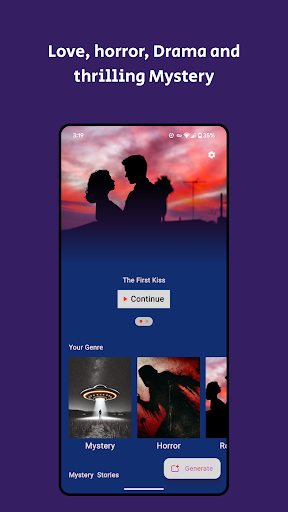
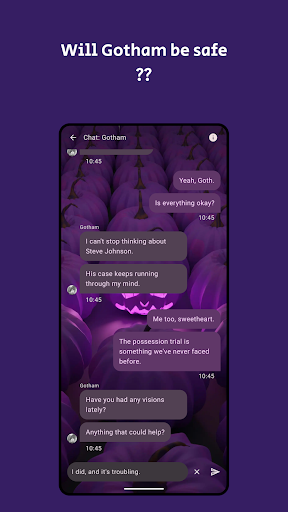
ChatSee – Where Stories Come to Life Through Conversations!
Discover a groundbreaking way to experience storytelling with ChatSee, the interactive app where YOU control the narrative. Unlike traditional books, ChatSee lets you chat with characters, influence the plot, and even create your own unique stories. Whether you’re a fan of thrilling mysteries, heartwarming dramas, or futuristic adventures, your choices shape every twist and turn in the story.
With ChatSee, you’re not just reading—you’re part of the story.
Key Features:
Free & Unlimited Stories: Access an ever-growing library of high-quality chat stories without any cost.
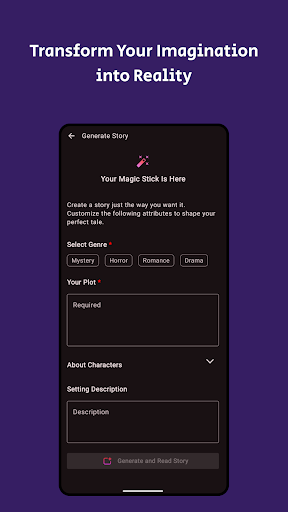
Create Your Own Plot: Ask custom questions and make choices that directly impact the storyline.
Instant Story Generation: Use our powerful AI to instantly create new stories tailored to your preferences.
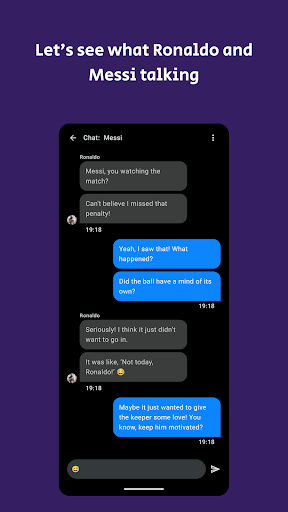
Real-Time Interactions: Chat with characters and watch the plot unfold through engaging, lifelike conversations.
Personalized Adventures: Customize your stories, ensuring that each one feels fresh and personal with every read.
AI-Driven Immersion: Enjoy dynamically evolving plots that respond to your decisions, making each story unpredictable and unique.
Whether you’re searching for interactive chat stories, looking to create your own narratives, or simply want to explore a new way of reading, ChatSee delivers an unparalleled storytelling experience. Get started today and immerse yourself in stories that adapt to YOU!
Daha fazla göster

1. MEmu yükleyicisini indirin ve kurulumu tamamlayın

2. MEmu'yu başlatın ve ana sayfada Google Play'i açın

3. Google Play'de ChatSee - Chat Stories arayın
Install
4. ChatSee - Chat Stories indirin ve yükleyin
5. Kurulum tamamlandığında başlamak için simgeye tıklayın

6. ChatSee - Chat Stories'i PC'de için MEmu'yu kullanın
MEmu Play, 50 milyon kullanıcısıyla en iyi ücretsiz Android emülatörüdür ve en üst düzey Android uygulama deneyiminin keyfini çıkarır. MEmu'nun sanallaştırma teknolojisi, en zorlu uygulamalar da dahil olmak üzere binlerce uygulamayı bilgisayarınızda sorunsuz bir şekilde çalıştırmanızı sağlar.
Daha büyük ekranla daha iyi grafiklere sahip; Pil veya mobil veri sınırlaması olmaksızın uzun süre.
Keymapping klavye ve fare veya gamepad'in hassas kontrolü için destek verir.
Multi-Instance yöneticisi ile tek bir bilgisayarda aynı anda birden fazla oyun hesabı veya görev gerçekleşilebilir.
Use ChatSee - Chat Stories on PC by following steps: