Lensa: avatar oluşturma, AI
Güncellendi
Mevcut Sürüm
1
Sunan

Cep telefonunda Lensa: avatar oluşturma, AI kullanırken fazla şarjlardan endişelenme, kendini küçük ekrandan kurtar ve uygulamayı çok daha büyük bir ekranda kullanmanın tadını çıkar. Şu andan itibaren, klavye ve fare ile uygulamayı tam ekran da kullanmayı dene. MEmu, beklediğin tüm şaşırtıcı özellikleri sunar: hızlı ve kolay kurulum, sezgisel kontroller, bunun dışında pil sınırı, mobil veri ve rahatsız edici aramalar artık yok. Yepyeni MEmu 9, bilgisayarında Lensa: avatar oluşturma, AI kullanmanın en iyi seçimidir. Emilimimizle kodlanan çok örnekli yönetici, aynı anda 2 veya daha fazla hesap açmayı mümkün kılar. Ve en önemlisi, özel emülasyon motorumuz PC'nin tüm potansiyelini serbest bırakabilir, her şeyi pürüzsüz ve eğlenceli hale getirebilir.
Daha fazla göster
Lensa: avatar oluşturma, AI’i MEmu Android Emülatör ile PC’ye indirin. Büyük ekranda oynamanın keyfini çıkarın. Lensa is a photo editor tool for retouching portrait selfies.
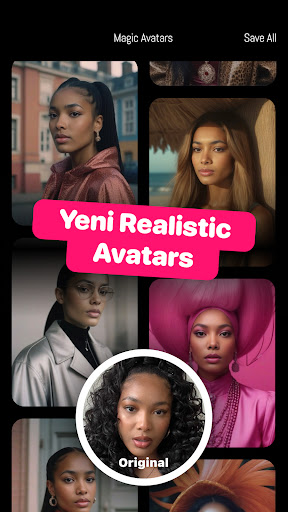
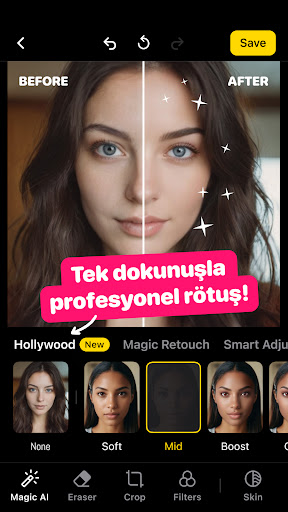
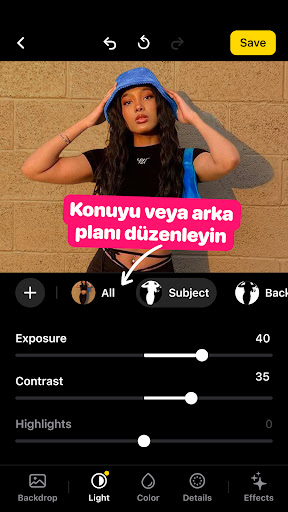
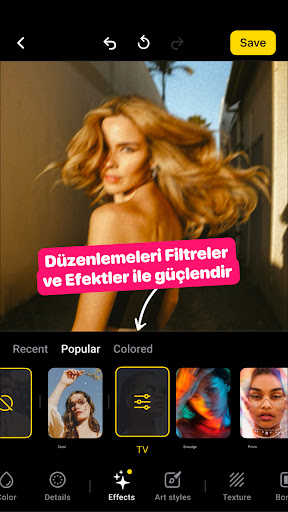
Lensa is a photo editor tool for retouching portrait selfies. The app has many photo editing filters and techniques for pictures to get a sweet selfie, remove any blur background or do any other necessary editing. With its simple editing features and camera editor effects, you can make every photo perfect 365 days a year. Capture memorable moments and do the necessary photography editing to freeze each moment in time. You don't need a lab or dark room because within seconds your peachy selfie is ready.
SKIN REFINING EFFECTS FOR THE PERFECT YOU
Professional editing for pictures has never been easier with the skin editor feature that allows you to make each portrait selfie clearer, remove blemish, or apply any other beauty filters for pictures of your choice. Put the focus on your body where you decide.
- You don't have to be a photography pro to use this editing app. The Auto-Adjust editing will make your life easier, so you only need to focus on taking the photo;
- Different tools, premade photo filters and camera effects make it possible to edit all blemishes so you have the stunning effects;
- Adjust your selfie to let it stand out or use the functional camera editor for something more traditional;
- Lensa also has an acne remover that you can use to edit pictures.
- Specify the photo retouch editing you want and Lensa does the rest.
SHOW YOUR TRUE SELF WITH THE EYE CORRECTOR EDITOR FOR PICTURES
Your eyes are the windows to your soul, so let them shine. There is also an eyebrow feature to enhance contours on your face or do other changes the way you want. Make a before editing and after picture to see the result of your work.
- Be in full control of your eyebrows and shape them how you want with the eyebrow editor;
- Adjust dark circles around your eyes or remove eye bags to get the best version of yourself;
- Easily revert to the original photo to make new modifications.
ILLUSTRATOR PHOTO EDITOR FOR EVERY SHOT
Camera apps come and go, but with Lensa it's not just another fad. Its top-notch editing allows you to express yourself with high-quality photography that is ageless, special, and unique. You won't need to rely on your smartphone camera to get this done, because Lensa can do all the edits you can imagine.
- Lens correction adjusts all effects for pictures to get the perfect shot;
- Use the art photo contrast editor to adjust lighting and touch up any blur photo;
- Be funky, choose the style you want to change your hair color and show the perfect smile with the flawless teeth whitener editor.
BACKGROUND EDITOR SO EASY TO USE YOU'll NEVER WANT TO USE ANOTHER APP
- Backgrounds can be tricky, but Lensa is about making complex things easy. You can easily use blur for image background to put the focus on your special moment;
- Background changer editor to add motion to your selfie;
- Use the portrait mode as a photo enhancer.
EXTRA FEATURES
Lensa is the outstanding editing app for photos! It has a wide range of features and offers you the chance to express yourself through photography. Other editing apps may provide similar tools, but Lensa gives you the power of editing choice.
- Color intensity to jazz up photos that have bad lighting;
- Numerous art tools, camera filters and effects to edit pictures until you are satisfied;
- Different styles from art to vintage camera effects;
- Selfie editor to tune up each photo before posting to your favorite social media;
- Temperature tool to modify the look and feel of each pic photo;
- Block out unwanted details with fade effect editing;
- Handy saturation editing to add character to each selfie;
- Sharpness tool to correct blurry photos caused by shaking;
- Different tints to match your style and personality.
Are you still asking yourself if all my photos have a perfect editing? Let it go! Use an art editor and beauty background enhancer to make sure that your every shot is on the spot. Enjoy a photo editor experience every day!
Daha fazla göster

1. MEmu yükleyicisini indirin ve kurulumu tamamlayın

2. MEmu'yu başlatın ve ana sayfada Google Play'i açın

3. Google Play'de Lensa: avatar oluşturma, AI arayın
Install
4. Lensa: avatar oluşturma, AI indirin ve yükleyin
5. Kurulum tamamlandığında başlamak için simgeye tıklayın

6. Lensa: avatar oluşturma, AI'i PC'de için MEmu'yu kullanın
MEmu Play, 50 milyon kullanıcısıyla en iyi ücretsiz Android emülatörüdür ve en üst düzey Android uygulama deneyiminin keyfini çıkarır. MEmu'nun sanallaştırma teknolojisi, en zorlu uygulamalar da dahil olmak üzere binlerce uygulamayı bilgisayarınızda sorunsuz bir şekilde çalıştırmanızı sağlar.
Daha büyük ekranla daha iyi grafiklere sahip; Pil veya mobil veri sınırlaması olmaksızın uzun süre.
Keymapping klavye ve fare veya gamepad'in hassas kontrolü için destek verir.
Multi-Instance yöneticisi ile tek bir bilgisayarda aynı anda birden fazla oyun hesabı veya görev gerçekleşilebilir.
Use Lensa: avatar oluşturma, AI on PC by following steps: