Dashboard 595
Güncellendi
Mevcut Sürüm
1.7.2
Sunan

Cep telefonunda Dashboard 595 kullanırken fazla şarjlardan endişelenme, kendini küçük ekrandan kurtar ve uygulamayı çok daha büyük bir ekranda kullanmanın tadını çıkar. Şu andan itibaren, klavye ve fare ile uygulamayı tam ekran da kullanmayı dene. MEmu, beklediğin tüm şaşırtıcı özellikleri sunar: hızlı ve kolay kurulum, sezgisel kontroller, bunun dışında pil sınırı, mobil veri ve rahatsız edici aramalar artık yok. Yepyeni MEmu 9, bilgisayarında Dashboard 595 kullanmanın en iyi seçimidir. Emilimimizle kodlanan çok örnekli yönetici, aynı anda 2 veya daha fazla hesap açmayı mümkün kılar. Ve en önemlisi, özel emülasyon motorumuz PC'nin tüm potansiyelini serbest bırakabilir, her şeyi pürüzsüz ve eğlenceli hale getirebilir.
Daha fazla göster
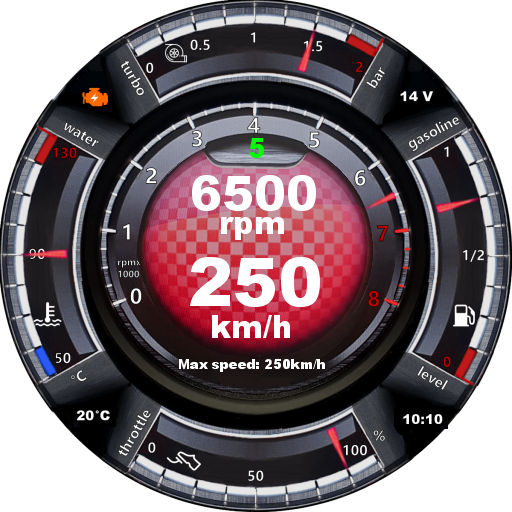
Dashboard 595’i MEmu Android Emülatör ile PC’ye indirin. Büyük ekranda oynamanın keyfini çıkarın. This application displays a car dashboard with a look inspired from the Abarth 595 car.
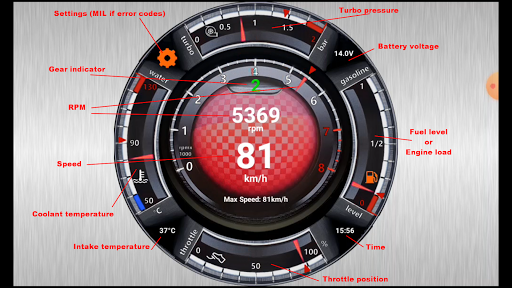
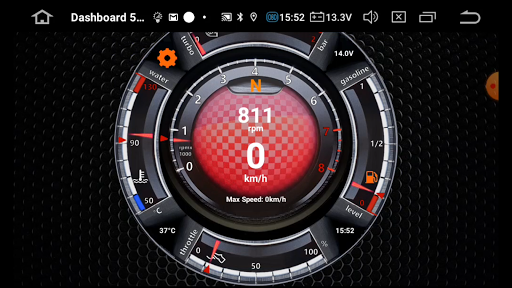
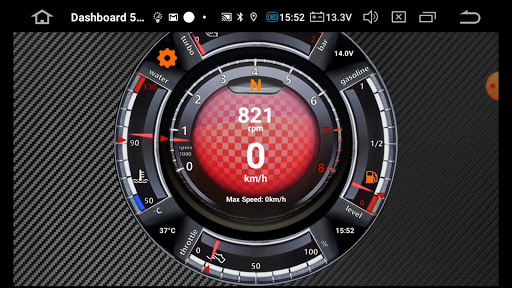
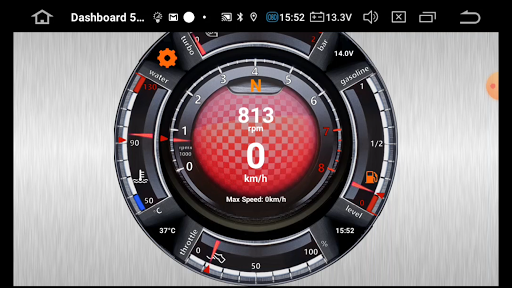
This application displays a car dashboard with a look inspired from the Abarth 595 car. It can work on almost any car (since 2001) and the displayed information is retrieved from the OBDII connector of the car with an ELM327 bluetooth adapter.
Important NOTES:
- It's mandatory to have an ELM327 bluetooth adapter connected to the car and paired with the Smartphone / tablet before using the app, else the app will not work. The app automatically detects ELM327 if it's properly connected and paired.
- With some ELM 327 adapter the app can fail to connect. In this case try to change the connection mode in settings. There are 3 different modes: Fast, Medium and Slow. Default mode is Fast.
Features:
- Display RPM, speed, current gear, odometer, shift-light, turbo pressure, fuel level (if supported by the car), engine load, oil temperature (if supported by the car), G-Force, Lateral G-Force, coolant temperature, throttle position, battery voltage, intake temperature (below coolant temperature gauge), time, MIL error codes if any.
- 3 different backgrounds (metal grid, carbon, aluminum). Select desired one with a long click on the background.
- 7 different center colors. Select desired one with a long click on the dashbord center.
- Connection mode selection depending on phone and ELM327 performances (settings).
- Metric units or Imperial units (settings).
- Up gauge indication: Turbo pressure or Lateral G-Force (settings).
- Right gauge indication: Fuel level, engine load, oil temperature or G-Force (settings).
- Gear indicator calibration depending on the car (settings).
- Shift-light calibration for cold engine and hot engine (settings).
- Set odometer (settings).
- Display error codes if any and option to clear codes (settings).
NOTES:
- The gear indicator is calibrated by default for the Abarth 595 5 speeds gearbox. You can re-calibrate it for any other car in the settings menu.
- In case of lateral G-Force indication is reversed, click on Time to fix it.
Daha fazla göster

1. MEmu yükleyicisini indirin ve kurulumu tamamlayın

2. MEmu'yu başlatın ve ana sayfada Google Play'i açın

3. Google Play'de Dashboard 595 arayın
Install
4. Dashboard 595 indirin ve yükleyin
5. Kurulum tamamlandığında başlamak için simgeye tıklayın

6. Dashboard 595'i PC'de için MEmu'yu kullanın
MEmu Play, 50 milyon kullanıcısıyla en iyi ücretsiz Android emülatörüdür ve en üst düzey Android uygulama deneyiminin keyfini çıkarır. MEmu'nun sanallaştırma teknolojisi, en zorlu uygulamalar da dahil olmak üzere binlerce uygulamayı bilgisayarınızda sorunsuz bir şekilde çalıştırmanızı sağlar.
Daha büyük ekranla daha iyi grafiklere sahip; Pil veya mobil veri sınırlaması olmaksızın uzun süre.
Keymapping klavye ve fare veya gamepad'in hassas kontrolü için destek verir.
Multi-Instance yöneticisi ile tek bir bilgisayarda aynı anda birden fazla oyun hesabı veya görev gerçekleşilebilir.
Use Dashboard 595 on PC by following steps: