
FirstPay
Güncellendi
Mevcut Sürüm
6.0.1
Sunan

Cep telefonunda FirstPay kullanırken fazla şarjlardan endişelenme, kendini küçük ekrandan kurtar ve uygulamayı çok daha büyük bir ekranda kullanmanın tadını çıkar. Şu andan itibaren, klavye ve fare ile uygulamayı tam ekran da kullanmayı dene. MEmu, beklediğin tüm şaşırtıcı özellikleri sunar: hızlı ve kolay kurulum, sezgisel kontroller, bunun dışında pil sınırı, mobil veri ve rahatsız edici aramalar artık yok. Yepyeni MEmu 9, bilgisayarında FirstPay kullanmanın en iyi seçimidir. Emilimimizle kodlanan çok örnekli yönetici, aynı anda 2 veya daha fazla hesap açmayı mümkün kılar. Ve en önemlisi, özel emülasyon motorumuz PC'nin tüm potansiyelini serbest bırakabilir, her şeyi pürüzsüz ve eğlenceli hale getirebilir.
Daha fazla göster
FirstPay’i MEmu Android Emülatör ile PC’ye indirin. Büyük ekranda oynamanın keyfini çıkarın. What’s New.
What’s New
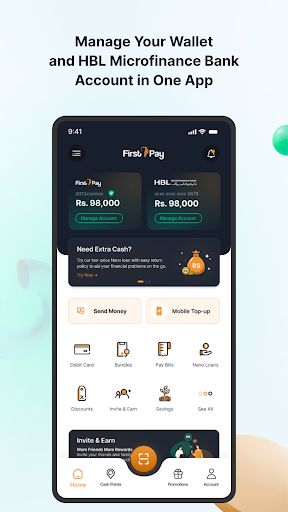
Account Linking & De-linking: Link your HBL Microfinance banking account to your FirstPay wallet and enjoy using a wider range of features across your HBL Microfinance account and the FirstPay Wallet.
Favorites: Easily save your most frequent transactions and recipients as favorites for quick access, making repeat payments and transfers faster and more convenient.
Cashpoint Visibility: View nearby HBL Microfinance Bank branches, ATMs, and authorized agents to help you locate cashpoints and banking services effortlessly.
FirstPay by HBL MicroFinance Bank Ltd.
About FirstPay:
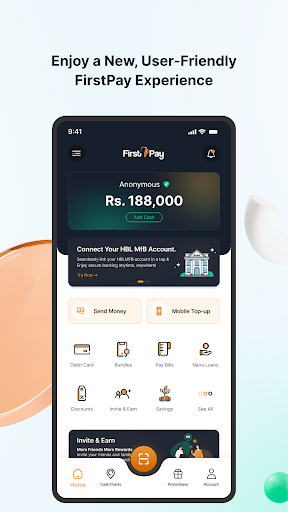
FirstPay, a mobile wallet powered by HBL Microfinance Bank is here to give you real Banking beyond the Branch experience. With a single tap, now send and receive money, linking of HBL Mfb account, access a loan with flexible payment plans, pay utility bills, and get mobile top-ups done for any network, from anywhere, anytime!
So why wait? Sign up for FirstPay today and bring the bank home!
FirstPay Features:
• Instant Funds Transfer – Send and receive money to:
o FirstPay wallet
o Bank Accounts like Alfalah, UBL, Faysal Bank, or any other bank across Pakistan
o Mobile wallets like EasyPaisa, JazzCash, Zindigi, SadaPay, or NayaPay
• Mobile Load – Prepaid & Postpaid mobile load on any network
• Mobile Bundle – Telenor
• Utility Bill Payments
o Electricity
o Gas
o Water
o Internet
o PTCL and many other bills
• Instant money with Nano Loan
o Apply for a Nano loan without any hassle of document submission and get up to Rs. 15,000 loans in no time!
• Account Linking/De-Linking
o Now conveniently link your HBL MfB account within the FirstPay app and enjoy the below features;
o Fund Transfer from Core Bank Account
o Utility Bill Payment
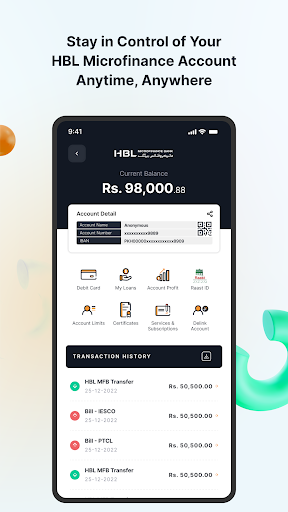
o Account Balance and Transaction History
o Cheque Book request and Status check
o Stop Payment of cheque
o Managing Bank Account Limits
o Account Maintenance and Tax Certificate
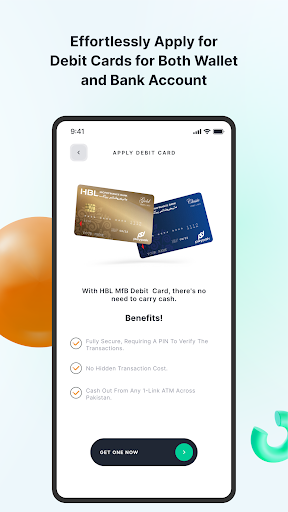
o HBL MfB Debit Card
o Manage Dynamic QR
o My Profits
o My Loans and much more…
• Debit Card
o Forget the hassle of standing in long queues just for cash withdrawals. Order your FirstPay Debit card and enjoy a world of discounts at a wide variety of brands across Pakistan.
• Debit Card Management
o Manage your FirstPay Debit card - Debit card activation
o PIN Generation
o Temporary blocking & PIN Change
o Statement of Account – get your account statement in just a click.
o Dispute transaction - simply mark the transaction disputed through your statement and get it resolved
• Invite Friends for more fun!
o Now invite your friends and family to FirstPay.
• Request Money
o When you need funds, request from your friends and family through FirstPay conveniently
• Favorites
o Now mark any beneficiaries as Favorite and make effortless Mobile Top Ups and money transfers to your favorite contacts.
• What’s more on FirstPay?
o Education Fee – Pay school, college or university fees through FirstPay instantly
o Pay your taxes, License Fees, Traffic Challans, Credit Card Bills, and many other payments with ease.
Follow us on social media to know what’s happening on FirstPay and download the FirstPay app today! We are super excited to see you on the other side.
In case of any suggestions or complaints, please write to us at complaints@hblmfb.com, or call 24/7 at 0800-42563.
Follow us at:
• Facebook
o https://web.facebook.com/FirstPaybyHBLMFB
• Twitter
o https://twitter.com/FirstPayHBLMFB
• Instagram
o https://www.instagram.com/firstpaybyhblmfb/
Daha fazla göster

1. MEmu yükleyicisini indirin ve kurulumu tamamlayın

2. MEmu'yu başlatın ve ana sayfada Google Play'i açın

3. Google Play'de FirstPay arayın
Install
4. FirstPay indirin ve yükleyin
5. Kurulum tamamlandığında başlamak için simgeye tıklayın

6. FirstPay'i PC'de için MEmu'yu kullanın
MEmu Play, 50 milyon kullanıcısıyla en iyi ücretsiz Android emülatörüdür ve en üst düzey Android uygulama deneyiminin keyfini çıkarır. MEmu'nun sanallaştırma teknolojisi, en zorlu uygulamalar da dahil olmak üzere binlerce uygulamayı bilgisayarınızda sorunsuz bir şekilde çalıştırmanızı sağlar.
Daha büyük ekranla daha iyi grafiklere sahip; Pil veya mobil veri sınırlaması olmaksızın uzun süre.
Keymapping klavye ve fare veya gamepad'in hassas kontrolü için destek verir.
Multi-Instance yöneticisi ile tek bir bilgisayarda aynı anda birden fazla oyun hesabı veya görev gerçekleşilebilir.
Use FirstPay on PC by following steps: