Journal: Notes, Planner, PDFs
Güncellendi
Mevcut Sürüm
111
Sunan

Cep telefonunda Journal: Notes, Planner, PDFs kullanırken fazla şarjlardan endişelenme, kendini küçük ekrandan kurtar ve uygulamayı çok daha büyük bir ekranda kullanmanın tadını çıkar. Şu andan itibaren, klavye ve fare ile uygulamayı tam ekran da kullanmayı dene. MEmu, beklediğin tüm şaşırtıcı özellikleri sunar: hızlı ve kolay kurulum, sezgisel kontroller, bunun dışında pil sınırı, mobil veri ve rahatsız edici aramalar artık yok. Yepyeni MEmu 9, bilgisayarında Journal: Notes, Planner, PDFs kullanmanın en iyi seçimidir. Emilimimizle kodlanan çok örnekli yönetici, aynı anda 2 veya daha fazla hesap açmayı mümkün kılar. Ve en önemlisi, özel emülasyon motorumuz PC'nin tüm potansiyelini serbest bırakabilir, her şeyi pürüzsüz ve eğlenceli hale getirebilir.
Daha fazla göster
Journal: Notes, Planner, PDFs’i MEmu Android Emülatör ile PC’ye indirin. Büyük ekranda oynamanın keyfini çıkarın. Welcome to Journal: Notes, Planner, Diary - an application designed to help you capture the essential moments of your daily life and manage your activities effectively.
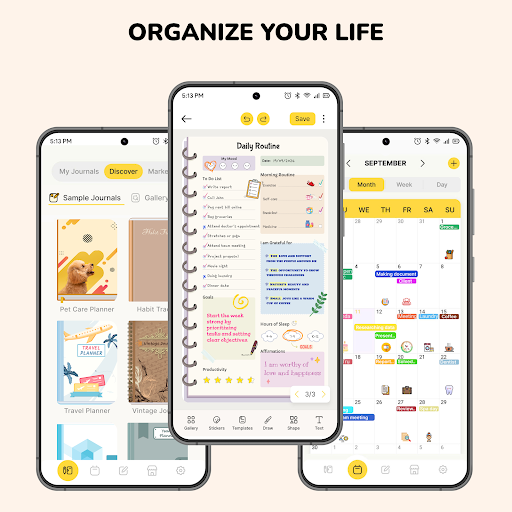
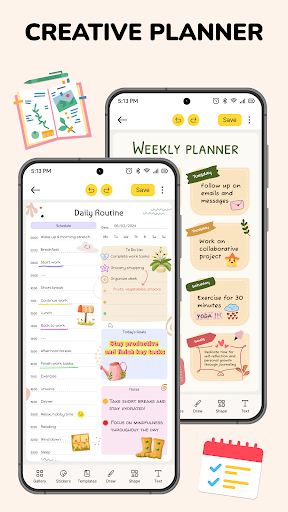
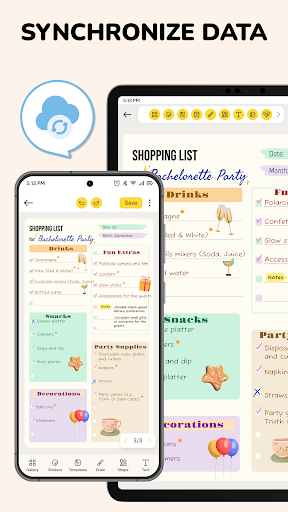
Welcome to Journal: Notes, Planner, Diary - an application designed to help you capture the essential moments of your daily life and manage your activities effectively. With Journal: Notes, Planner, Diary app, you can create and organize your personal journal, notes, notepad and schedule effortlessly. Use it as your daily notebook, where you can record thoughts, emotions, and future plans, seamlessly integrating the convenience of a digital notepad with the structured organization of a traditional notebook.
Why should you choose our application? The application seamlessly blending the functionalities of a journal, diary, and note-taking app, it goes beyond the conventional to offer a personalized planner tailored for your daily needs. Whether you prefer the structure of a traditional physical notebook or the convenience of a digital notepad, Journal: Notes, Planner, Diary app has you covered. It's the key to bringing order, efficiency, and time-saving solutions into your life.
Key Feature
Stay organized at work, school and life: Integrated with diverse planning and schedule management functionalities. With the ability to quickly and creatively take notes, you can easily capture every idea and information instantly. Personalize your notebook easily. Choose from different themes in this app to keep your notepad organized.
Take notes, write documents, sketch ideas: Journal: Notes, Planner, Diary app serves as a traditional physical notebook. You can take notes, brainstorm ideas, and plan on virtual pages just like real ones. Write on a plethora of customizable paper templates, Capture your thoughts using a range of multimedia tools, including pencil, highlighter, text.
Import & store PDF documents: You can effortlessly import PDF files, take notes, make direct annotations on the documents within the notebook. You can easily highlight key points, do exercises, and effortlessly export your notes back to PDF format.
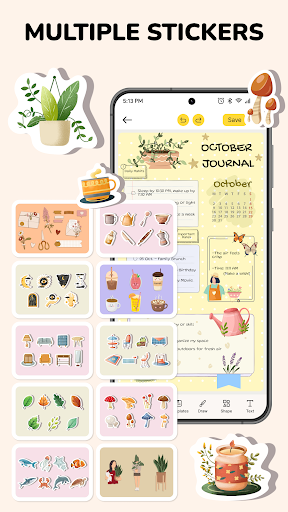
Template & sticker collection: Whether you prefer the simplicity of a digital notepad or the structured organization of a physical notebook, this collection has you covered. Including over 1000 adorable stickers and a curated library of +300 unique templates spanning various topics. Make a uniquely expressive reflection of your thoughts and style, whether you're jotting down quick notes on your digital notepad or sketching ideas in your favorite notebook & planner.
Combined with digital calendar: Users can seamlessly create events, set tasks, and manage their schedules directly within the digital calendar interface. Journal: Notes, Planner, Diary app helps to write notes, journal or organize notepad in the form of a calendar. This integrated functionality offers a comprehensive solution for users to efficiently manage their time and tasks all within a single, user-friendly platform.
Sync all your devices, send & share: Effortlessly synchronize your journal, notepad, planner, and diary across all your devices with our Sync feature. This ensures that your digital space remains consistent and up-to-date across all your devices. Stay seamlessly connected and access to journal, planner & notepad anytime, anywhere
Smart reminders with link journal to event: You will not miss any events or tasks with smart reminders feature. Journal: Notes, Planner, Diary app enables you to schedule reminders for your notebooks, notepad, journal & planner ensuring you never miss important notes. Stay well-organized notepad.
Discover a transformative journey with Journal: Notes, Planner, Diary. Where every plan, every moment in your life is elegantly recorded. Download Journal: Notes, Planner, Diary app now to redefine how you write notepad & planner, organize, and thrive in your unique journey, seamlessly integrating the best of both worlds – the tactile experience of a classic notebook and the digital efficiency of a handy notepad.
Daha fazla göster

1. MEmu yükleyicisini indirin ve kurulumu tamamlayın

2. MEmu'yu başlatın ve ana sayfada Google Play'i açın

3. Google Play'de Journal: Notes, Planner, PDFs arayın
Install
4. Journal: Notes, Planner, PDFs indirin ve yükleyin
5. Kurulum tamamlandığında başlamak için simgeye tıklayın

6. Journal: Notes, Planner, PDFs'i PC'de için MEmu'yu kullanın
MEmu Play, 50 milyon kullanıcısıyla en iyi ücretsiz Android emülatörüdür ve en üst düzey Android uygulama deneyiminin keyfini çıkarır. MEmu'nun sanallaştırma teknolojisi, en zorlu uygulamalar da dahil olmak üzere binlerce uygulamayı bilgisayarınızda sorunsuz bir şekilde çalıştırmanızı sağlar.
Daha büyük ekranla daha iyi grafiklere sahip; Pil veya mobil veri sınırlaması olmaksızın uzun süre.
Keymapping klavye ve fare veya gamepad'in hassas kontrolü için destek verir.
Multi-Instance yöneticisi ile tek bir bilgisayarda aynı anda birden fazla oyun hesabı veya görev gerçekleşilebilir.
Use Journal: Notes, Planner, PDFs on PC by following steps: