Meteo Weather Widget
Güncellendi
Mevcut Sürüm
2.6.0-20240628_084252
Sunan

Cep telefonunda Meteo Weather Widget kullanırken fazla şarjlardan endişelenme, kendini küçük ekrandan kurtar ve uygulamayı çok daha büyük bir ekranda kullanmanın tadını çıkar. Şu andan itibaren, klavye ve fare ile uygulamayı tam ekran da kullanmayı dene. MEmu, beklediğin tüm şaşırtıcı özellikleri sunar: hızlı ve kolay kurulum, sezgisel kontroller, bunun dışında pil sınırı, mobil veri ve rahatsız edici aramalar artık yok. Yepyeni MEmu 9, bilgisayarında Meteo Weather Widget kullanmanın en iyi seçimidir. Emilimimizle kodlanan çok örnekli yönetici, aynı anda 2 veya daha fazla hesap açmayı mümkün kılar. Ve en önemlisi, özel emülasyon motorumuz PC'nin tüm potansiyelini serbest bırakabilir, her şeyi pürüzsüz ve eğlenceli hale getirebilir.
Daha fazla göster
Meteo Weather Widget’i MEmu Android Emülatör ile PC’ye indirin. Büyük ekranda oynamanın keyfini çıkarın. Meteo Weather Widget is a weather app showing the weather in a very detailed way at a glance on your home screen.
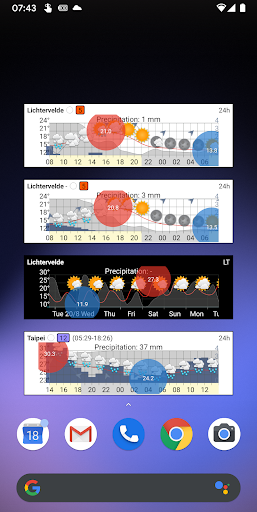
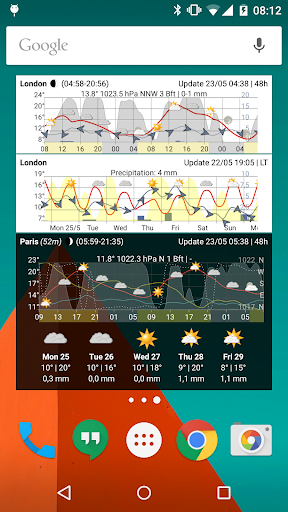
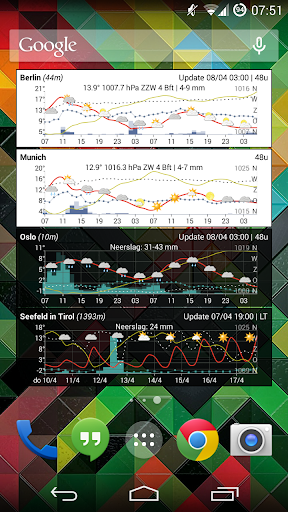
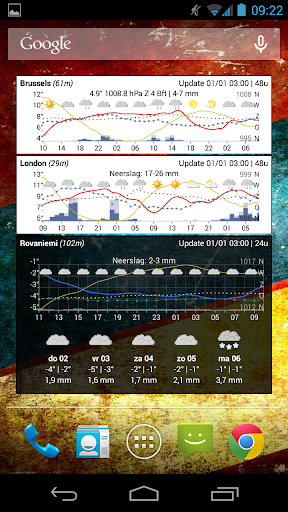
Meteo Weather Widget is a weather app showing the weather in a very detailed way at a glance on your home screen. While many weather apps are showing the weather forecast in a rather basic way, this app does that by visualizing the forecast in a so-called meteogram. Doing so shows you a much better overview of when exactly rain will fall, the sun will be shining, when it will become cloudy...
The main focus of the app consists in showing the meteogram on a small home screen widget (e.g. a 4X1 widget). Even while the widget does not occupy that much space on the home screen, it still manages showing the forecast in a clear way. Simply add a widget on your home screen, specify your location (or let the widget automatically determine your location) and the weather forecast appears on your home screen.
The meteogram shows the temperature and expected precipitation for the complete forecast period. Besides those weather elements, the wind speed, wind direction and air pressure can also be visualized on the meteogram. The user has all freedom to customize how the meteogram should look like.
Feature overview:
• Temperature, precipitation, wind and pressure
• Cloudiness / clearness indication
• Short-term forecast (next 24 or 48 hours)
• Short-term forecast for the next 5 days
• Fully customizable: colors, graph settings, ...
A "donate" version of the app adds below features:
• Widget providing a long-term forecast (next 10 days)
• Show humidity percentage
• Show sunrise and sunset
• Better (temperature) graph visualization (f.e. color the graph in blue when the temperature falls below freezing, custom line thickness and style, ...)
• Show moon phase
• Show wind chill
• Feature allowing you to save current settings as default settings
• Enable (paid) weather provider(s) (as in-app subscription)
• For the United States only: NOAA as weather provider
About the weather forecast data
All thanks to MET.NO (The Norwegian Meteorological Institute) for offering the weather forecast data (notice that for the long-term forecast period, one of the best weather models - ECMWF - is used by MET.NO).
For locations in the United States, NOAA is offered as short term weather provider.
NOTE: additional weather providers can be enabled by an in-app subscription.
And finally ...
• Contact me if you have suggestions, remarks, issues... (info@meteogramwidget.com).
• The app is optimized for use on smartphones.
Daha fazla göster

1. MEmu yükleyicisini indirin ve kurulumu tamamlayın

2. MEmu'yu başlatın ve ana sayfada Google Play'i açın

3. Google Play'de Meteo Weather Widget arayın
Install
4. Meteo Weather Widget indirin ve yükleyin
5. Kurulum tamamlandığında başlamak için simgeye tıklayın

6. Meteo Weather Widget'i PC'de için MEmu'yu kullanın
MEmu Play, 50 milyon kullanıcısıyla en iyi ücretsiz Android emülatörüdür ve en üst düzey Android uygulama deneyiminin keyfini çıkarır. MEmu'nun sanallaştırma teknolojisi, en zorlu uygulamalar da dahil olmak üzere binlerce uygulamayı bilgisayarınızda sorunsuz bir şekilde çalıştırmanızı sağlar.
Daha büyük ekranla daha iyi grafiklere sahip; Pil veya mobil veri sınırlaması olmaksızın uzun süre.
Keymapping klavye ve fare veya gamepad'in hassas kontrolü için destek verir.
Multi-Instance yöneticisi ile tek bir bilgisayarda aynı anda birden fazla oyun hesabı veya görev gerçekleşilebilir.
Use Meteo Weather Widget on PC by following steps: