My CUPRA App
Güncellendi
Mevcut Sürüm
2.4.1
Sunan

Cep telefonunda My CUPRA App kullanırken fazla şarjlardan endişelenme, kendini küçük ekrandan kurtar ve uygulamayı çok daha büyük bir ekranda kullanmanın tadını çıkar. Şu andan itibaren, klavye ve fare ile uygulamayı tam ekran da kullanmayı dene. MEmu, beklediğin tüm şaşırtıcı özellikleri sunar: hızlı ve kolay kurulum, sezgisel kontroller, bunun dışında pil sınırı, mobil veri ve rahatsız edici aramalar artık yok. Yepyeni MEmu 9, bilgisayarında My CUPRA App kullanmanın en iyi seçimidir. Emilimimizle kodlanan çok örnekli yönetici, aynı anda 2 veya daha fazla hesap açmayı mümkün kılar. Ve en önemlisi, özel emülasyon motorumuz PC'nin tüm potansiyelini serbest bırakabilir, her şeyi pürüzsüz ve eğlenceli hale getirebilir.
Daha fazla göster
My CUPRA App’i MEmu Android Emülatör ile PC’ye indirin. Büyük ekranda oynamanın keyfini çıkarın. Dive into the driving revolution with MY CUPRA APP – the game-changer that redefines every trip, putting the power to command your CUPRA right in the palm of your hand.
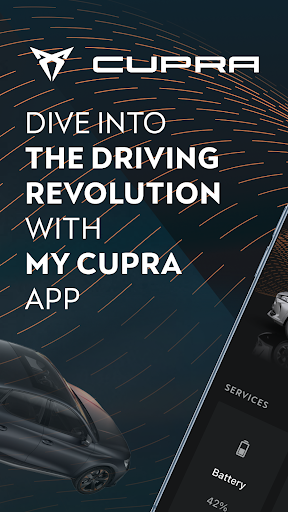
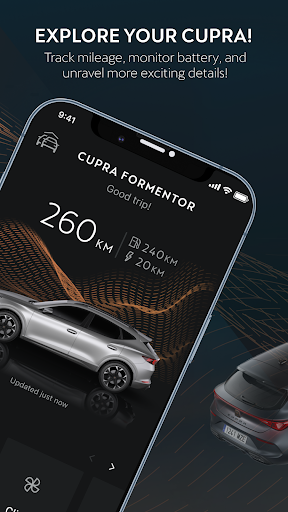
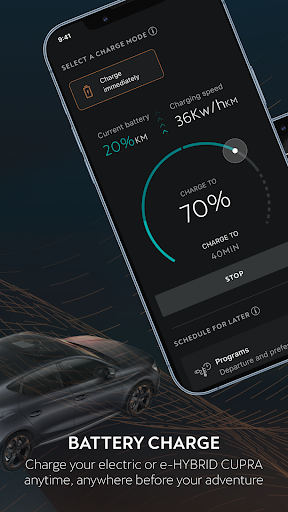
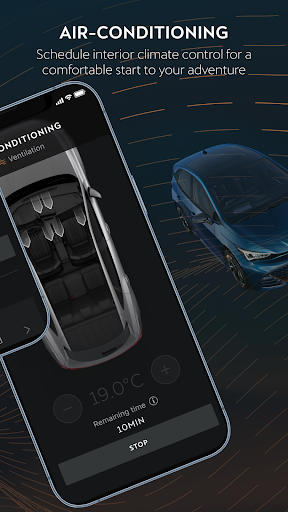
Dive into the driving revolution with MY CUPRA APP – the game-changer that redefines every trip, putting the power to command your CUPRA right in the palm of your hand. Picture juicing up your ride and pre-warming the interior of your vehicle, all effortlessly orchestrated from your smartphone, wherever your adventure takes you. MY CUPRA APP is your exclusive ticket to the cutting edge of personalized driving.
Guess what? Now, MY CUPRA APP is available for all CUPRA vehicles.
Download MY CUPRA APP now and unlock:
Remote Mastery of Your Beast:
• Monitor the status and parking position of your CUPRA.
• Check the status of doors, windows, and lights, all while tracking time and mileage until your next pit stop, directly from your smartphone.
Journey Crafting at Your Fingertips:
• Ready, set, roll! Set a unique or recurring time to roll out, letting your vechicle auto climate the interior before your adventure begins
• Check the battery's charge progress of your electric or e-HYBRID vehicle and the range at your disposal before hitting the road.
Online Route and Destination Import:
• Craft your route like a boss from the comfort of your home, with all your favorite destinations and preferences saved and seamlessly sent to your car's navigation system.
Instant Intelligence and Absolute Control:
• Dive deep into the detailed information about your CUPRA: mileage, battery status…
• Get real-time alerts about your ride's maintenance needs and snazzy reports to keep your CUPRA at its A-game.
• Max out every journey by accessing key data such as total driving time, distance traveled, average speed, and overall fuel savings.
Everything Under Control:
• With MY CUPRA App, you can easily and quickly contact your Preferred Authorized Service and keep a detailed track of your appointments
• Keep everything under control and receive a notification if someone tries to force the car door or move it, if your car enters or exits certain areas at specific times, or if the user-configured speed limit is exceeded.
Plug and Charge:
• Charge up anywhere, anytime! Easily install your certificate in your vehicle and make the most of your charging plan at different charging points.
• Sign up for a hassle-free charging plan and get your certificate from the SEAT/CUPRA Carga Fácil app (exclusive for hybrid or electric vehicles).
Download the app and discover this and other features.
The availability of each functionality depends on your vehicle's software version.
Make It Yours, Make It Legendary:
1. Download MY CUPRA APP and get ready for an unrivaled level of control.
2. Connect your CUPRA following simple instructions and unleash its potential from the palm of your hand.
3. Experience the freedom to control your CUPRA from anywhere, anticipating every journey to your liking.
Daha fazla göster

1. MEmu yükleyicisini indirin ve kurulumu tamamlayın

2. MEmu'yu başlatın ve ana sayfada Google Play'i açın

3. Google Play'de My CUPRA App arayın
Install
4. My CUPRA App indirin ve yükleyin
5. Kurulum tamamlandığında başlamak için simgeye tıklayın

6. My CUPRA App'i PC'de için MEmu'yu kullanın
MEmu Play, 50 milyon kullanıcısıyla en iyi ücretsiz Android emülatörüdür ve en üst düzey Android uygulama deneyiminin keyfini çıkarır. MEmu'nun sanallaştırma teknolojisi, en zorlu uygulamalar da dahil olmak üzere binlerce uygulamayı bilgisayarınızda sorunsuz bir şekilde çalıştırmanızı sağlar.
Daha büyük ekranla daha iyi grafiklere sahip; Pil veya mobil veri sınırlaması olmaksızın uzun süre.
Keymapping klavye ve fare veya gamepad'in hassas kontrolü için destek verir.
Multi-Instance yöneticisi ile tek bir bilgisayarda aynı anda birden fazla oyun hesabı veya görev gerçekleşilebilir.
Use My CUPRA App on PC by following steps: