Notebloc Scanner - Scan to PDF
Güncellendi
Mevcut Sürüm
1
Sunan

Cep telefonunda Notebloc Scanner - Scan to PDF kullanırken fazla şarjlardan endişelenme, kendini küçük ekrandan kurtar ve uygulamayı çok daha büyük bir ekranda kullanmanın tadını çıkar. Şu andan itibaren, klavye ve fare ile uygulamayı tam ekran da kullanmayı dene. MEmu, beklediğin tüm şaşırtıcı özellikleri sunar: hızlı ve kolay kurulum, sezgisel kontroller, bunun dışında pil sınırı, mobil veri ve rahatsız edici aramalar artık yok. Yepyeni MEmu 9, bilgisayarında Notebloc Scanner - Scan to PDF kullanmanın en iyi seçimidir. Emilimimizle kodlanan çok örnekli yönetici, aynı anda 2 veya daha fazla hesap açmayı mümkün kılar. Ve en önemlisi, özel emülasyon motorumuz PC'nin tüm potansiyelini serbest bırakabilir, her şeyi pürüzsüz ve eğlenceli hale getirebilir.
Daha fazla göster
Notebloc Scanner - Scan to PDF’i MEmu Android Emülatör ile PC’ye indirin. Büyük ekranda oynamanın keyfini çıkarın. Download our scanner app to scan, save & share your notes, sketches, drawings, and other documents.
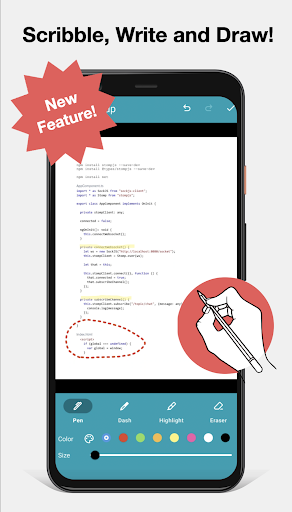
Download our scanner app to scan, save & share your notes, sketches, drawings, and other documents. You can export the documents to PDF or JPEG files.
• Notebloc® is a 100% free scanner app supporting unlimited usage, developed by a notebook company in Barcelona.
• You can scan any type of notes, paper documents, receipts, drawings, sketches, photos or images.
• Use our batch scan feature to scan multiple pages at once.
• You can create single or multi page documents and organize them in folders and subfolders.
• It includes OCR for typed texts in 18 different languages (English, Spanish, French, Italian, Danish, Catalan, Dutch, German, Finnish, Hungarian, Latin, Norwegian, Polish, Portuguese, Romanian, Swedish, Tagalog and Turkish).
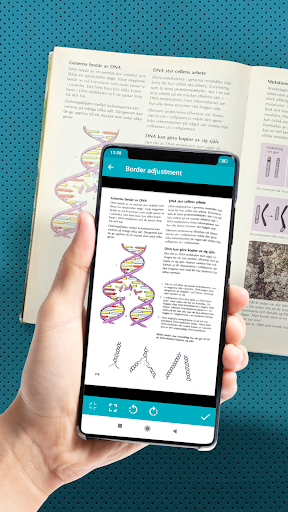
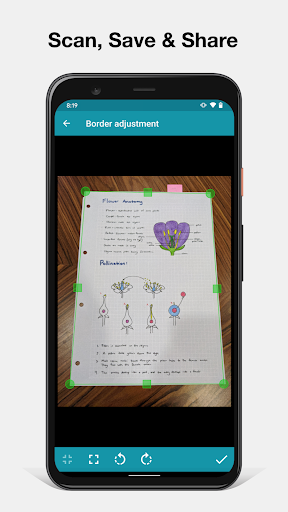
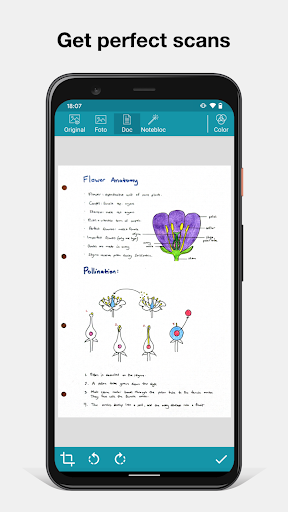
• The app will automatically detect the corners and correct the perspective of the image. Making it appear as if it was taken with a 90 degrees angle.
• Any shadows or similar will disappear.
• You can crop a document or image directly inside the app.
• Your scanned documents can be saved or shared through email / Whatsapp / Dropbox, etc.
With the Notebloc® app:
We correct the perspective of your captured piece of paper: Notebloc geometrically fits your photos (see example above), making that the image on the screen completely straight, as if you had taken the picture in a perfect 90 degree angle.
We eliminate any trace of shade in your photos: Imagine you could have the perfect light intensity to digitize your notes in any circumstance, time and place. That may seem impossible, but with the Notebloc app your digitized notes will look perfect, clean, without any imperfection due to light and shadow. In your digital image you will only get what there is written or drawn on a completely white background.
Within the application you can:
- Create documents and save them as PDF or JPG.
- Share documents online: e-mail, instant messaging, social networks, etc.
- Rename documents.
- Classify documents by date of creation or edition.
- Choose in what size of PDF you want to keep your notes.
- Digitize images / other documents that you may want to save along with your Notebloc notes.
- Add, copy and order pages within the same document.
- Create folders to better organize your files.
When used in conjunction with our Notebloc® notebooks, you get optimal results. The gridlines and background of our paper will magically disappear.
------------------
About Notebloc®:
Notebloc is a brand of digitizable paper notebooks, born in Barcelona in 2013. All Notebloc products are compatible with our mobile app that allows your ideas, notes, drawings and sketches from your Notebloc to be converted to digital.
About Notebloc Scanner app:
The Notebloc app is the only document scanner app developed by professionals in the notebook industry. At Notebloc, we care about the needs of all professionals and students who search for the best scanning and document organization tools.
Daha fazla göster

1. MEmu yükleyicisini indirin ve kurulumu tamamlayın

2. MEmu'yu başlatın ve ana sayfada Google Play'i açın

3. Google Play'de Notebloc Scanner - Scan to PDF arayın
Install
4. Notebloc Scanner - Scan to PDF indirin ve yükleyin
5. Kurulum tamamlandığında başlamak için simgeye tıklayın

6. Notebloc Scanner - Scan to PDF'i PC'de için MEmu'yu kullanın
MEmu Play, 50 milyon kullanıcısıyla en iyi ücretsiz Android emülatörüdür ve en üst düzey Android uygulama deneyiminin keyfini çıkarır. MEmu'nun sanallaştırma teknolojisi, en zorlu uygulamalar da dahil olmak üzere binlerce uygulamayı bilgisayarınızda sorunsuz bir şekilde çalıştırmanızı sağlar.
Daha büyük ekranla daha iyi grafiklere sahip; Pil veya mobil veri sınırlaması olmaksızın uzun süre.
Keymapping klavye ve fare veya gamepad'in hassas kontrolü için destek verir.
Multi-Instance yöneticisi ile tek bir bilgisayarda aynı anda birden fazla oyun hesabı veya görev gerçekleşilebilir.
Use Notebloc Scanner - Scan to PDF on PC by following steps: