Pragmatic Play Verify
Güncellendi
Mevcut Sürüm
2.5.1
Sunan

Cep telefonunda Pragmatic Play Verify kullanırken fazla şarjlardan endişelenme, kendini küçük ekrandan kurtar ve uygulamayı çok daha büyük bir ekranda kullanmanın tadını çıkar. Şu andan itibaren, klavye ve fare ile uygulamayı tam ekran da kullanmayı dene. MEmu, beklediğin tüm şaşırtıcı özellikleri sunar: hızlı ve kolay kurulum, sezgisel kontroller, bunun dışında pil sınırı, mobil veri ve rahatsız edici aramalar artık yok. Yepyeni MEmu 9, bilgisayarında Pragmatic Play Verify kullanmanın en iyi seçimidir. Emilimimizle kodlanan çok örnekli yönetici, aynı anda 2 veya daha fazla hesap açmayı mümkün kılar. Ve en önemlisi, özel emülasyon motorumuz PC'nin tüm potansiyelini serbest bırakabilir, her şeyi pürüzsüz ve eğlenceli hale getirebilir.
Daha fazla göster
MEmu Play ile bilgisayarınızda Pragmatic Play Verify kullanmanın mükemmel deneyimini yaşayın. Masaüstü sürümleri için binlerce Android uygulaması sunan güçlü ve ücretsiz bir Android emülatörüdür. Arkadaşlarınızla bağlantı kurmanın ve çalışmalarınızı daha verimli bir şekilde geliştirmenin keyfini çıkarın! Are you worried about playing fake games without realising before it’s too late?
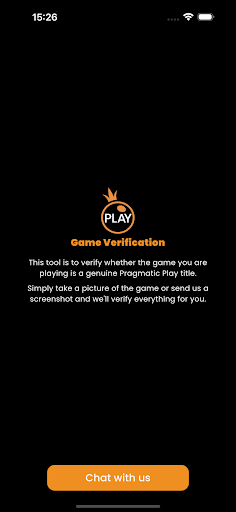
Are you worried about playing fake games without realising before it’s too late? Secure your gaming experience with the Pragmatic Play Verify
The Pragmatic Play Verify is a reliable and easy to use tool that will allow you to verify the authenticity of the Pragmatic Play game you are playing, so you can avoid games that are fraudulent and do not offer a fair chance to win.
Key Features
Instant game verification with the click of a button.
Real-time fraud detection with our advanced algorithms that can flag fake or unlawfully distributed games.
Market coverage to detect fraudulent games in territories where Pragmatic Play games are made available.
How to verify a game’s authenticity:
Using the Pragmatic Play Verify couldn’t be easier.
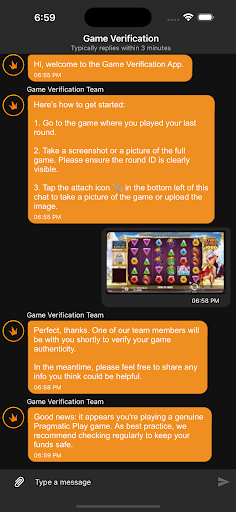
(1) Simply download and install the app
(2) Load the Pragmatic Play game you want to check
(3) Take a screenshot or a picture of the full game. Please ensure the round ID is clearly visible.
(4) Tap the attach icon in the bottom left of this chat to take a picture of the game or upload the image.
From here, you will be able to verify the information from the app matches the gameplay information that you are playing. Doing this will help to ensure that you play 100% authentic Pragmatic Play games so you can play with confidence.
If you need any further information, or have any questions on the use of the Pragmatic Play Verify, please contact us at report@pragmaticplay.com.
Daha fazla göster

1. MEmu yükleyicisini indirin ve kurulumu tamamlayın

2. MEmu'yu başlatın ve ana sayfada Google Play'i açın

3. Google Play'de Pragmatic Play Verify arayın
Install
4. Pragmatic Play Verify indirin ve yükleyin
5. Kurulum tamamlandığında başlamak için simgeye tıklayın

6. Pragmatic Play Verify'i PC'de için MEmu'yu kullanın
MEmu Play, 50 milyon kullanıcısıyla en iyi ücretsiz Android emülatörüdür ve en üst düzey Android uygulama deneyiminin keyfini çıkarır. MEmu'nun sanallaştırma teknolojisi, en zorlu uygulamalar da dahil olmak üzere binlerce uygulamayı bilgisayarınızda sorunsuz bir şekilde çalıştırmanızı sağlar.
Daha büyük ekranla daha iyi grafiklere sahip; Pil veya mobil veri sınırlaması olmaksızın uzun süre.
Keymapping klavye ve fare veya gamepad'in hassas kontrolü için destek verir.
Multi-Instance yöneticisi ile tek bir bilgisayarda aynı anda birden fazla oyun hesabı veya görev gerçekleşilebilir.
Use Pragmatic Play Verify on PC by following steps: