SEAT CONNECT App
Güncellendi
Mevcut Sürüm
1.15.1
Sunan

Cep telefonunda SEAT CONNECT App kullanırken fazla şarjlardan endişelenme, kendini küçük ekrandan kurtar ve uygulamayı çok daha büyük bir ekranda kullanmanın tadını çıkar. Şu andan itibaren, klavye ve fare ile uygulamayı tam ekran da kullanmayı dene. MEmu, beklediğin tüm şaşırtıcı özellikleri sunar: hızlı ve kolay kurulum, sezgisel kontroller, bunun dışında pil sınırı, mobil veri ve rahatsız edici aramalar artık yok. Yepyeni MEmu 9, bilgisayarında SEAT CONNECT App kullanmanın en iyi seçimidir. Emilimimizle kodlanan çok örnekli yönetici, aynı anda 2 veya daha fazla hesap açmayı mümkün kılar. Ve en önemlisi, özel emülasyon motorumuz PC'nin tüm potansiyelini serbest bırakabilir, her şeyi pürüzsüz ve eğlenceli hale getirebilir.
Daha fazla göster
SEAT CONNECT App’i MEmu Android Emülatör ile PC’ye indirin. Büyük ekranda oynamanın keyfini çıkarın. SEAT CONNECT app brings enhanced connectivity and technology to your SEAT.
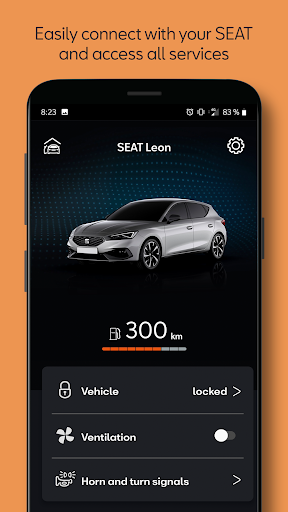
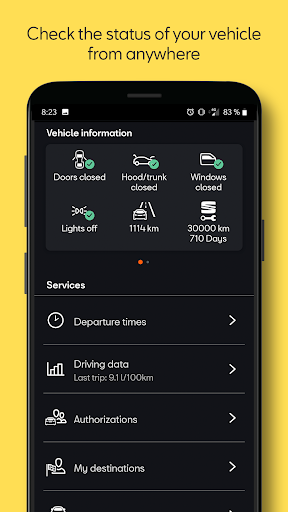
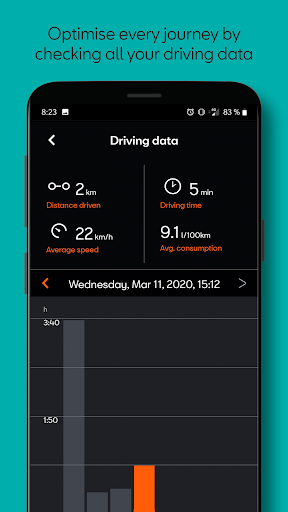
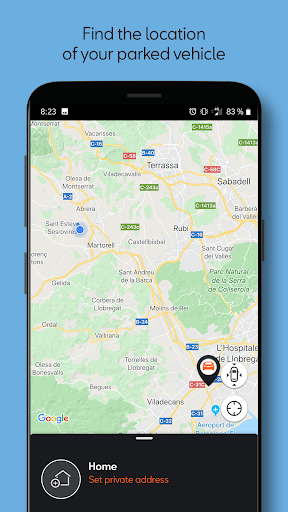
SEAT CONNECT app brings enhanced connectivity and technology to your SEAT. Connect with your car. Anywhere, any time.
Manage your SEAT from your smartphone.
Compatible with:
SEAT Mii electric
SEAT Leon manufactured from May 2020
SEAT Ateca manufactured from September 2020
SEAT Tarraco manufactured from September 2020
SEAT Ibiza manufactured from September 2020
SEAT Arona manufactured from September 2020
Our latest advancements in car connectivity bring you access to a range of connected services to help you manage your vehicle remotely, monitor its status and plan your journey ahead.
Discover SEAT CONNECT Online Services:
Remote access to your SEAT
• Vehicle status: Remotely check the status of doors, windows and lights of your vehicle and review the time and mileage until the next service due. All from your smartphone.
• Parking position: Can’t remember where you parked? Locate your vehicle’s last known position and even get directions to it.
Prepare your journey
• e-Manager: Start charging your electric or e-Hybrid vehicle’s battery, check its range and status directly from your smartphone before starting your journey.
• Remote climatisation: Get your electric or e-Hybrid vehicle ready-to-go by setting your desired temperature before departing, automatically activating the air conditioning or heater as required
• Departure times: Like to plan ahead? Set a single or recurring departure time so your electric or e-Hybrid car can automatically charge the battery and heat or cool the interior before your journey.
• Online Route and Destination Services*: Plan your route from home with your saved destinations and preferences and send it directly to your car's navigation system.
Information at a glance
• Driving data and insights: Optimise every drive by accessing key data and insights such as total driving time, distance travelled, average speed and overall fuel economy.
• Vehicle health reports**: Receive vehicle maintenance alerts and health reports to keep your SEAT in perfect condition.
Stay in control**
• Set your Preferred Service Partner: Hassle free whenever a warning light is activated. Your authorised workshop will take care of it.
• Personalisation*: Manage your vehicle settings from your smartphone, save your favourite addresses, your route preferences and then synchronize these settings with your vehicle. Want more? Over 600 settings can be saved in the infotainment system.
• Remote lock & unlock: Use your smartphone to lock and unlock your car remotely.
• Horn and Turn signals: Easily spot your parked car by remotely activating the horn and flashing hazard lights.
• Anti-theft alarm: Stay in control and receive an alert if an attempt is made to break into or move your car.
• Area alert: Get automatic notifications when the driver of your car arrives or leaves a certain area at specified times.
• Speed alert: Activate selected speed limits that the driver of your vehicle should follow and receive notifications if the speed is exceeded.
Want to check which CONNECT services are included in your vehicle? Please go to the SEAT CONNECT Official Website or contact with SEAT Customer Care for further information
*Only available for compatible vehicles manufactured from November 2020.
**Not available for Mii Electric.
Daha fazla göster

1. MEmu yükleyicisini indirin ve kurulumu tamamlayın

2. MEmu'yu başlatın ve ana sayfada Google Play'i açın

3. Google Play'de SEAT CONNECT App arayın
Install
4. SEAT CONNECT App indirin ve yükleyin
5. Kurulum tamamlandığında başlamak için simgeye tıklayın

6. SEAT CONNECT App'i PC'de için MEmu'yu kullanın
MEmu Play, 50 milyon kullanıcısıyla en iyi ücretsiz Android emülatörüdür ve en üst düzey Android uygulama deneyiminin keyfini çıkarır. MEmu'nun sanallaştırma teknolojisi, en zorlu uygulamalar da dahil olmak üzere binlerce uygulamayı bilgisayarınızda sorunsuz bir şekilde çalıştırmanızı sağlar.
Daha büyük ekranla daha iyi grafiklere sahip; Pil veya mobil veri sınırlaması olmaksızın uzun süre.
Keymapping klavye ve fare veya gamepad'in hassas kontrolü için destek verir.
Multi-Instance yöneticisi ile tek bir bilgisayarda aynı anda birden fazla oyun hesabı veya görev gerçekleşilebilir.
Use SEAT CONNECT App on PC by following steps: