Widgets Color Widgets + Icons
Güncellendi
Mevcut Sürüm
2.6.6
Sunan

Cep telefonunda Widgets Color Widgets + Icons kullanırken fazla şarjlardan endişelenme, kendini küçük ekrandan kurtar ve uygulamayı çok daha büyük bir ekranda kullanmanın tadını çıkar. Şu andan itibaren, klavye ve fare ile uygulamayı tam ekran da kullanmayı dene. MEmu, beklediğin tüm şaşırtıcı özellikleri sunar: hızlı ve kolay kurulum, sezgisel kontroller, bunun dışında pil sınırı, mobil veri ve rahatsız edici aramalar artık yok. Yepyeni MEmu 9, bilgisayarında Widgets Color Widgets + Icons kullanmanın en iyi seçimidir. Emilimimizle kodlanan çok örnekli yönetici, aynı anda 2 veya daha fazla hesap açmayı mümkün kılar. Ve en önemlisi, özel emülasyon motorumuz PC'nin tüm potansiyelini serbest bırakabilir, her şeyi pürüzsüz ve eğlenceli hale getirebilir.
Daha fazla göster
Widgets Color Widgets + Icons’i MEmu Android Emülatör ile PC’ye indirin. Büyük ekranda oynamanın keyfini çıkarın. From the team behind WatchMaker, the largest watchface design community in the world - get ready to make your home screen unique with widgetopia!
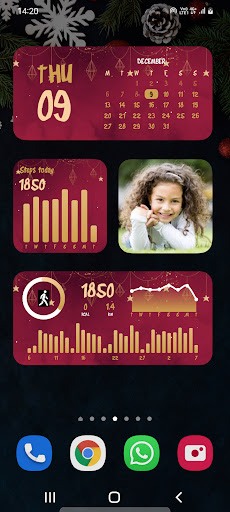
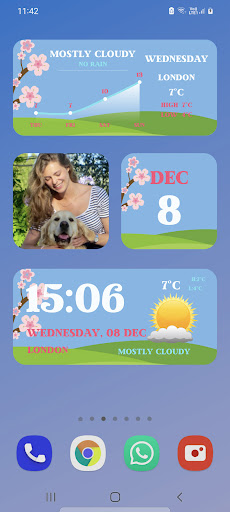
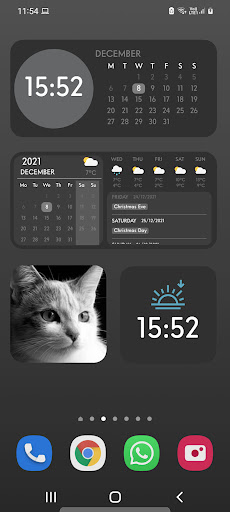
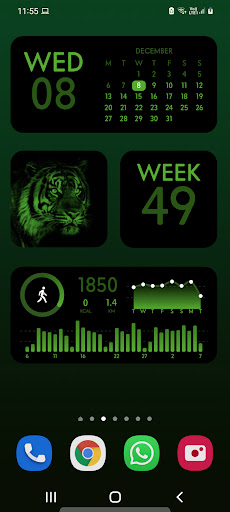
From the team behind WatchMaker, the largest watchface design community in the world - get ready to make your home screen unique with widgetopia!
If you got bored of the same old look on your Android smartphone and want to do something new then try this iOS 16 Launcher app.
Try the new aesthetic refreshed look of iOS 16 on your Android smartphone, with all the widgets for iOS 16.
THOUSANDS OF WIDGETS
There are 75,000+ pre-built widgets which you can use right away!
CREATE YOUR OWN WIDGET
With widgetopia, you can use our powerful design tools to make your own designs and display any data you need.
- 75,000+ widgets, more each day!
- 100+ home screen / lock screen wallpapers
- Over 70 widget themes!
- Christmas widget themes!
- Time & date
- Analog clock including seconds
- 1000 Watch Hands + Backgrounds
- Weather (current, hourly, daily)
- Steps
- Charts
- Countdowns
- Battery Indicator
- Use your own photos
- Javascript expressions
- Moon phase
- Calendar + Agenda
- Themeable widgets
- Transparent widgets
- Animated GIFs
- Color Widgets and monochrome
- iPhone style widgets like WidgetSmith
- Much more coming soon!
REMIX EXISTING WIDGETS
You can remix any widget you like and customize to your heart's content!
The easiest way to find the best widgets, widgets themes, and edit the home screen - widgetopia iOS 16 - Color Widgets
PRICING
Free version allows use of all widgets excluding those with weather data, including full design tools.
Upgrade to the premium version (one-off payment) to unlock all widgets, all themes, get regular content updates and remove ads!
No subscriptions or hidden fees.
Privacy Policy: https://widgetopia.io/privacy/wm
Terms of Use: https://widgetopia.io/terms/wm
Requested access:
Calendar - display calendar data on widgets
Google Fit - widgetopia optionally integrates with Google Fit. This data is used to display your step count and activity if you select one of those widget types.
Location - get weather data for your location
Daha fazla göster

1. MEmu yükleyicisini indirin ve kurulumu tamamlayın

2. MEmu'yu başlatın ve ana sayfada Google Play'i açın

3. Google Play'de Widgets Color Widgets + Icons arayın
Install
4. Widgets Color Widgets + Icons indirin ve yükleyin
5. Kurulum tamamlandığında başlamak için simgeye tıklayın

6. Widgets Color Widgets + Icons'i PC'de için MEmu'yu kullanın
MEmu Play, 50 milyon kullanıcısıyla en iyi ücretsiz Android emülatörüdür ve en üst düzey Android uygulama deneyiminin keyfini çıkarır. MEmu'nun sanallaştırma teknolojisi, en zorlu uygulamalar da dahil olmak üzere binlerce uygulamayı bilgisayarınızda sorunsuz bir şekilde çalıştırmanızı sağlar.
Daha büyük ekranla daha iyi grafiklere sahip; Pil veya mobil veri sınırlaması olmaksızın uzun süre.
Keymapping klavye ve fare veya gamepad'in hassas kontrolü için destek verir.
Multi-Instance yöneticisi ile tek bir bilgisayarda aynı anda birden fazla oyun hesabı veya görev gerçekleşilebilir.
Use Widgets Color Widgets + Icons on PC by following steps: