
Verity Mods for Minecraft
Güncellendi
Mevcut Sürüm
3.9
Sunan

Cep telefonunda Verity Mods for Minecraft kullanırken fazla şarjlardan endişelenme, kendini küçük ekrandan kurtar ve uygulamayı çok daha büyük bir ekranda kullanmanın tadını çıkar. Şu andan itibaren, klavye ve fare ile uygulamayı tam ekran da kullanmayı dene. MEmu, beklediğin tüm şaşırtıcı özellikleri sunar: hızlı ve kolay kurulum, sezgisel kontroller, bunun dışında pil sınırı, mobil veri ve rahatsız edici aramalar artık yok. Yepyeni MEmu 9, bilgisayarında Verity Mods for Minecraft kullanmanın en iyi seçimidir. Emilimimizle kodlanan çok örnekli yönetici, aynı anda 2 veya daha fazla hesap açmayı mümkün kılar. Ve en önemlisi, özel emülasyon motorumuz PC'nin tüm potansiyelini serbest bırakabilir, her şeyi pürüzsüz ve eğlenceli hale getirebilir.
Daha fazla göster
MEmu Play ile bilgisayarınızda Verity Mods for Minecraft kullanmanın mükemmel deneyimini yaşayın. Masaüstü sürümleri için binlerce Android uygulaması sunan güçlü ve ücretsiz bir Android emülatörüdür. Arkadaşlarınızla bağlantı kurmanın ve çalışmalarınızı daha verimli bir şekilde geliştirmenin keyfini çıkarın! Step into one of the most mysterious horror experiences ever created for MCPE.
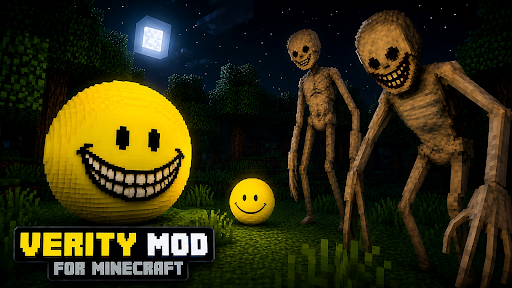
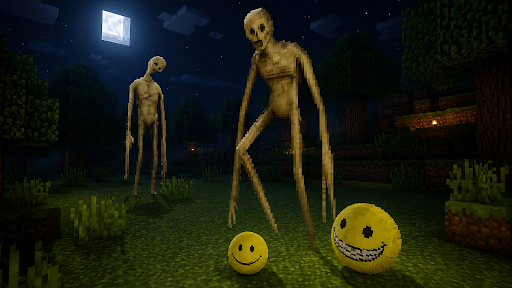
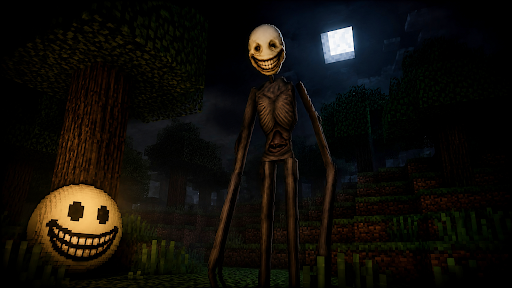
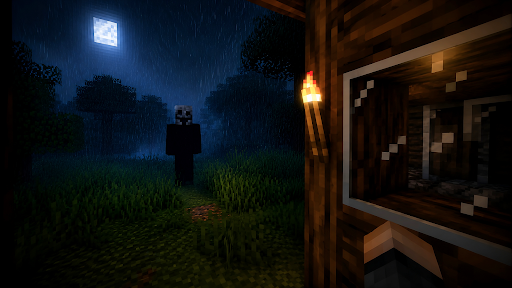
Step into one of the most mysterious horror experiences ever created for MCPE. This Verity Mod for Minecraft introduces a strange smiling entity that has quickly become one of the most talked-about creatures in the Bedrock horror community. If you enjoy creepy survival adventures, unsettling mysteries, and atmospheric encounters, the Verity Minecraft Mod offers a completely different way to experience your world.
At first, Verity appears harmless. A floating yellow smiley watches players from a distance, often behaving like a curious companion rather than a threat. However, as your adventure continues, the creature begins revealing its true nature. What starts as a friendly encounter slowly transforms into something far more disturbing, making this Verity addon for Minecraft one of the most unique horror additions available for Bedrock Edition.
Behind the smile hides a terrifying secret.
As the story unfolds, Verity reveals its true form — a towering nightmare with elongated limbs, unnatural proportions, and an unsettling grin. The entity becomes increasingly obsessed with the player, appearing unexpectedly throughout the world and creating a constant feeling of tension. This unique concept has helped Verity Minecraft mod become one of the most recognizable modern horror creatures among fans of Minecraft horror mods, analog horror stories, and creepy survival experiences.
More Than Just Scary Smiley
The nightmare does not end there.
In addition to MCPE Verity mods, this collection features several popular horror addons inspired by mysterious entities, stalkers, and psychological horror experiences.
Fake Player Experience
Have you ever felt like someone else was inside your world? Fake Player Experience creates disturbing encounters with mysterious figures that resemble real players.
The Knocker
A terrifying creature that stalks players during the night. Instead of attacking immediately, it uses unsettling sounds and unexpected appearances to create constant paranoia.
Playmate
A mysterious entity that turns survival into a deadly game of hide-and-seek. Unpredictable encounters, eerie behavior, and psychological tension make every exploration feel dangerous.
Horror Survival Collection
Whether you enjoy creepy entities, stalker creatures, analog horror inspired adventures, survival challenges, scary Minecraft Verity addons, or mysterious encounters, this collection offers a variety of experiences designed to make every Bedrock night feel memorable.
Features
Easy one-click installation;
Multiple Minecraft Verity Mods;
Supports modern Bedrock versions;
Horror entities and creepy creatures;
User-friendly interface;
Frequent content updates;
Multiplayer compatible;
Safe and tested content;
No external applications required;
Fast access to addon information and installation.
Download Verity Mod for Minecraft PE and discover why so many players have become fascinated by the smiling entity known as Verity. Explore mysterious worlds, survive terrifying encounters, and experience one of the most unique horror adventures available for Minecraft Bedrock Edition.
DISCLAIMER: This is an unofficial Minecraft PE application and is not affiliated with Mojang AB, Microsoft Corporation, or their respective owners. All rights reserved. In accordance with http://account.mojang.com/documents/brand_guidelines.
Credits: All characters, entities, textures, models, names, and concepts featured within these community-created addons remain the property of their respective creators. This application serves as a utility that helps users discover and install publicly available community content.
Daha fazla göster

1. MEmu yükleyicisini indirin ve kurulumu tamamlayın

2. MEmu'yu başlatın ve ana sayfada Google Play'i açın

3. Google Play'de Verity Mods for Minecraft arayın
Install
4. Verity Mods for Minecraft indirin ve yükleyin
5. Kurulum tamamlandığında başlamak için simgeye tıklayın

6. Verity Mods for Minecraft'i PC'de için MEmu'yu kullanın
MEmu Play, 50 milyon kullanıcısıyla en iyi ücretsiz Android emülatörüdür ve en üst düzey Android uygulama deneyiminin keyfini çıkarır. MEmu'nun sanallaştırma teknolojisi, en zorlu uygulamalar da dahil olmak üzere binlerce uygulamayı bilgisayarınızda sorunsuz bir şekilde çalıştırmanızı sağlar.
Daha büyük ekranla daha iyi grafiklere sahip; Pil veya mobil veri sınırlaması olmaksızın uzun süre.
Keymapping klavye ve fare veya gamepad'in hassas kontrolü için destek verir.
Multi-Instance yöneticisi ile tek bir bilgisayarda aynı anda birden fazla oyun hesabı veya görev gerçekleşilebilir.
Use Verity Mods for Minecraft on PC by following steps: