XForce Varex
Güncellendi
Mevcut Sürüm
1.5.8
Sunan

Cep telefonunda XForce Varex kullanırken fazla şarjlardan endişelenme, kendini küçük ekrandan kurtar ve uygulamayı çok daha büyük bir ekranda kullanmanın tadını çıkar. Şu andan itibaren, klavye ve fare ile uygulamayı tam ekran da kullanmayı dene. MEmu, beklediğin tüm şaşırtıcı özellikleri sunar: hızlı ve kolay kurulum, sezgisel kontroller, bunun dışında pil sınırı, mobil veri ve rahatsız edici aramalar artık yok. Yepyeni MEmu 9, bilgisayarında XForce Varex kullanmanın en iyi seçimidir. Emilimimizle kodlanan çok örnekli yönetici, aynı anda 2 veya daha fazla hesap açmayı mümkün kılar. Ve en önemlisi, özel emülasyon motorumuz PC'nin tüm potansiyelini serbest bırakabilir, her şeyi pürüzsüz ve eğlenceli hale getirebilir.
Daha fazla göster
XForce Varex’i MEmu Android Emülatör ile PC’ye indirin. Büyük ekranda oynamanın keyfini çıkarın. VAREX Smart Box control module for the Varex mufflers is one of XForce Performance Exhausts’ latest patent pending technologies.
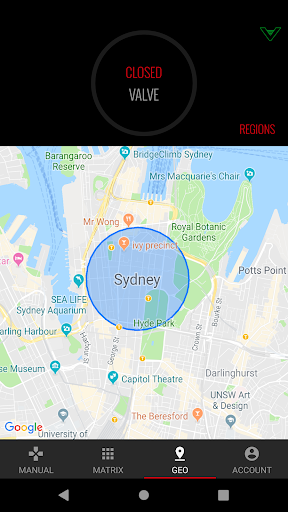
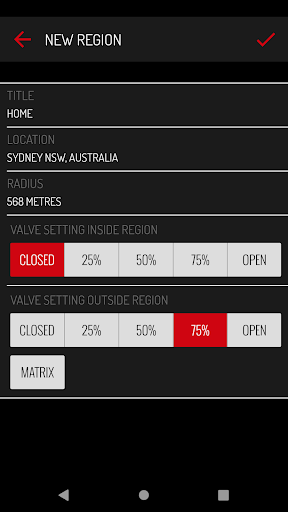
VAREX Smart Box control module for the Varex mufflers is one of XForce Performance Exhausts’ latest patent pending technologies. It brings the ultimate user experience of volume adjustable exhaust to the performance car enthusiasts. Through this technology, our users will be able to have full control of how their Varex exhaust systems sound and perform.
***This App will work exclusively with the VAREX Smart Box control module.***
This app features:
XFORCE accounts:
You can now sign up for an optional XFORCE account that will extend the power of your VAREX SMARTBOX. Accounts are 100% free but are not required to continue enjoying your VAREX SMARTBOX.
With an XFORCE account, you can unlock these new features:
- Store Matrix profiles to the cloud and quickly load them on to your VAREX SMARTBOX.
- Store Geo regions to the cloud and quickly load them on to your VAREX SMARTBOX.
- Send diagnostic logs straight to your account, for quick and convenient assistance by our support team.
- Setup a new VAREX SMARTBOX or new phone in seconds! Just login and quickly load your Matrix and Geo cloud data.
- With more to come in the future.
Note: The VAREX SMARTBOX continues to be fully operational without an XFORCE account but we highly encourage you to check them out!
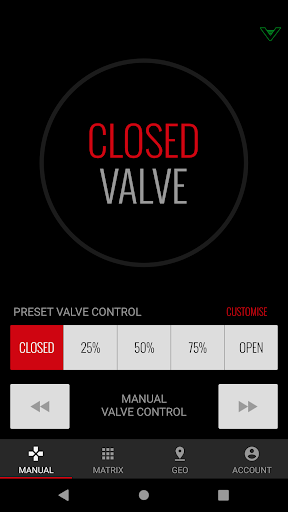
● Manual Mode: Manually adjust the valve position of the muffler to certain position/degree. Also features four preset positions which is Closed, 25%, 50%, 75%, Open.
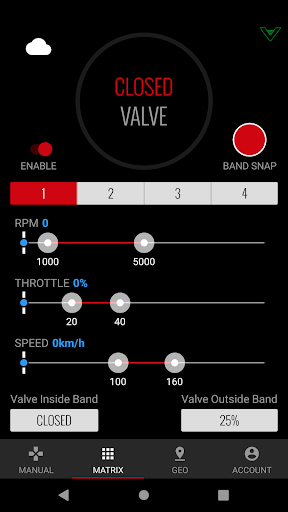
● Matrix Mode: Set vehicle parameters range to trigger the Valve operation. Such vehicle parameter includes Engine RPM, Throttle Position and Vehicle Speed. Slider interface are utilized for the selection of those parameters range/band. Valve preset positions inside or outside the range/band can also be manually selected.
VAREX muffler technology:
The XForce VAREX muffler utilizes our patented technology to combine both the design of the stock muffler and the performance muffler into one single compact unit. A sophisticated butterfly valve mechanism is implemented to redirect the exhaust gas flow and vary between the two.
For higher sound level, the exhaust flows are directed through the opening path and produces maximum power with a robust sound level (or the “sports car note”) and near-zero resistance.
Whilst for lower sound level, the exhaust flows are directed through the chambered path (similar design with the stock muffler), and produces minimum sound level that gives you the best in-car comfort. Angle of the valve is also controllable, which can be adjusted to stop at various points between sports mode and silence mode. This gives you further freedom to set the optimal sound level according to your desired preference.
The latest VAREX Smart Box Control Module serves as a bridge between the users and the Varex mufflers. Through the App and the Module, the user will be able to fine tune the exhaust sounds and performance levels to suit different occasions and the user’s preferred driving styles.
Daha fazla göster

1. MEmu yükleyicisini indirin ve kurulumu tamamlayın

2. MEmu'yu başlatın ve ana sayfada Google Play'i açın

3. Google Play'de XForce Varex arayın
Install
4. XForce Varex indirin ve yükleyin
5. Kurulum tamamlandığında başlamak için simgeye tıklayın

6. XForce Varex'i PC'de için MEmu'yu kullanın
MEmu Play, 50 milyon kullanıcısıyla en iyi ücretsiz Android emülatörüdür ve en üst düzey Android uygulama deneyiminin keyfini çıkarır. MEmu'nun sanallaştırma teknolojisi, en zorlu uygulamalar da dahil olmak üzere binlerce uygulamayı bilgisayarınızda sorunsuz bir şekilde çalıştırmanızı sağlar.
Daha büyük ekranla daha iyi grafiklere sahip; Pil veya mobil veri sınırlaması olmaksızın uzun süre.
Keymapping klavye ve fare veya gamepad'in hassas kontrolü için destek verir.
Multi-Instance yöneticisi ile tek bir bilgisayarda aynı anda birden fazla oyun hesabı veya görev gerçekleşilebilir.
Use XForce Varex on PC by following steps: