Ragnarok Origin: Classic
更新日期
目前版本
2.0.4
提供者

愛玩Ragnarok Origin: Classic的你,雙手不應該被束縛在智慧手機的小屏幕上。像職業選手一樣用鍵盤和滑鼠來全面控制你的遊戲吧。逍遙模擬器給你提供了你所有的期待。在電腦上下載、安裝Ragnarok Origin: Classic並盡情遊玩。再也不用擔心剩餘電量、流量消耗和煩人的來電。全新的逍遙模擬器9是你在電腦上遊玩Ragnarok Origin: Classic的最佳選擇!我们用心準備,完美的按鍵映射系統讓Ragnarok Origin: Classic宛如電腦遊戲;我們,用嫻熟的技術編程,逍遙多開器讓所有遊戲開好開滿;獨一無二的虛擬化引擎釋放你電腦的全部潛力,一切都入絲般順滑。我們不僅在意你怎樣遊玩,更在意如何讓你享受遊玩的樂趣!
更多
透過逍遙模擬器,在電腦上下載Ragnarok Origin: Classic,享受大熒幕的暢快體驗。 The RO where you grow with Monthly Pass only, inviting you to enjoy the pure adventure.

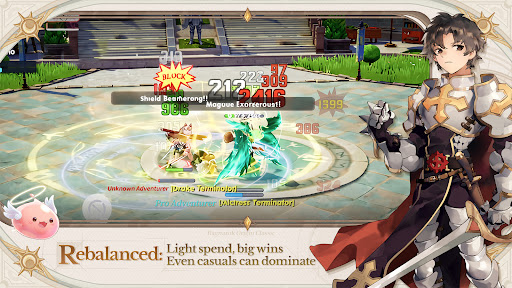
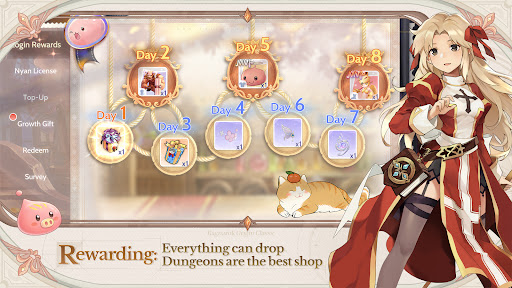
The RO where you grow with Monthly Pass only, inviting you to enjoy the pure adventure
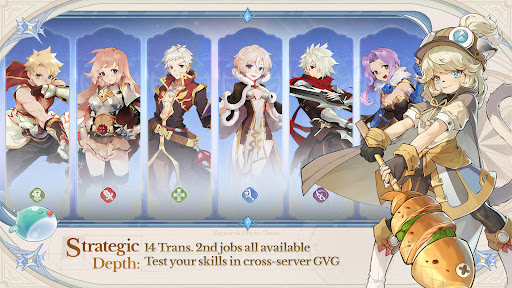
Classic legacy, all 14 Trans. 2nd Jobs now available together
Hassle-free progression for easy adventuring, fast leveling, and loads of rewards
Fair PvP where skill speaks for itself, showcase your prowess in GvG across servers
Everything can drop — dungeons are the best shop
Play together across the Americas, team up and make friends with no region limits
Collect from 203 costumes freely, mix and match to create endless styles
[The RO where Players Grow with Monthly Pass Only]
Experience a fair adventure environment driven solely by the [Monthly Pass] – with the pass in hand, the world is yours.
Here, we completely shatter the dominance of "whale players". You can earn Gold Coins through active play and directly exchange them for a Monthly Pass. MVP cards and rare headwear are all obtained from loot, and you can even gift them to friends. In the land of Midgard, your effort and strategy are the only standards that define your status.
[Re-discover the original ROO excitement]
For all adventurers who love Ragnarok Origin: ROO
No more gacha draws — no S-tier Pets, no Red Sigils, no colorful Statues
Classic protects the pure adventure experience
[Rich Job Builds]
Re-created 14 classic Trans. 2nd jobs with 27 unique builds, offering stress-free job switching.
The Cute Doram job [Summoner] makes its debut!
Experiment with limitless job builds, and relive the most cherished, most thrilling adventures from your memories.
[Pan-America Cross-Server Competition]
Breaking boundaries, from New York to São Paulo — no matter what language you speak, you'll always find friends to fight alongside.
Defying distance, could you stumble upon a long-distance romance?
Or maybe take down a formidable rival and earn glory for your city!
[Fair PvP Open to All]
This is a paradise for PvP enthusiasts: from 5v5 tactical squads to epic 80v80 guild wars.
Join all classic events with zero entry barriers — victory or defeat depends entirely on your skills and team coordination.
Together, we will witness the rise of the true champions!
[Battle for Your Style]
Dungeons are the best marketplace, where you sell loot to get your favorite costumes.
With 203 costumes to collect freely, it's easy to fill up your wardrobe. Even non-paying players can stay cute and switch up their looks every single day!
==Official News==
【Official Website】:http://roocamer.gnjoy.game/
【Official Fan Page】:
https://www.facebook.com/RagnarokOriginClassicNA/
https://www.facebook.com/RagnarokOriginClassicBR/
https://www.facebook.com/RagnarokOriginClassicLATAM/
【Discord】:https://discord.gg/ezStTDzxH8
【YouTube】:https://www.youtube.com/@RagnarokOriginClassic-AM
更多

1. 下載逍遙安裝器並完成設置

2. 啟動逍遙後打開位於桌面上的谷歌商店

3. 在谷歌商店中搜尋Ragnarok Origin: Classic
Install
4. 下載並安裝Ragnarok Origin: Classic
5. 下載完成後點擊圖標來啟動

6. 透過逍遙享受在電腦上玩Ragnarok Origin: Classic
逍遙安卓是優秀的安卓模擬器,全球超過5000萬用戶的優先選擇。逍遙安卓以虛擬化技術為核心,為用户打造突破手機配備局限的遊戲平台!
大屏精細展示;無限待機,超越電池和流量限制
鍵鼠,手把操作全面支持,操作更精準
用逍遙多開同時運行多個遊戲、應用。
Play Ragnarok Origin: Classic on PC by following steps: