Ragnarok Origin: Classic
อัปเดตเมื่อ
เวอร์ชันปัจจุบัน
2.0.4
ให้บริการโดย

เวลาคุณเล่น Ragnarok Origin: Classic, คุณอาจรู้สึกว่ามือคุณอาจบังจอแล้วทำให้ไม่ได้เล่นแบบเต็มที่. เล่นแบบไร้ขีดจำกัดด้วยเม้าส์และคีย์บอร์ด. MEmu มีตัวเลือกหลายอย่างให้คุณใช้งานเกมที่คุณเล่นแบบที่คุณต้องการ. ดาวน์โหลดและเล่น Ragnarok Origin: Classic บน PC. เล่นนานแค่ไหนก็ได้, ไม่ต้องชาร์จแบตเตอรี่, หรือเจอคนโทรเข้ามาระหว่างเล่น. MEmu 9 เป็นตัวเลือกสำหรับการเล่น Ragnarok Origin: Classic บน PC. ทางทีมงานเราได้ปรับแต่งเกม, ปรับให้เล่นเกมบางเกมได้เหมือนเล่น Ragnarok Origin: Classic เป็นเกม PC เช่นเล็งด้วยเม้าส์หรือใช้คีย์บอร์ด. ระบบของเรายังทำให้คุณสามารถเปิดเล่นได้มากกว่า 2 เกมพร้อมๆกันในคอมของคุณ. และที่สำคัญที่สุด, ระบบโปรแกรมของเราสามารถทำให้คุณใช้ระบบของ PC ทำให้เกมลื่นเหมือนกับใช้โทรศัพท์รุ่นล่าสุด. เราไม่ได้ดูแลเรื่องการเล่นเกม, แต่เราดูแลถึงความสนุกสนานที่คุณได้จากการเล่นด้วย.
แสดงเพิ่มเติม
ดาวน์โหลด Ragnarok Origin: Classic บน PC ด้วย MEmu Android Emulator สนุกกับการเล่นบนหน้าจอขนาดใหญ่ The RO where you grow with Monthly Pass only, inviting you to enjoy the pure adventure.
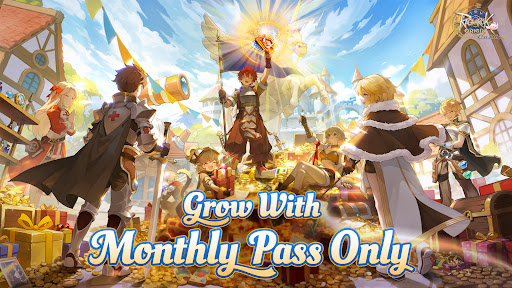
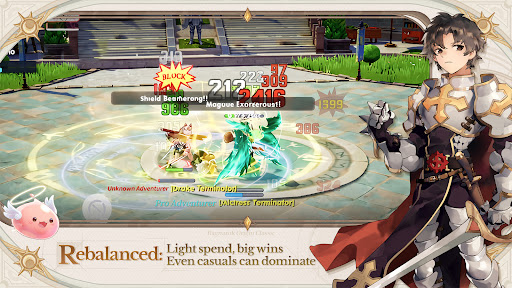
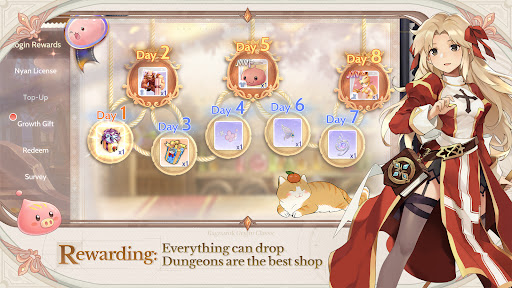
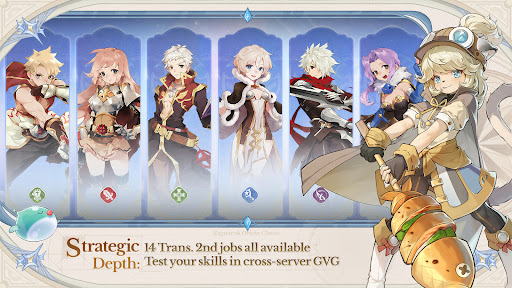
The RO where you grow with Monthly Pass only, inviting you to enjoy the pure adventure
Classic legacy, all 14 Trans. 2nd Jobs now available together
Hassle-free progression for easy adventuring, fast leveling, and loads of rewards
Fair PvP where skill speaks for itself, showcase your prowess in GvG across servers
Everything can drop — dungeons are the best shop
Play together across the Americas, team up and make friends with no region limits
Collect from 203 costumes freely, mix and match to create endless styles
[The RO where Players Grow with Monthly Pass Only]
Experience a fair adventure environment driven solely by the [Monthly Pass] – with the pass in hand, the world is yours.
Here, we completely shatter the dominance of "whale players". You can earn Gold Coins through active play and directly exchange them for a Monthly Pass. MVP cards and rare headwear are all obtained from loot, and you can even gift them to friends. In the land of Midgard, your effort and strategy are the only standards that define your status.
[Re-discover the original ROO excitement]
For all adventurers who love Ragnarok Origin: ROO
No more gacha draws — no S-tier Pets, no Red Sigils, no colorful Statues
Classic protects the pure adventure experience
[Rich Job Builds]
Re-created 14 classic Trans. 2nd jobs with 27 unique builds, offering stress-free job switching.
The Cute Doram job [Summoner] makes its debut!
Experiment with limitless job builds, and relive the most cherished, most thrilling adventures from your memories.
[Pan-America Cross-Server Competition]
Breaking boundaries, from New York to São Paulo — no matter what language you speak, you'll always find friends to fight alongside.
Defying distance, could you stumble upon a long-distance romance?
Or maybe take down a formidable rival and earn glory for your city!
[Fair PvP Open to All]
This is a paradise for PvP enthusiasts: from 5v5 tactical squads to epic 80v80 guild wars.
Join all classic events with zero entry barriers — victory or defeat depends entirely on your skills and team coordination.
Together, we will witness the rise of the true champions!
[Battle for Your Style]
Dungeons are the best marketplace, where you sell loot to get your favorite costumes.
With 203 costumes to collect freely, it's easy to fill up your wardrobe. Even non-paying players can stay cute and switch up their looks every single day!
==Official News==
【Official Website】:http://roocamer.gnjoy.game/
【Official Fan Page】:
https://www.facebook.com/RagnarokOriginClassicNA/
https://www.facebook.com/RagnarokOriginClassicBR/
https://www.facebook.com/RagnarokOriginClassicLATAM/
【Discord】:https://discord.gg/ezStTDzxH8
【YouTube】:https://www.youtube.com/@RagnarokOriginClassic-AM
แสดงเพิ่มเติม

1. ดาวน์โหลดตัวติดตั้ง MEmu และสิ้นสุดการติดตั้ง

2. เริ่ม MEmu จากนั้นเปิด Google Play บนหน้าแรก

3. ค้นหา Ragnarok Origin: Classic ใน Google Play
Install
4. ดาวน์โหลดและติดตั้ง Ragnarok Origin: Classic
5. เมื่อติดตั้งเสร็จให้คลิกที่ไอคอนเพื่อเริ่มใช้งาน

6. สนุกกับการเล่น Ragnarok Origin: Classic บนพีซีด้วย MEmu
MEmu App Player เป็นอีมูเลเตอร์ Android ที่ดีที่สุดและผู้คนกว่า 50 ล้านคนเพลิดเพลินไปกับประสบการณ์การเล่นเกม Android ที่ยอดเยี่ยม เทคโนโลยีการจำลองเสมือนของ MEmu ช่วยให้คุณเล่นเกม Android หลายพันเกมได้อย่างราบรื่นบนพีซีของคุณแม้แต่เกมที่ต้องใช้กราฟิกมากที่สุด
จอใหญ่และกราฟฟิกสวยกว่า; เล่นได้นาน, ไม่ต้องใช้แบตเตอรี่โทรศัพท์หรือเน็ตโทรศัพท์.
ระบบปรับแต่งปุ่มคีย์บอร์ดและเม้าส์ตามที่คุณเลือก
เล่นมากกว่าหนึ่งเกมบน PC ในเวลาเดียวกันด้วยระบบหลายจอหรือ Multi-Instance manager.
Play Ragnarok Origin: Classic on PC by following steps: