American Airlines
更新日期
目前版本
2024.42
提供者

想體驗American Airlines,可是手機熒幕太小,一載軟體就變燙,怎麼辦?透過逍遙模擬器,在電腦的大熒幕上暢快體驗!用鍵鼠操作更精準流暢,逍遙模擬器滿足您的所有期待。在電腦上下載安裝American Airlines,不用擔心電池當掉,想體驗多久就多久,順暢跑一天~全新的逍遙模擬器9,絕對是您體驗American Airlines電腦版的最佳選擇。完美的按鍵映射系統讓American Airlines如PC軟體般順手;強大的多開功能可同時執行多個任務;獨家虛擬化技術更能徹底釋放電腦效能,保障長時間穩定運作。我們致力於不讓設備限制您的體驗,助您輕鬆高效,暢快無比!
更多
透過逍遙模擬器,在電腦上下載American Airlines,享受大熒幕的暢快體驗。 With the American Airlines app, you’re covered with the information you need exactly when you need it.
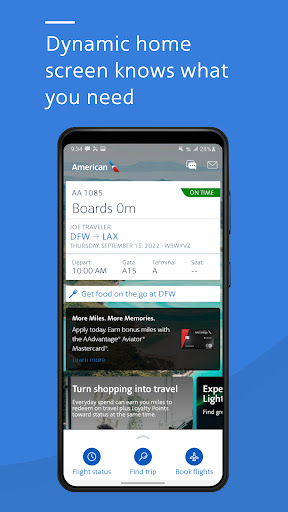
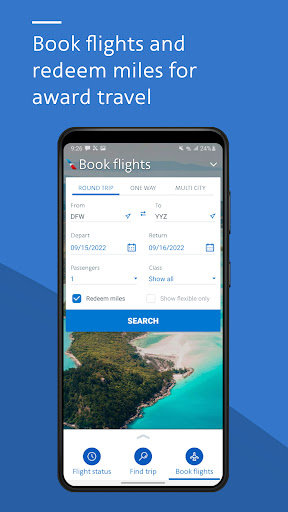
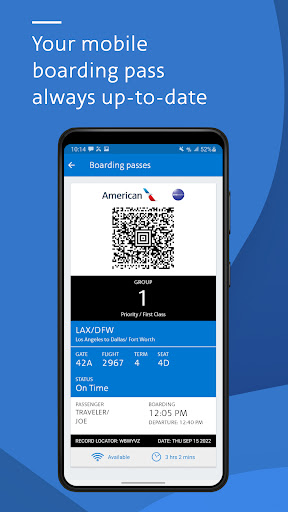
With the American Airlines app, you’re covered with the information you need exactly when you need it. Need a mobile boarding pass? Wondering where the closest Admirals Club® lounge is located? All of this info, and more, is available at your fingertips.
-Dynamic home screen: Knows where you are in your travel journey and gives you easy access to the right tools at the right time.
-Mobile boarding pass: Check in for your trip and retrieve your mobile boarding pass. No need to print, and it’s updated along the way.
-Flight updates: Get the latest flight updates by simply retrieving your reservation and allowing American Airlines to send notifications to your mobile device.
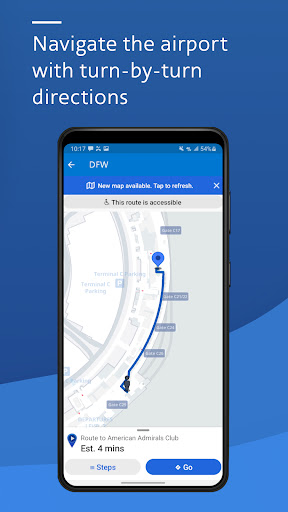
-Interactive terminal maps: Navigating airports is a breeze with our interactive terminal maps. Find the closest Admirals Club lounge or get directions to your connecting gate.
-AAdvantage® account details: Review all the details of your AAdvantage account right from the app. Not an AAdvantage member? Sign up today.
-Upgrade your seat: Request and purchase upgrades with ease. Want to see where you are on the list? The app displays the upgrade standby list within four hours of your scheduled departure.
-Seat selection: Select or change your seat within the app. Just pick the one you’d like and change it on the spot.
-Track your bag: Know exactly where your bag is from the time it leaves your hands to when you extend the handle at your final destination.
-Save your reservation: Your recently viewed reservations are automatically saved in the app so you can easily grab the details for your next flight in seconds.
-Wi-Fi access in the air: Don’t forget on flights with Wi-Fi, you can use the American app and aa.com to check flight information and watch movies and TV shows at no cost.
Contact Us: 800-222-2377
Why we need the permissions:
Bluetooth
We will be adding location assistance to mapping (see our new terminal maps) that uses BLE
Location
Your location helps us give you relevant information tailored to where you are at the time.
Photos/Media/Files
Access to photos is required to store parking reminders.
Camera
The camera allows the app to scan credit cards and expedite the checkout process.
Wi-Fi connection information
This allows the app to understand when connectivity exists to give you the data you need.
Other
Other various permissions allow the app to: receive google notifications, process notifications while the device is trying to sleep, access American’s web services, and vibrate for important messages.
更多

1. 下載逍遙安裝器並完成設置

2. 啟動逍遙後打開位於桌面上的谷歌商店

3. 在谷歌商店中搜尋American Airlines
Install
4. 下載並安裝American Airlines
5. 下載完成後點擊圖標來啟動

6. 透過逍遙享受在電腦上體驗American Airlines
逍遙安卓是優秀的安卓模擬器,全球超過5000萬用戶的優先選擇。逍遙安卓以虛擬化技術為核心,為用户打造突破手機配備局限的應用平台!
大屏精細展示;無限待機,超越電池和流量限制
鍵鼠,手把操作全面支持,操作更精準
用逍遙多開同時運行多個遊戲、應用。
Use American Airlines on PC by following steps: