
Peakbagger
更新日期
目前版本
1727195776
提供者

想體驗Peakbagger,可是手機熒幕太小,一載軟體就變燙,怎麼辦?透過逍遙模擬器,在電腦的大熒幕上暢快體驗!用鍵鼠操作更精準流暢,逍遙模擬器滿足您的所有期待。在電腦上下載安裝Peakbagger,不用擔心電池當掉,想體驗多久就多久,順暢跑一天~全新的逍遙模擬器9,絕對是您體驗Peakbagger電腦版的最佳選擇。完美的按鍵映射系統讓Peakbagger如PC軟體般順手;強大的多開功能可同時執行多個任務;獨家虛擬化技術更能徹底釋放電腦效能,保障長時間穩定運作。我們致力於不讓設備限制您的體驗,助您輕鬆高效,暢快無比!
更多
透過逍遙模擬器,在電腦上下載Peakbagger,享受大熒幕的暢快體驗。 Bring the mountains with you wherever you go!
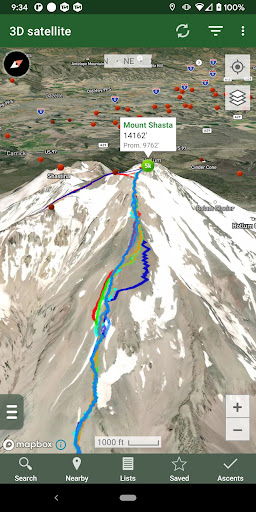
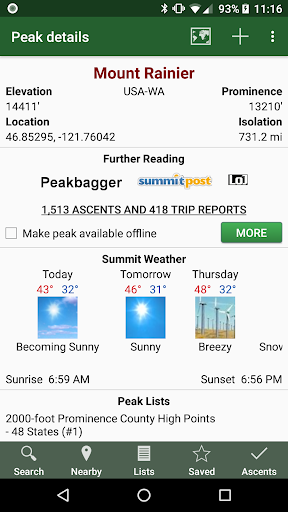
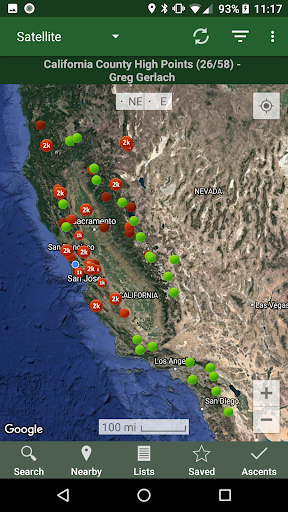
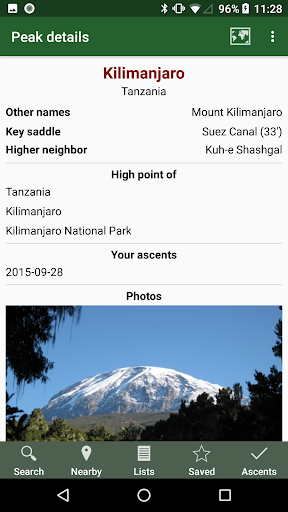
Bring the mountains with you wherever you go!
* Search the huge database of mountains and trip reports from Peakbagger.com and ListsOfJohn.com
* Keep track of your climbs, even when offline
* Measure your progress against hundreds of peak lists
* Get route information and directions from SummitPost and ListsofJohn.com
* Find peaks near your current location, or near other peaks
* Filter peaks by prominence, or climbed vs. unclimbed, or inclusion on a peak list
* See what other peaks are often climbed together with your target peak
* See weather forecasts for all U.S. peaks from the National Weather Service, and for 11,000+ major peaks worldwide from mountain-forecast.com
* See topographic maps for anywhere in the world (+/- 60 degrees latitude)
* See protected land area coverage in North America, Europe, Japan, and Australia and New Zealand.
* Save a peak to your device for offline use, including topographic maps
* Download topographic maps along a route for offline use
* Import and display GPS tracks and waypoints instantly
* On-screen compass keeps you oriented along your track
* Long click on the map to get Street View, elevation, and driving directions
* Record your starting elevation, and information about the gear and route you used
* Leaderboards show the top climbers for each peak list
* See peaks your Peakbagger buddies have climbed recently
* Automatically upload your ascents to ListsOfJohn (U.S. peaks)
* Show daily satellite imagery for any location on any day since 2011
* Display elevation profile for a GPS track, and show your current location along the profile
* See sunrise and sunset times at a peak, even when offline
* Record GPS tracks, including timestamps, and add them to your ascents
* Create and edit tracks right in the app
* Automatically find survey benchmarks near peaks (U.S.)
* Hunt benchmarks and get your finds recorded in the official government benchmark data sheets
HOW TO IMPORT GPS TRACKS - 4 OPTIONS
1) Click on the "Load GPS track" link on the ascent details page for an ascent that has a GPS track.
2) Click on a GPX, KML or KMZ file on your phone, for example, in an email attachment or on Google Drive
3) Open a GPX file in your Web browser, then click "Share" in the browser's menu, then select "Peakbagger"
4) Download or copy a GPX, KML, or KMZ file to your phone manually, then open it with a file browsing app (such as Discoverer)
更多

1. 下載逍遙安裝器並完成設置

2. 啟動逍遙後打開位於桌面上的谷歌商店

3. 在谷歌商店中搜尋Peakbagger
Install
4. 下載並安裝Peakbagger
5. 下載完成後點擊圖標來啟動

6. 透過逍遙享受在電腦上體驗Peakbagger
逍遙安卓是優秀的安卓模擬器,全球超過5000萬用戶的優先選擇。逍遙安卓以虛擬化技術為核心,為用户打造突破手機配備局限的應用平台!
大屏精細展示;無限待機,超越電池和流量限制
鍵鼠,手把操作全面支持,操作更精準
用逍遙多開同時運行多個遊戲、應用。
Use Peakbagger on PC by following steps: