American Airlines
更新日期
当前版本
2024.42
提供者

想体验American Airlines,可是手机屏幕太小,用一会就变烫,怎么办?使用逍遥模拟器,在电脑的大屏幕上畅快体验!在电脑上下载安装American Airlines,不用担心电量问题,想体验多久就多久,顺畅用一天~全新的逍遥模拟器9,绝对是您体验American Airlines电脑版的好选择。完美的按键映射系统让American Airlines如PC端般运行;强大的多开功能可同时使用多个应用;独家虚拟化技术更能彻底发挥电脑效能,保障长时间稳定运作。我们致力于不让设备限制您的体验,用起来轻松高效,畅快无比!
更多
透过逍遥模拟器,在电脑上下载American Airlines,享受大荧屏的畅快体验。 With the American Airlines app, you’re covered with the information you need exactly when you need it.
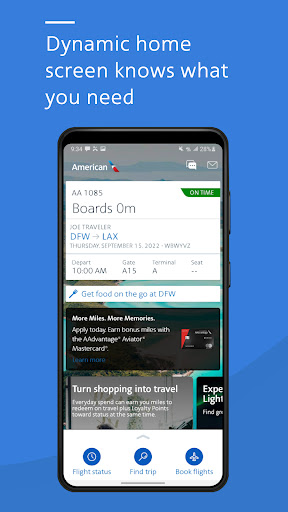
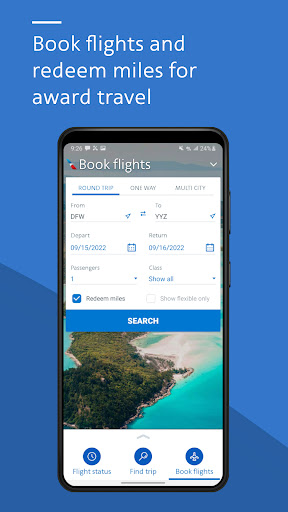
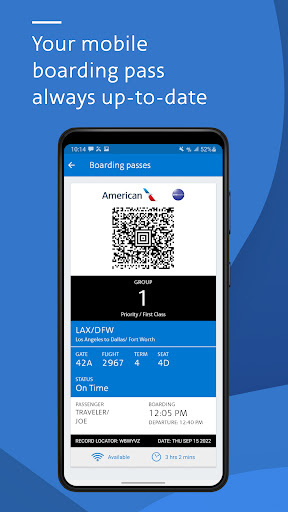
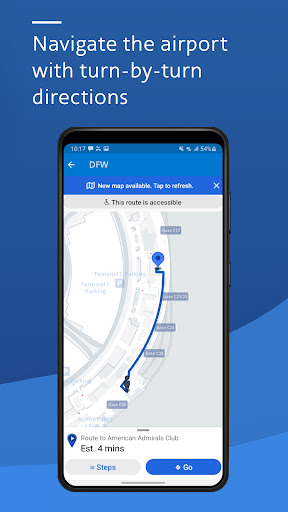
With the American Airlines app, you’re covered with the information you need exactly when you need it. Need a mobile boarding pass? Wondering where the closest Admirals Club® lounge is located? All of this info, and more, is available at your fingertips.
-Dynamic home screen: Knows where you are in your travel journey and gives you easy access to the right tools at the right time.
-Mobile boarding pass: Check in for your trip and retrieve your mobile boarding pass. No need to print, and it’s updated along the way.
-Flight updates: Get the latest flight updates by simply retrieving your reservation and allowing American Airlines to send notifications to your mobile device.
-Interactive terminal maps: Navigating airports is a breeze with our interactive terminal maps. Find the closest Admirals Club lounge or get directions to your connecting gate.
-AAdvantage® account details: Review all the details of your AAdvantage account right from the app. Not an AAdvantage member? Sign up today.
-Upgrade your seat: Request and purchase upgrades with ease. Want to see where you are on the list? The app displays the upgrade standby list within four hours of your scheduled departure.
-Seat selection: Select or change your seat within the app. Just pick the one you’d like and change it on the spot.
-Track your bag: Know exactly where your bag is from the time it leaves your hands to when you extend the handle at your final destination.
-Save your reservation: Your recently viewed reservations are automatically saved in the app so you can easily grab the details for your next flight in seconds.
-Wi-Fi access in the air: Don’t forget on flights with Wi-Fi, you can use the American app and aa.com to check flight information and watch movies and TV shows at no cost.
Contact Us: 800-222-2377
Why we need the permissions:
Bluetooth
We will be adding location assistance to mapping (see our new terminal maps) that uses BLE
Location
Your location helps us give you relevant information tailored to where you are at the time.
Photos/Media/Files
Access to photos is required to store parking reminders.
Camera
The camera allows the app to scan credit cards and expedite the checkout process.
Wi-Fi connection information
This allows the app to understand when connectivity exists to give you the data you need.
Other
Other various permissions allow the app to: receive google notifications, process notifications while the device is trying to sleep, access American’s web services, and vibrate for important messages.
更多

1. 下载逍遥安装器并完成设置

2. 启动逍遥后打开位于桌面上的谷歌商店

3. 在谷歌商店中搜索American Airlines
Install
4. 下载并安装American Airlines
5. 下载完成后点击图标来启动

6. 通过逍遥在电脑上享受American Airlines
逍遥安卓是优秀的安卓模拟器,全球超过5000万用户的优先选择。逍遥安卓以虚拟化技术为核心,为用户打造突破手机配置局限的游戏平台!
大屏精细展示;无限待机,超越电池和流量限制
键鼠、手把操作全面支持,操作更精准
用逍遥多开同时运行多个游戏、应用。
Use American Airlines on PC by following steps: