
FujiStyle - Film Recipes Frame
更新日期
目前版本
1.1.0
提供者

想體驗FujiStyle - Film Recipes Frame,可是手機熒幕太小,一載軟體就變燙,怎麼辦?透過逍遙模擬器,在電腦的大熒幕上暢快體驗!用鍵鼠操作更精準流暢,逍遙模擬器滿足您的所有期待。在電腦上下載安裝FujiStyle - Film Recipes Frame,不用擔心電池當掉,想體驗多久就多久,順暢跑一天~全新的逍遙模擬器9,絕對是您體驗FujiStyle - Film Recipes Frame電腦版的最佳選擇。完美的按鍵映射系統讓FujiStyle - Film Recipes Frame如PC軟體般順手;強大的多開功能可同時執行多個任務;獨家虛擬化技術更能徹底釋放電腦效能,保障長時間穩定運作。我們致力於不讓設備限制您的體驗,助您輕鬆高效,暢快無比!
更多
使用逍遙模擬器在電腦上享受FujiStyle - Film Recipes Frame的卓越體驗。這是一款功能強大的免費安卓模擬器,為您提供數千款安卓應用程式的桌面版本。與好友互動,有效率完成工作,盡情享受! FUJISTYLE is a professional companion tool for Fujifilm camera users—Master Film Simulation on your X100VI, XT5, or GFX.
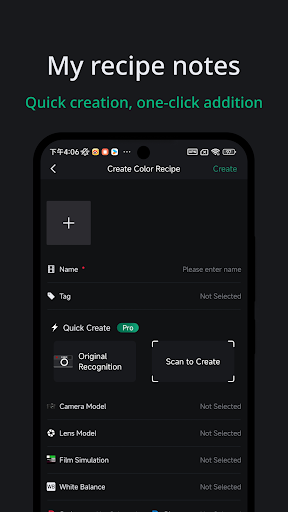
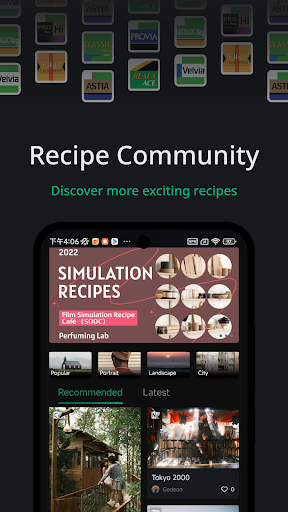
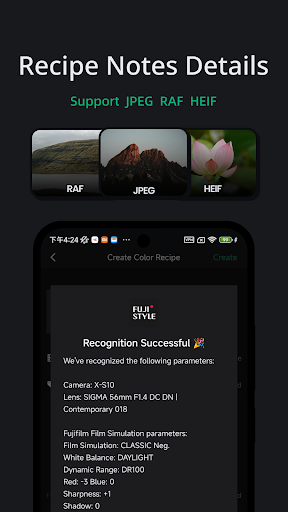
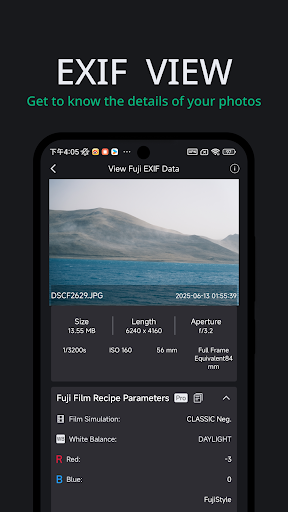
FUJISTYLE is a professional companion tool for Fujifilm camera users—Master Film Simulation on your X100VI, XT5, or GFX. 1000+ recipes. Beautiful frames!. Whether you’re recording and organizing Fuji color recipes, adding frame/watermarks, or identifying the film simulation parameters behind your images, FUJISTYLE has you covered. Hundreds of curated recipes + 20+ border & watermark styles included.
• Loved by Fuji photographers
• Active topic in global Fuji communities
• Highly rated by users
Thousands of Fuji shooters share color recipes here. We also include popular film-simulation recipes for free browsing. If you use a Fuji X-series camera, you can apply these parameters on-camera to get unique SOOC aesthetics.
Important Notice
FUJISTYLE is not an official FUJIFILM app. It’s an independent companion tool for enthusiasts and is not affiliated with or endorsed by FUJIFILM Corporation.
FUJISTYLE is not an official FUJIFILM app. It’s an independent companion tool for enthusiasts and is not affiliated with or endorsed by FUJIFILM Corporation.
FUJISTYLE is not an official FUJIFILM app. It’s an independent companion tool for enthusiasts and is not affiliated with or endorsed by FUJIFILM Corporation.
Key Features
Fujifilm Color Recipe Notes
Save unlimited film-simulation recipes locally—manage, search, and organize without being limited by your camera’s custom slots.
One-Tap SOOC Recipe Recognition
Detect likely recipe parameters from Fujifilm JPEG originals to skip tedious manual entry.
View Original Photo EXIF
Quickly inspect EXIF to understand the full shooting context.
Borders & Watermarks (WYSIWYG)
Live preview editing, auto-read photo info, batch watermark, keep original quality. 60+ Fuji-style frames & watermark templates.
Recipe Community
Discover, collect, and share creative recipes with Fujifilm fans worldwide.
Recipe Recognition & Camera Import (Selected Models) NEW
For a subset of supported Fujifilm cameras, FUJISTYLE can help you recognize recipes and import/apply settings faster.
How it works: Generate camera-ready formats (e.g., QR codes or structured setting cards) to speed up entry; on supported models/firmware, you can scan or transfer settings from the app for quicker setup.
What’s supported: Film simulation, DR, tone/curve, color, sharpness, noise reduction, WB & shifts, grain, clarity, etc. (Actual items vary by model/firmware.)
Compatibility: Availability varies by camera model, region, and firmware. Not all parameters or models support automatic import; manual confirmation or edits may still be required.
Free User Benefits
Record & manage unlimited color recipes
One-tap recognition for Fujifilm JPEG recipes
View essential EXIF data
Browse the recipe community for free
Pro Membership (Optional)
Deeper identification of film-specific parameters
Quick-add recipe parameters to your library
Unlock 60+ exclusive borders & watermarks
Generate personalized recipe cards
Cloud backup & sync support
Subscriptions & Billing (Google Play)
Payments are processed via your Google Play account.
Subscriptions auto-renew unless canceled at least 24 hours before the end of the current period.
Manage or cancel anytime in Google Play › Payments & subscriptions.
Restore purchases by signing in with the same Google account (or tap Restore Purchase in-app).
User Agreement: https://cord-yuzu-95e.notion.site/FUJISTYLE-User-Agreement-385d2da2f48f4fcc8f2a21dc00262e28?pvs=4
Privacy Policy: https://cord-yuzu-95e.notion.site/FUJISTYLE-Privacy-Policy-d2808cc8b4a0462886da66f0c1de2640?pvs=4
更多

1. 下載逍遙安裝器並完成設置

2. 啟動逍遙後打開位於桌面上的谷歌商店

3. 在谷歌商店中搜尋FujiStyle - Film Recipes Frame
Install
4. 下載並安裝FujiStyle - Film Recipes Frame
5. 下載完成後點擊圖標來啟動

6. 透過逍遙享受在電腦上體驗FujiStyle - Film Recipes Frame
逍遙安卓是優秀的安卓模擬器,全球超過5000萬用戶的優先選擇。逍遙安卓以虛擬化技術為核心,為用户打造突破手機配備局限的應用平台!
大屏精細展示;無限待機,超越電池和流量限制
鍵鼠,手把操作全面支持,操作更精準
用逍遙多開同時運行多個遊戲、應用。
Use FujiStyle - Film Recipes Frame on PC by following steps: