Manual Camera: DSLR Camera Pro
更新日期
目前版本
1.20
提供者

想體驗Manual Camera: DSLR Camera Pro,可是手機熒幕太小,一載軟體就變燙,怎麼辦?透過逍遙模擬器,在電腦的大熒幕上暢快體驗!用鍵鼠操作更精準流暢,逍遙模擬器滿足您的所有期待。在電腦上下載安裝Manual Camera: DSLR Camera Pro,不用擔心電池當掉,想體驗多久就多久,順暢跑一天~全新的逍遙模擬器9,絕對是您體驗Manual Camera: DSLR Camera Pro電腦版的最佳選擇。完美的按鍵映射系統讓Manual Camera: DSLR Camera Pro如PC軟體般順手;強大的多開功能可同時執行多個任務;獨家虛擬化技術更能徹底釋放電腦效能,保障長時間穩定運作。我們致力於不讓設備限制您的體驗,助您輕鬆高效,暢快無比!
更多
透過逍遙模擬器,在電腦上下載Manual Camera: DSLR Camera Pro,享受大熒幕的暢快體驗。 This Manual Camera DSLR app will turn your phone into professional camera like, with fully manual camera control on ISO, shutter speed, exposure, manual focus and another features like a professional camera, which can bring your mobile photography to the next level.
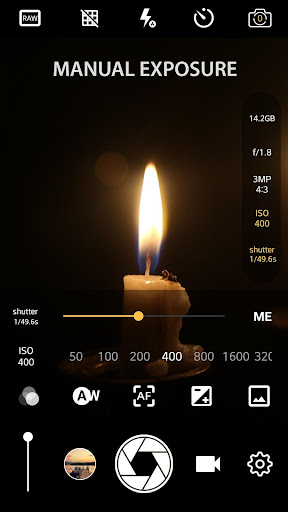
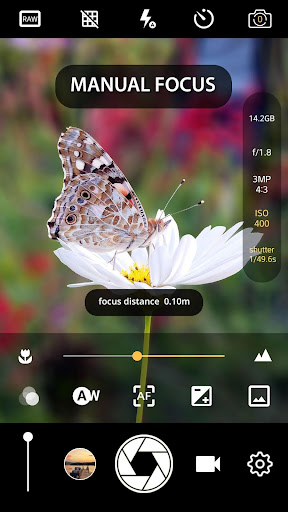
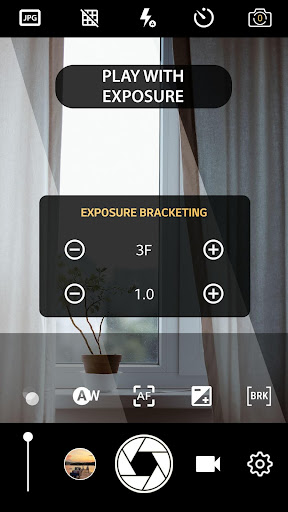
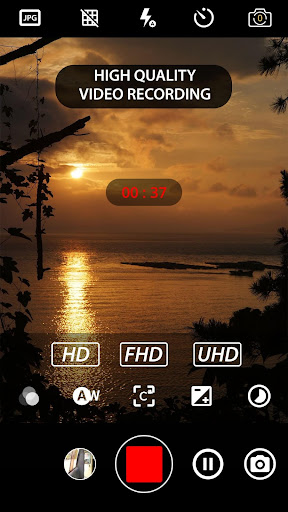
This Manual Camera DSLR app will turn your phone into professional camera like, with fully manual camera control on ISO, shutter speed, exposure, manual focus and another features like a professional camera, which can bring your mobile photography to the next level. Take the best capture of your photo and even record your video in 4K UHD resolution.
☆ DSLR Camera HD Professional main features : ☆
✓ Control exposure
✓ Control white balance
✓ Manual ISO *
✓ Manual focus *
✓ Control shutter speed *
✓ Save RAW photo *
✓ Real time filter / color effect
✓ 4K camera recording (on supported devices)
✓ Timelapse / fast motion video
✓ Slow motion video *
✓ Set video frame rate and bit rate
✓ Intervalometer / interval shot
✓ Geotagging
✓ Photo stamping
* Require Android 5.0+ with Camera2API enabled by phone manufacture
It's an excellent fast camera app, perform quickly giving your fast camera performance which is able to take many pictures at some interval in burst mode, very useful for creating stop motion or time lapse video
Create photos with different effects and another pro hd camera pro features like manual exposure lock, manual ISO, white balance, hd camera pro grid view, golden ratio grid, etc. and reach the highest level of dslr photography with this dslr camera professional.
DSLR Camera Professional additional features :
* Burst camera app with configurable delay to create stop motion or create time lapse video
* Face detection / facial recognition
* Front back hd camera pro selection, save raw photo only using rear camera
* Professional camera hd features: Scene mode, focus mode, burst mode, color effects, white balance, and manual exposure lock, manual ISO.
* Choose to and 4k video quality and resolution.
* 4K camera recording (With optional audio recording) like professional camera hd
* Option to turn off the shutter sound.
* GUI to change the orientation without any pause works in any direction.* Adjustable volume keys (image to zoom receive or change the exposure compensation).
* Excellent and fast camera / burst camera hd performance
* Remote control (optional audio countdown) timer (with configurable delay) automatic repeat mode.
* Customable volume keys to perform quick operation like dslr camera app
* HD camera feature to adjust shutter speed
* Manual Focus like DSLR camera halide
* HD camera feature to choose manual ISO like procam halide
* Manual Exposure
* Location targeting feature
* Remove with multi-touch gesture and single-touch control.
* Option to lock the photo or 4k video in portrait or landscape orientation.
* 4K video recording on supported device, turn your phone into 4k camera app
* Realtime Photo Filter on procam halide
* Photo Grid : 4K camera line, golden ration line
* Disable the shutter sound / silent camera mode when take photo or record 4k video
* Optional GPS location tagging (geotagging), photos and videos; For photos that compass direction contains.
* A date and time stamp on photos, raw photo, location coordinates and implements a custom text.
* (Some) external microphone support.
* Manual focus distance; manual ISO / iso dslr photography ;
manual camera exposure lock; RAW (DNG) files on front back manual camera
* Manual ISO / iso manual or just balance ISO ( set iso manual )
* Flash mode feature like procam halide
* Save JPG and RAW Photo for dslr photography
* Brightness / exposure setting
* Burst camera mode useful for creating time lapse or stop motion which required interval shooting
* Unlock phone manual camera professional capability to record at 4k camera on supported devices
All complete features like dslr photography packaged in small compact size and clean interface,
Download this professional camera hd and start record your 4k video
Note :
To use all manual camera features you need device with Android 5.0 and up which is support camera2 API, you will know that your device is supported if you can find “enable camera2api” option in setting menu.
更多

1. 下載逍遙安裝器並完成設置

2. 啟動逍遙後打開位於桌面上的谷歌商店

3. 在谷歌商店中搜尋Manual Camera: DSLR Camera Pro
Install
4. 下載並安裝Manual Camera: DSLR Camera Pro
5. 下載完成後點擊圖標來啟動

6. 透過逍遙享受在電腦上體驗Manual Camera: DSLR Camera Pro
逍遙安卓是優秀的安卓模擬器,全球超過5000萬用戶的優先選擇。逍遙安卓以虛擬化技術為核心,為用户打造突破手機配備局限的應用平台!
大屏精細展示;無限待機,超越電池和流量限制
鍵鼠,手把操作全面支持,操作更精準
用逍遙多開同時運行多個遊戲、應用。
Use Manual Camera: DSLR Camera Pro on PC by following steps: