Muviz Edge: AOD & Edge Lights
更新日期
目前版本
2.0.0.1
提供者

想體驗Muviz Edge: AOD & Edge Lights,可是手機熒幕太小,一載軟體就變燙,怎麼辦?透過逍遙模擬器,在電腦的大熒幕上暢快體驗!用鍵鼠操作更精準流暢,逍遙模擬器滿足您的所有期待。在電腦上下載安裝Muviz Edge: AOD & Edge Lights,不用擔心電池當掉,想體驗多久就多久,順暢跑一天~全新的逍遙模擬器9,絕對是您體驗Muviz Edge: AOD & Edge Lights電腦版的最佳選擇。完美的按鍵映射系統讓Muviz Edge: AOD & Edge Lights如PC軟體般順手;強大的多開功能可同時執行多個任務;獨家虛擬化技術更能徹底釋放電腦效能,保障長時間穩定運作。我們致力於不讓設備限制您的體驗,助您輕鬆高效,暢快無比!
更多
透過逍遙模擬器,在電腦上下載Muviz Edge: AOD & Edge Lights,享受大熒幕的暢快體驗。 Muviz Edge is a first of its kind app that displays a Live Music Visualizer around the edges of your screen while you are listening to music from your favourite music apps.
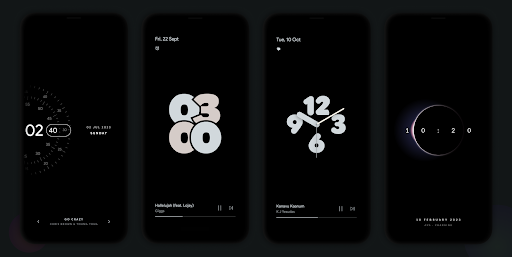
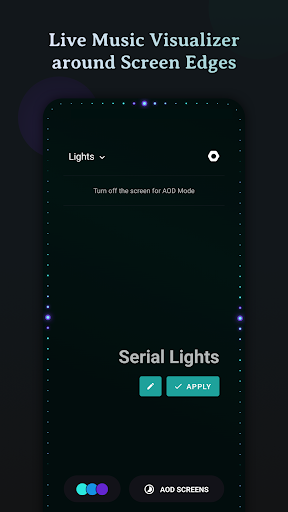
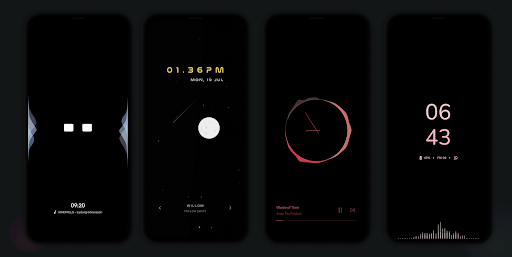
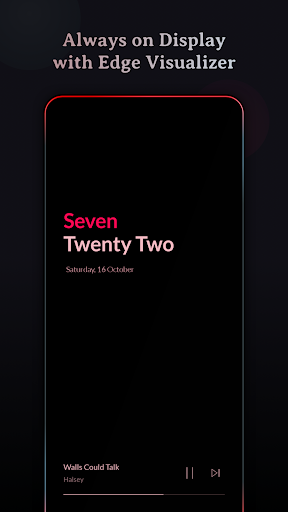
Muviz Edge is a first of its kind app that displays a Live Music Visualizer around the edges of your screen while you are listening to music from your favourite music apps. You can even enjoy edge lighting over our exciting set of Always on Display Screens.
It's a perfect music companion to add edge music lighting to your new age devices with edge to edge rounded screen.
Supports major Music Apps
Enjoy audio visualizer with music from various music apps no matter whether they are offline or streaming.
Always On Display
Continue enjoying edge visualizer even after the screen is turned off with our Always on Display screensaver feature.
We have growing set of AODs which can be used independently or along with our visualizers. Always on Displays can be extensively customised with our inbuilt editor. Even you can set your own AOD backgrounds.
Some of the AODs are
• Nothing(2) AOD Screensaver
• iPhone (or) iOS style AOD Screensaver
• Android 14's AOD Screensaver
• Star field AOD with live Moon phase
• Half Concentric Clock AOD Screensaver
• Pixel Concentric Clock AOD Screensaver
• Google Pixel AOD Screensaver
• Nothing(1) AOD Screensaver
• Solar System Clock AOD Screensaver
• Eclipse Clock AOD Screensaver
• Flip Clock AOD Screensaver
• Android 12 Clock AOD Screensaver
• Text Clock AOD Screensaver
• Nike Watch Face AOD Screensaver
• Blinky Animation AOD Screensaver
• Retro 8-bit Clock AOD Screensaver
and more to come.
Customizable Design Packs
The app contains responsive visualizer design packs crafted specifically for screen edges and can be customized to match your style. Get ready to experience fresh new designs as you go!
Color Palette Galore
The app allows you to customize the visualizer colors in many possible ways.
• Select colors from a set of stock palettes.
• Use colors from album cover / album art / cover art of the currently playing music.
• Automatically apply colors from current album art.
• Add your own custom color palette.
• Save all eye catching color palettes into your palette collection.
Visualizer Control Options
• Option to select music sources for visualization.
• Option to dim the background and keep the screen ON when visualizer is active.
• Option to hide visualizer over fullscreen apps. (while playing games and videos)
• Option to select apps over which visualizer should be displayed.
Burn-in Protection
Improved pixel shifting is built into our AODs to prevent AMOLED screens from burn-in.
Facing issues? don't hesitate to drop us a mail at support@sparkine.com
更多

1. 下載逍遙安裝器並完成設置

2. 啟動逍遙後打開位於桌面上的谷歌商店

3. 在谷歌商店中搜尋Muviz Edge: AOD & Edge Lights
Install
4. 下載並安裝Muviz Edge: AOD & Edge Lights
5. 下載完成後點擊圖標來啟動

6. 透過逍遙享受在電腦上體驗Muviz Edge: AOD & Edge Lights
逍遙安卓是優秀的安卓模擬器,全球超過5000萬用戶的優先選擇。逍遙安卓以虛擬化技術為核心,為用户打造突破手機配備局限的應用平台!
大屏精細展示;無限待機,超越電池和流量限制
鍵鼠,手把操作全面支持,操作更精準
用逍遙多開同時運行多個遊戲、應用。
Use Muviz Edge: AOD & Edge Lights on PC by following steps: