Muviz Edge: AOD & Edge Lights
更新日
現在のバージョン
2.0.0.1
提供元

スマートフォンは不要!パソコンと同じようにキーボードとマウスで操作できます。MEmu Playは、あなたが待ち望んでいたすべての楽しみをお届けします。バッテリー残量や小さな画面を気にすることなく、Muviz Edge: AOD & Edge Lightsをご利用ください。最新のMEmu 9は、Muviz Edge: AOD & Edge LightsをPCで体験するのに最適です!完璧なキーマッピングシステムにより、PCのようなスムーズな操作性を実現します。マルチインスタンス機能により、複数のアプリケーションを同時に実行できます。独自の仮想化エンジンがPCのパフォーマンスを最大限に引き出します。アプリを使用するだけでなく、高品質な体験を得ることができます。
もっと見る
Muviz Edge: AOD & Edge LightsをPCでダウンロード!大画面でより楽しむ。電源が落ちてしまうとか通信料が足りないとかの問題を心配する必要がなく、PCの大画面でより快適にゲームを楽しましょう! Muviz Edge is a first of its kind app that displays a Live Music Visualizer around the edges of your screen while you are listening to music from your favourite music apps.
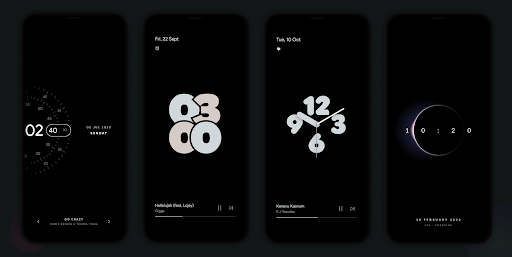
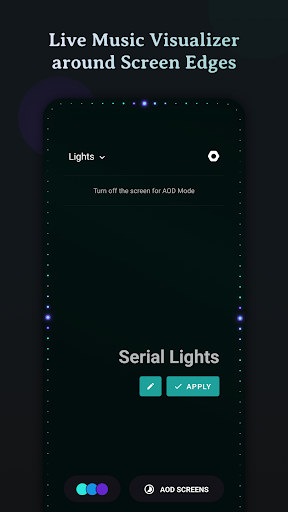
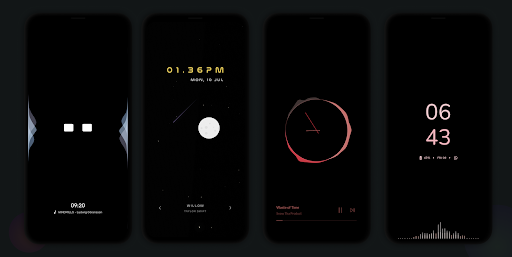
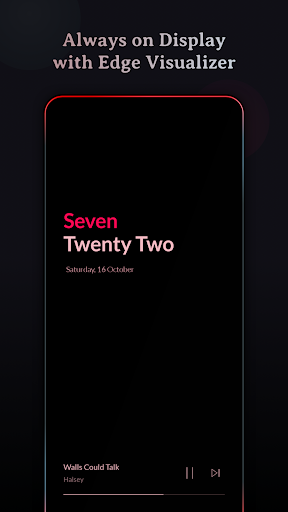
Muviz Edge is a first of its kind app that displays a Live Music Visualizer around the edges of your screen while you are listening to music from your favourite music apps. You can even enjoy edge lighting over our exciting set of Always on Display Screens.
It's a perfect music companion to add edge music lighting to your new age devices with edge to edge rounded screen.
Supports major Music Apps
Enjoy audio visualizer with music from various music apps no matter whether they are offline or streaming.
Always On Display
Continue enjoying edge visualizer even after the screen is turned off with our Always on Display screensaver feature.
We have growing set of AODs which can be used independently or along with our visualizers. Always on Displays can be extensively customised with our inbuilt editor. Even you can set your own AOD backgrounds.
Some of the AODs are
• Nothing(2) AOD Screensaver
• iPhone (or) iOS style AOD Screensaver
• Android 14's AOD Screensaver
• Star field AOD with live Moon phase
• Half Concentric Clock AOD Screensaver
• Pixel Concentric Clock AOD Screensaver
• Google Pixel AOD Screensaver
• Nothing(1) AOD Screensaver
• Solar System Clock AOD Screensaver
• Eclipse Clock AOD Screensaver
• Flip Clock AOD Screensaver
• Android 12 Clock AOD Screensaver
• Text Clock AOD Screensaver
• Nike Watch Face AOD Screensaver
• Blinky Animation AOD Screensaver
• Retro 8-bit Clock AOD Screensaver
and more to come.
Customizable Design Packs
The app contains responsive visualizer design packs crafted specifically for screen edges and can be customized to match your style. Get ready to experience fresh new designs as you go!
Color Palette Galore
The app allows you to customize the visualizer colors in many possible ways.
• Select colors from a set of stock palettes.
• Use colors from album cover / album art / cover art of the currently playing music.
• Automatically apply colors from current album art.
• Add your own custom color palette.
• Save all eye catching color palettes into your palette collection.
Visualizer Control Options
• Option to select music sources for visualization.
• Option to dim the background and keep the screen ON when visualizer is active.
• Option to hide visualizer over fullscreen apps. (while playing games and videos)
• Option to select apps over which visualizer should be displayed.
Burn-in Protection
Improved pixel shifting is built into our AODs to prevent AMOLED screens from burn-in.
Facing issues? don't hesitate to drop us a mail at support@sparkine.com
もっと見る

1. MEmuインストーラーをダウンロードしてセットアップを完了する

2. MEmuを起動し、デスクトップでのPlayストアを開く

3. PlayストアでMuviz Edge: AOD & Edge Lightsを検索する
Install
4. Muviz Edge: AOD & Edge Lightsをダウンロードしてインストールする
5. インストールが完了したら、アイコンをクリックしてスタート

6. MEmuを使ってパソコンでMuviz Edge: AOD & Edge Lightsを体験する
MEmu Playは現在、最高の無料Androidエミュレーターであり、5,000万人のユーザーが優れたAndroidアプリ体験を楽しんでいます。MEmuの仮想化テクノロジーにより、数千ものAndroidアプリをコンピューターでスムーズに実行できます。
大画面でより精細;無限の待機、電池とドラフィックの極限を超え
キーボード・マウス・コントローラーを全力でサポート、より快適
マルチインスタンスで複数のゲームを同時に実行
Use Muviz Edge: AOD & Edge Lights on PC by following steps: