BuffBuff
Оновлено
Поточна версія
1.01.5201
Постачальник

Перестаньте турбуватися про надмірні витрати, використовуючи ххх на своєму мобільному телефоні, звільніться від крихітного екрану і насолоджуйтеся використанням програми на набагато більшому дисплеї. Відтепер отримуйте повний екран свого додатка за допомогою клавіатури та миші. MEmu пропонує вам усі дивовижні функції, які ви очікували: швидка установка та просте налаштування, інтуїтивно зрозумілі елементи керування, більше обмежень від акумулятора, мобільних даних та тривожних дзвінків. Зовсім новий MEmu 9 – найкращий вибір для використання Єдина Школа на вашому комп’ютері. За допомогою нашого поглинання менеджер із кількома примірниками одночасно дозволяє відкрити 2 або більше рахунків. І найголовніше, наш ексклюзивний емуляційний двигун може вивільнити весь потенціал вашого ПК, зробити все гладким і приємним.
Show more
Насолоджуйтесь чудовим досвідом використання BuffBuff на ПК за допомогою MEmu Play. Це потужний безкоштовний емулятор Android, який пропонує тисячі програм Android для настільних комп'ютерів. Насолоджуйтесь спілкуванням з друзями та покращенням своєї роботи з більшою ефективністю! BuffBuff brings a unified place to buy official game currency and items at a low price.
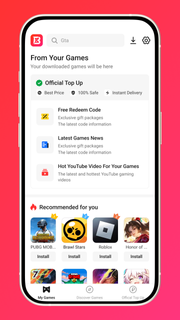
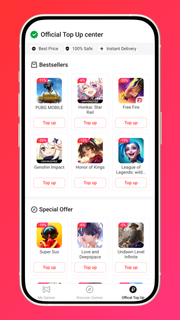
BuffBuff brings a unified place to buy official game currency and items at a low price. It focuses on fast delivery and a simple purchase flow that reduces failed transactions. The app also organizes helpful content and community activities so players can stay informed without leaving the store. You can manage your account, track orders, and adjust language or currency in one place. Download BuffBuff APK on APKPure to access these tools with quick updates and reliable downloads.Main featuresOfficial top-ups with instant deliveryBuffBuff provides officially certified game items with payment protection. Orders are processed quickly, and you receive delivery status in real time. This gives you a clear timeline from checkout to in-game arrival.Wide game coverage with clear product pagesBuffBuff lists top-ups for PUBG Mobile UC, Free Fire Diamonds, MLBB, Genshin Impact Genesis Crystals, Honkai Star Rail, Valorant, Arena Breakout Infinite, Zenless Zone Zero, Roblox, and Steam Wallet. Each page shows denominations, regions, and notes, so you can choose correctly the first time.Savings and rewards that stackUp to 55% off on selected items. New users receive a coupon and a welcome bonus of 50 points, while cashback lets you redeem 100 points for 1 USD at checkout. You can combine available offers when the terms allow for extra savings.Code center, giveaways, and event dropsFree redeem codes, hosts giveaways, and lucky draws are available on BuffBuff. The code center organizes active codes by game so you can find them faster. You also see expiry information to avoid missed claims.Account sign-in and order managementSign in with Google or VK to sync your profile. BuffBuff lets you track each order, review payment history, manage coupons, and set your preferred language and currency. You can export receipts if you need purchase records.Curated news and community updatesBuffBuff aggregates game news and event summaries to support your purchase planning. You can follow updates for new banners, season resets, or region-specific sales. This keeps your top-ups aligned with current content.Security and payments on BuffBuffBuffBuff uses encryption to protect payment information and personal data. All items are official so you avoid account risk from unverified sources. You can review Payment Methods and Security details inside the app before you place an order.Stay connected with BuffBuffTo never miss free codes or time-limited promotions, you can enable notifications in the app. BuffBuff also shares event reminders on Telegram, VK, Discord, X, Instagram, and Facebook. Following these channels helps you catch flash sales and community drops faster.High intent game pages in BuffBuffPopular destinations include PUBG Mobile, Free Fire, MLBB, Genshin Impact, Honkai Star Rail, Zenless Zone Zero, Arena Breakout Infinite, Valorant, Roblox, and Steam Wallet. You can bookmark these pages to speed up repeat purchases. Each page displays regional notes that help reduce top-up errors.How to use BuffBuffUse this quick guide to complete a secure game top-up from the app. The steps keep you focused from install to delivery confirmation.Download BuffBuff APK from APKPure and install the BuffBuff APK. Open the app and allow basic permissions.Create an account or sign in with Google or VK. Set your region, language, and currency in settings.After that, open the game catalog and select a title such as PUBG Mobile, Free Fire, or Genshin Impact. Choose the top-up amount or item you need.Then confirm your player ID or required login details as shown on the product page. Review pricing, discounts, points, and coupons before you proceed to payment.So you can confirm delivery, wait for the success notice in the app, and check your in-game mailbox or inventory. Track the order in your account and visit the code center to redeem any active codes.Download and start savingBuffBuff helps you purchase official game currency at a better price with fast delivery and simple order tracking. Download BuffBuff APK latest version on APKPure and start saving on your next top-up.FAQsIs BuffBuff safe for game top-ups?Yes, BuffBuff is a legitimate top-up service that provides officially certified items and uses encryption for payments. Orders on BuffBuff are processed with instant delivery status, which helps you verify fulfillment without guesswork.How do points and cashback work in BuffBuff?BuffBuff grants a welcome bonus of 50 points to new users and offers cashback on eligible purchases. You can redeem 100 points for 1 USD during checkout, and available coupons or discounts may stack according to the offer rules shown in the app.Which games can I top up on BuffBuff?BuffBuff supports many popular titles, including PUBG Mobile UC, Free Fire Diamonds, MLBB, Genshin Impact Genesis Crystals, Honkai Star Rail, Valorant, Arena Breakout Infinite, Zenless Zone Zero, Roblox, and Steam Wallet credit. You can search by title in the app to see regional notes and available denominations.Where can I find free redeem codes in BuffBuff?The BuffBuff code center lists free redeem codes by game, along with expiry details and redemption notes. You can also follow BuffBuff on Telegram, VK, Discord, X, Instagram, and Facebook to catch new drops and event giveaways.
Show more

1. Download MEmu installer and finish the setup

2. Start MEmu then open Google Play on the desktop

3. Search BuffBuff in Google Play
Install
4. Download and Install BuffBuff
5. On install completion click the icon to start

6. Enjoy using BuffBuff on PC with MEmu
MEmu App Player є кращим безкоштовним емулятором Android, і 50 мільйонів людей вже користуються його чудовим ігровим досвідом Android. Технологія віртуалізації MEmu дає вам змогу відтворювати тисячі ігор Android на вашому комп'ютері, навіть найбільш насичених графікою.
Bigger screen with better graphics; Long duration, without limitation of battery or mobile data.
Full Keymapping support for precise control of keyboard and mouse or gamepad.
Multiple game accounts or tasks on single PC at one time with Multi-Instance manager.
Use BuffBuff on PC by following steps: