Famelack
Оновлено
Поточна версія
3.6
Постачальник

Перестаньте турбуватися про надмірні витрати, використовуючи ххх на своєму мобільному телефоні, звільніться від крихітного екрану і насолоджуйтеся використанням програми на набагато більшому дисплеї. Відтепер отримуйте повний екран свого додатка за допомогою клавіатури та миші. MEmu пропонує вам усі дивовижні функції, які ви очікували: швидка установка та просте налаштування, інтуїтивно зрозумілі елементи керування, більше обмежень від акумулятора, мобільних даних та тривожних дзвінків. Зовсім новий MEmu 9 – найкращий вибір для використання Єдина Школа на вашому комп’ютері. За допомогою нашого поглинання менеджер із кількома примірниками одночасно дозволяє відкрити 2 або більше рахунків. І найголовніше, наш ексклюзивний емуляційний двигун може вивільнити весь потенціал вашого ПК, зробити все гладким і приємним.
Show more
Насолоджуйтесь чудовим досвідом використання Famelack на ПК за допомогою MEmu Play. Це потужний безкоштовний емулятор Android, який пропонує тисячі програм Android для настільних комп'ютерів. Насолоджуйтесь спілкуванням з друзями та покращенням своєї роботи з більшою ефективністю! Famelack suits users who want quick access to live broadcasts from many countries without signups or interruptions.
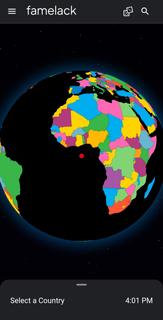
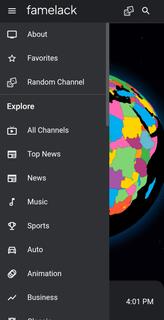
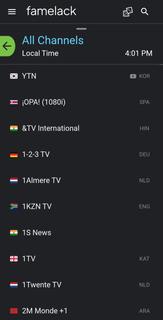
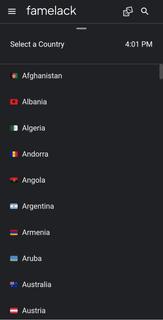
Famelack suits users who want quick access to live broadcasts from many countries without signups or interruptions. It brings news, sports, music, and culture together in a clean layout, so you can move between topics in seconds. Because links are regularly checked, playback stays dependable with minimal buffering. If you prefer simple viewing with no distractions, Famelack APK offers a focused way to browse and play live streams across regions. Famelack features at a glanceGlobal live TV across countries and genresFamelack covers more than one thousand live TV channels from over one hundred thirty countries. The catalog spans news, sports, movies, kids, and music, so you can find a national news feed or a niche music station in one place. This broad scope helps you follow events and culture from different regions without switching apps.Free and ad free with no accountThe Famelack app does not require a subscription or login. There are no ads and no third party trackers, which keeps navigation straightforward and playback uninterrupted. As a result, you can open the app and start watching or listening immediately.TV and radio in one appFamelack combines live TV and online radio in a single player, so you can switch audio or video as needed. You move from a TV channel to a radio station without leaving the current screen, which makes it practical for background listening or focused viewing. This setup keeps both formats close at hand.Simple discovery with search, filters, globe, and RandomFinding something to watch or hear is straightforward. You can browse by country or category, run a smart search, and apply filters to narrow results. If you want to explore, use the interactive 3D globe to jump to a region or tap Random to try a different channel. These tools make discovery faster than scrolling long lists.Reliable streams checked for qualityFamelack uses community powered TV sources and curated radio links that are checked frequently. This maintenance helps reduce dead links and limits buffering, with HD or 4K streams available when the source provides them. The focus on working links keeps the Famelack TV experience stable across many regions. Things to know before using FamelackChannel availability can change as public sources update, and some stations may be temporarily offline. Content languages generally match their country of origin, so you may encounter broadcasts in different languages while browsing.Live video uses significant data, and a stable connection improves playback. For long sessions, using Wi Fi may help avoid unexpected data usage and keep streams consistent. How to use Famelack on AndroidGetting started is quick and does not require an account. In the Famelack latest version, the home screen highlights countries and categories for fast access. You can switch between TV and radio at any time while keeping playback simple.Open Famelack and allow the catalog to load on the home screen.Choose a country or category to browse, or tap the 3D globe to explore by region.Select a channel to start playback, then use the player controls for full screen or basic settings.Switch to Radio mode from the player to listen to stations, and return to TV when ready.Add a channel to Favorites for quick access, or use search, filters, or Random to find something new. Start watching and listening with FamelackFamelack brings live world TV and online radio together with no ads and no signups, supported by actively checked links. If you want a direct way to explore global broadcasts, download Famelack and begin browsing channels by country or category.
Show more

1. Download MEmu installer and finish the setup

2. Start MEmu then open Google Play on the desktop

3. Search Famelack in Google Play
Install
4. Download and Install Famelack
5. On install completion click the icon to start

6. Enjoy using Famelack on PC with MEmu
MEmu App Player є кращим безкоштовним емулятором Android, і 50 мільйонів людей вже користуються його чудовим ігровим досвідом Android. Технологія віртуалізації MEmu дає вам змогу відтворювати тисячі ігор Android на вашому комп'ютері, навіть найбільш насичених графікою.
Bigger screen with better graphics; Long duration, without limitation of battery or mobile data.
Full Keymapping support for precise control of keyboard and mouse or gamepad.
Multiple game accounts or tasks on single PC at one time with Multi-Instance manager.
Use Famelack on PC by following steps: