MT Manager
Оновлено
Поточна версія
2.26.8
Постачальник

Перестаньте турбуватися про надмірні витрати, використовуючи ххх на своєму мобільному телефоні, звільніться від крихітного екрану і насолоджуйтеся використанням програми на набагато більшому дисплеї. Відтепер отримуйте повний екран свого додатка за допомогою клавіатури та миші. MEmu пропонує вам усі дивовижні функції, які ви очікували: швидка установка та просте налаштування, інтуїтивно зрозумілі елементи керування, більше обмежень від акумулятора, мобільних даних та тривожних дзвінків. Зовсім новий MEmu 9 – найкращий вибір для використання Єдина Школа на вашому комп’ютері. За допомогою нашого поглинання менеджер із кількома примірниками одночасно дозволяє відкрити 2 або більше рахунків. І найголовніше, наш ексклюзивний емуляційний двигун може вивільнити весь потенціал вашого ПК, зробити все гладким і приємним.
Show more
Насолоджуйтесь чудовим досвідом використання MT Manager на ПК за допомогою MEmu Play. Це потужний безкоштовний емулятор Android, який пропонує тисячі програм Android для настільних комп'ютерів. Насолоджуйтесь спілкуванням з друзями та покращенням своєї роботи з більшою ефективністю! MT Manager helps developers, modders, and translators work directly on an Android device when editing apps and project files.
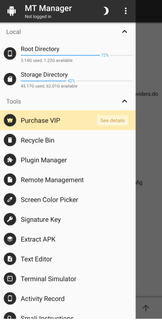
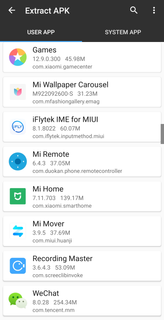
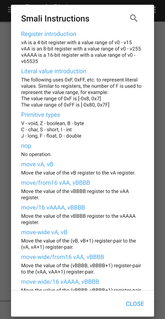
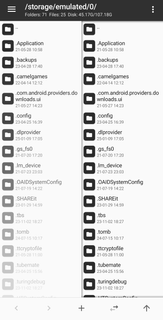
MT Manager helps developers, modders, and translators work directly on an Android device when editing apps and project files. It focuses on on-device workflows, so you can browse storage, inspect archives, and adjust builds without switching to a desktop. Most tasks run without root, while advanced actions adapt when root access is available. With a clear dual pane layout, it supports quick navigation between folders and project assets. For users comparing options, MT Manager APK offers practical tools for efficient edits and testing.MT Manager features for Android editingAdvanced APK editingMT Manager handles decompile and recompile tasks so you can modify DEX and smali code, as well as XML and ARSC resources. It supports package cloning and optimization, and it can remove signature verification when your workflow requires deeper inspection. After changes, you can zipalign and sign builds in place, which keeps the process contained on your device.Dual pane file manager with optional rootThe dual pane design lets you copy, move, rename, and delete files while viewing source and destination side by side. If root is granted, MT Manager can access system directories, remount partitions as read write, and adjust permissions or owners when project work needs it. This structure helps you keep project folders organized during iterative edits.In place archive operationsOpen APK, ZIP, RAR, and TAR archives like a desktop file archiver and change their contents without fully unpacking. You can add, replace, or remove files directly inside the archive, and compress or extract quickly when a rebuild is necessary. This reduces unnecessary unpack and repack cycles and shortens iteration time.Built in editors and viewersMT Manager includes a syntax highlighting text editor for code and config files, a hex editor for low level adjustments, and viewers for images, music, and fonts. A diff tool helps you compare changes against the original, and a script executor supports routine tasks during complex edits. These tools keep inspection and edits in one place.App management and automationYou can install, uninstall, and back up apps, with batch support when multiple packages need handling. MT Manager offers bookmarks, themes, and plugin support to automate frequent actions, plus FTP connections and multi threaded transfers that continue in the background. This combination helps maintain project momentum across large files and remote sources.Before editing with MT ManagerAlways back up original APKs and data before starting, then work on copies to keep a clean recovery path. Use the diff tool to compare changes as you proceed, and edit incrementally for large projects. Dual pane navigation and in place archive editing reduce repack cycles, so consider small, frequent edits and test on device between steps. When you download MT Manager, plan a simple folder structure for builds, resources, and backups to avoid confusion later.Signing and installation notesKeep your signing keys safe and consistent across builds. If a device already has a differently signed version installed, uninstall it before installing a new package to prevent signature conflicts. After rebuilding, zipalign and sign the APK, then verify installation on a test device before wider use. Heavy users can consider MT Manager VIP to keep advanced features available during long or repeated sessions.Root and workflow considerationsRoot is optional and should be used only when a task truly needs system access. Make a full device backup before altering protected areas or changing permissions in system directories. When root is not required, stay within user storage and app archives to minimize risk. MT Manager Android workflows benefit from clear checkpoints, so validate each stage before moving forward.How to use MT Manager on AndroidThis quick guide outlines a basic on-device workflow for editing and rebuilding an app. After the MT Manager download, start with a copy of your target APK and move through inspection, edits, and signing in one sequence.Open MT Manager and use the dual pane view to browse storage. Create a working copy of the APK in a dedicated project folder.If system files are involved, enable root only as needed and review permissions carefully. Avoid changes to protected areas unless required.Tap the APK to open the archive, then inspect resources with the built in viewers. Decompile DEX or resources when edits are necessary.Edit files in the text editor or hex editor, then rebuild the project. Use the diff tool to compare your changes against the original copy.Zipalign and sign the build, then remove any differently signed version before installing the new package. Test on device and repeat edits as needed.Get started with MT ManagerMT Manager supports on-device APK editing, archive work, and app management in one tool. It is suitable for users who need iterative changes and local testing on Android. Download MT Manager latest version to begin.
Show more

1. Download MEmu installer and finish the setup

2. Start MEmu then open Google Play on the desktop

3. Search MT Manager in Google Play
Install
4. Download and Install MT Manager
5. On install completion click the icon to start

6. Enjoy using MT Manager on PC with MEmu
MEmu App Player є кращим безкоштовним емулятором Android, і 50 мільйонів людей вже користуються його чудовим ігровим досвідом Android. Технологія віртуалізації MEmu дає вам змогу відтворювати тисячі ігор Android на вашому комп'ютері, навіть найбільш насичених графікою.
Bigger screen with better graphics; Long duration, without limitation of battery or mobile data.
Full Keymapping support for precise control of keyboard and mouse or gamepad.
Multiple game accounts or tasks on single PC at one time with Multi-Instance manager.
Use MT Manager on PC by following steps: