Block Crush!
تازہ کاری
موجودہ ورژن
2.3.2
پیشکش بذریعہ

Block Crush! کھیلنے کے اپنے پورے جنون کے دوران آپ کے ہاتھ آپ کے فون کی ایک چھوٹی سی اسکرین تک محدود نہیں ہونے چاہئیں۔ پرو کی طرح کھیلیں اور کی بورڈ اور ماؤس کے سہارے اپنے گیم پر مکمل کنٹرول حاصل کریں۔ MEmu آپ کو وہ تمام چیزیں پیش کرتا ہے جس کی آپ امید کرتے ہیں۔ پی سی پر Block Crush! ڈاؤن لوڈ کریں اور کھیلیں۔ جتنی دیر تک آپ چاہیں کھیلیں، بیٹری، موبائل ڈیٹا کی کوئی حد نہیں ہے اور پریشان کن کالز نہیں ہیں۔ نئے برانڈ کا MEmu 9 پی سی پر Block Crush! کھیلنے کا بہترین اختیار ہے۔ ہماری مہارت کی مدد سے تیار کردہ، شاندار پری سیٹ کی میپنگ سسٹم Block Crush! کو ایک ریئل پی سی گیم بناتا ہے۔ MEmu کثیر نظیری منیجرایک ہی ڈیوائس پر 2 یا زیادہ اکاؤنٹس پلے کرنا ممکن بناتا ہے۔ اور سب سے اہم بات یہ ہے کہ، ہمارا خصوصی ایمولیشن انجن آپ کے پی سی کی مکمل طاقت ریلیز کرتے ہوئے ہر چیز ہموار بنا سکتا ہے۔
مزید دکھائیں
Download Block Crush! on PC with MEmu Android Emulator. Enjoy playing on big screen. Welcome to Block Crush — a classic block puzzle and line-clear puzzle game built around fitting blocks, clearing full lines, and solving each board with smart spatial reasoning inspired by classic line-based block logic.
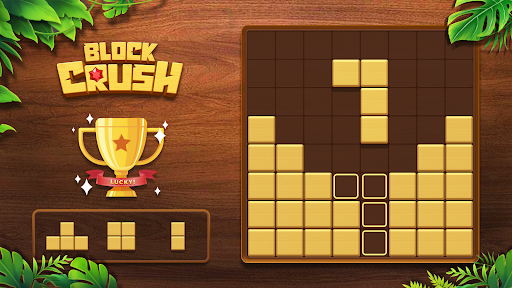
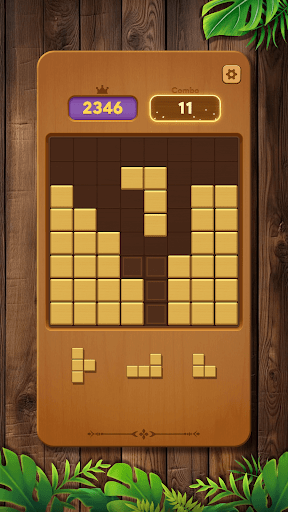
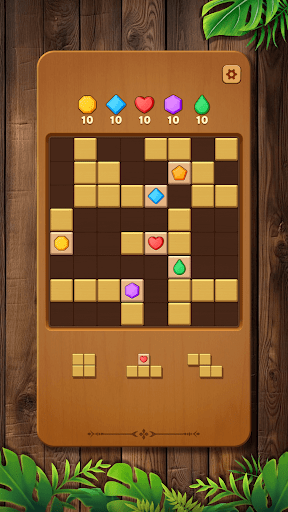
Welcome to Block Crush — a classic block puzzle and line-clear puzzle game built around fitting blocks, clearing full lines, and solving each board with smart spatial reasoning inspired by classic line-based block logic.
As a thoughtful brain teaser, this puzzle challenges you to think ahead, control the grid, and manage space through clean, precise block placement. Every move matters — each block changes the board, creates patterns, and opens opportunities for longer runs.
Inspired by classic line-clear logic found in iconic block-shaping puzzle games, Block Crush blends puzzle solving with familiar fit-the-blocks mechanics, paired with a calm, wooden visual style. The focus stays on reading the grid, planning placements, and maintaining space through consistent line completion.
Solve the Puzzle with Each Placement
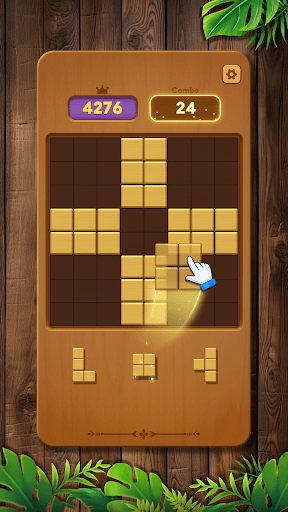
Place blocks onto the grid to complete full lines, clear space, and maintain control of the puzzle board using familiar block-fitting principles.
Every clear refreshes the grid, creates new openings, and can trigger chain-clear moments that extend your run.
Fit shapes, fill gaps, and prevent grid lock by reading patterns and planning several moves ahead through classic puzzle logic.
Play offline anytime — no wifi or internet connection needed, just pure puzzle problem-solving wherever you are.
Key Features
● Classic Block Puzzle Flow: Fit blocks, complete lines, and solve the board through clear, line-based puzzle logic.
● Chain Clears & Smooth Feedback: Satisfying clear effects that reward clean block placement and shape matching.
● Spatial Depth: Use logical thinking and spatial awareness to avoid grid lock and extend each run.
● Line Completion Gameplay: Clear full lines to refresh the board and maintain open space.
● Offline Play: Enjoy a full offline puzzle experience with no wifi required.
● Play Anywhere: Perfect for travel, commuting, or relaxing without internet access.
Why Puzzle Fans Enjoy It
At its core, Block Crush is a classic block puzzle built on fitting blocks, completing lines, and solving each board through thoughtful planning and grid-based reasoning.
If you enjoy block puzzles, line-clear challenges, classic block-shaping gameplay, or games you can play offline without wifi, this experience delivers a clean and rewarding way to sharpen your mind anytime.
مزید دکھائیں

1. MEmu انسٹالر ڈاؤن لوڈ کریں اور سیٹ اپ مکمل کریں

2. MEmu شروع کریں اسکے بعد ڈیسکٹاپ پر Google Play کھولیں

3. Google Play میں Block Crush! تلاش کریں
Install
4. Block Crush! ڈاؤن لوڈ کریں اور انسٹال کریں
5. انسٹال مکمل ہونے کے بعد سٹارٹ کرنے کے لیے آئیکن پر کلک کریں

6. MEmu کے ساتھ پی سی پر Block Crush! کھیلنے کا لطف لیں
MEmu پلے بہترین اینڈرائڈ ایمولیٹر ہے اور 100 ملین لوگ اس کے زبردست اینڈرائڈ گیمنگ تجربہ سے لطف اندوز ہو رہے ہیں۔ MEmu کی ورچولائزیشن ٹیکنالوجی آپ کو اپنے PC پر ہزاروں اینڈرائڈ گیمز یہاں تک کہ انتہائی گرافک والے گیمز باسہولت کھیلنے کی طاقت دیتی ہے۔
بہتر گرافکس کے ساتھ بڑی اسکرین؛ طویل دورانیہ، بیٹری یا لامحدود موبائل ڈیٹا کے بغیر۔
کی بورڈ اور ماؤس یا گیم پیڈ کے عین مطابق کنٹرول کے لیے کی میپنگ کا پورا سپورٹ۔
کثیر مثالی منیجر کے ساتھ بیک وقت ایک پی سی پر متعدد گیم اکاؤنٹس یا ٹاسکس۔
پی سی پر درج ذیل مراحل پر عمل کرتے ہوئے Block Crush! کھیلیں: