Judas
تازہ کاری
موجودہ ورژن
پیشکش بذریعہ

Judas کھیلنے کے اپنے پورے جنون کے دوران آپ کے ہاتھ آپ کے فون کی ایک چھوٹی سی اسکرین تک محدود نہیں ہونے چاہئیں۔ پرو کی طرح کھیلیں اور کی بورڈ اور ماؤس کے سہارے اپنے گیم پر مکمل کنٹرول حاصل کریں۔ MEmu آپ کو وہ تمام چیزیں پیش کرتا ہے جس کی آپ امید کرتے ہیں۔ پی سی پر Judas ڈاؤن لوڈ کریں اور کھیلیں۔ جتنی دیر تک آپ چاہیں کھیلیں، بیٹری، موبائل ڈیٹا کی کوئی حد نہیں ہے اور پریشان کن کالز نہیں ہیں۔ نئے برانڈ کا MEmu 9 پی سی پر Judas کھیلنے کا بہترین اختیار ہے۔ ہماری مہارت کی مدد سے تیار کردہ، شاندار پری سیٹ کی میپنگ سسٹم Judas کو ایک ریئل پی سی گیم بناتا ہے۔ MEmu کثیر نظیری منیجرایک ہی ڈیوائس پر 2 یا زیادہ اکاؤنٹس پلے کرنا ممکن بناتا ہے۔ اور سب سے اہم بات یہ ہے کہ، ہمارا خصوصی ایمولیشن انجن آپ کے پی سی کی مکمل طاقت ریلیز کرتے ہوئے ہر چیز ہموار بنا سکتا ہے۔
مزید دکھائیں
Download Judas on PC with MEmu Android Emulator. Enjoy playing on big screen. Judas is an upcoming narrative-driven first-person shooter developed by Ghost Story Games and marks the return of acclaimed creator Ken Levine since BioShock Infinite.
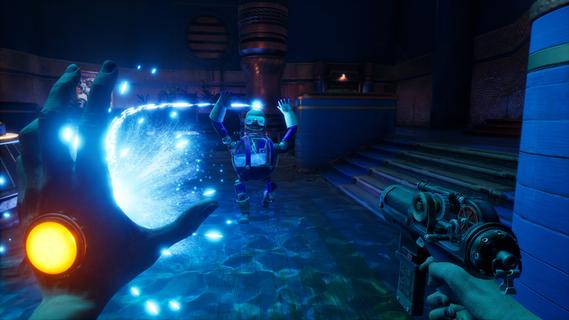
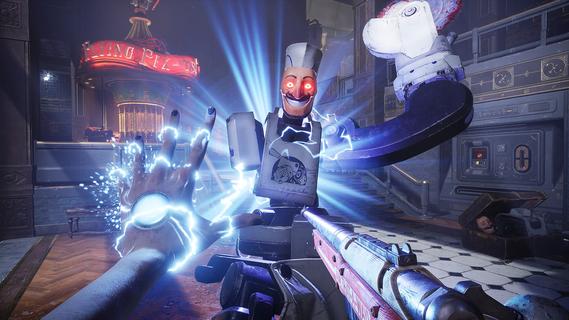
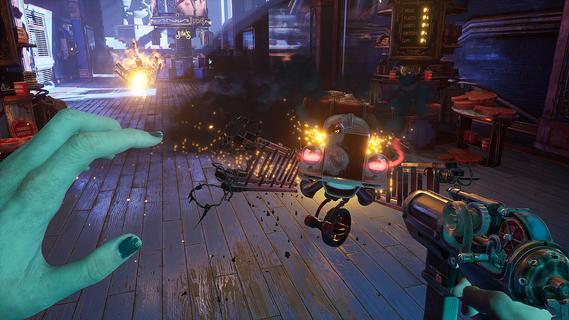
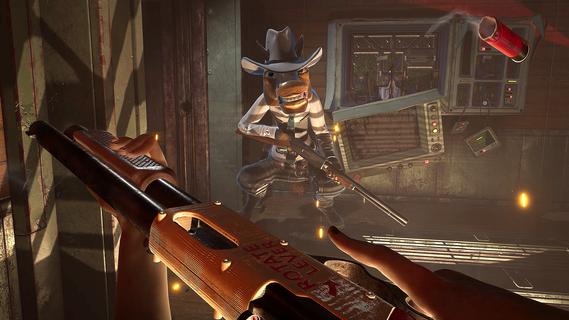
Judas is an upcoming narrative-driven first-person shooter developed by Ghost Story Games and marks the return of acclaimed creator Ken Levine since BioShock Infinite. Set aboard the disintegrating generation ship Mayflower, which is stranded in an asteroid field orbiting Proxima Centauri, the game thrusts players into the role of Judas—a mysterious, troubled hacker and self-taught engineer who must navigate a fractured society and a desperate escape plan. The core of Judas’ gameplay lies in its blend of traditional FPS mechanics with innovative narrative and roguelike elements. Players wield a gun in one hand and a variety of “organic powers” in the other, allowing for dynamic combat against hostile robots and mutated creatures that have run amok aboard the failing ship. The combat is strategic, encouraging the use of environmental elements—such as electrifying water puddles to damage multiple enemies—and hacking, which lets players manipulate machines and security systems to turn foes against each other or solve puzzles. Narratively, Judas employs a “pseudo-procedural” storytelling approach, where handcrafted story elements are modularly combined to create a unique experience each playthrough. Player choices have significant consequences, shaping alliances and rivalries with the ship’s key figures—Tom, Nefertiti, and Hope—who exist as holograms after losing their physical bodies. Each leader has distinct ideologies and goals: Tom wants to maintain the mission’s original course, Nefertiti believes in human-machine fusion for evolution, and Hope seeks to end her suffering. Aligning with or opposing these factions influences the story’s progression and the player’s survival chances. A standout feature is the roguelike mechanic: when Judas dies, she is “reprinted,” allowing players to upgrade abilities and stats, encouraging experimentation and repeated attempts. The ship’s layout and challenges also shift with each run, ensuring fresh experiences and replayability. This system, combined with a branching narrative, means no two playthroughs are alike. Adding emotional depth and companionship is Scutty, a robot dog who assists Judas in exploration and possibly combat, reminiscent of iconic sidekicks in narrative shooters. The game’s world is richly detailed, with audio logs and environmental storytelling revealing the tragic history of the Mayflower and its passengers. Judas stands out by focusing on player agency, strategic decision-making, and a morally complex story set in a sci-fi universe. It is not just about shooting enemies but also about navigating fractured relationships, making tough choices, and deciding whether to repair what was broken or let the ship—and its doomed mission—burn. With its unique mix of FPS action, hacking, organic powers, and a dynamic narrative structure, Judas promises a deeply immersive and replayable experience for fans of story-driven shooters.
مزید دکھائیں

1. MEmu انسٹالر ڈاؤن لوڈ کریں اور سیٹ اپ مکمل کریں

2. MEmu شروع کریں اسکے بعد ڈیسکٹاپ پر Google Play کھولیں

3. Google Play میں Judas تلاش کریں
Install
4. Judas ڈاؤن لوڈ کریں اور انسٹال کریں
5. انسٹال مکمل ہونے کے بعد سٹارٹ کرنے کے لیے آئیکن پر کلک کریں

6. MEmu کے ساتھ پی سی پر Judas کھیلنے کا لطف لیں
MEmu پلے بہترین اینڈرائڈ ایمولیٹر ہے اور 100 ملین لوگ اس کے زبردست اینڈرائڈ گیمنگ تجربہ سے لطف اندوز ہو رہے ہیں۔ MEmu کی ورچولائزیشن ٹیکنالوجی آپ کو اپنے PC پر ہزاروں اینڈرائڈ گیمز یہاں تک کہ انتہائی گرافک والے گیمز باسہولت کھیلنے کی طاقت دیتی ہے۔
بہتر گرافکس کے ساتھ بڑی اسکرین؛ طویل دورانیہ، بیٹری یا لامحدود موبائل ڈیٹا کے بغیر۔
کی بورڈ اور ماؤس یا گیم پیڈ کے عین مطابق کنٹرول کے لیے کی میپنگ کا پورا سپورٹ۔
کثیر مثالی منیجر کے ساتھ بیک وقت ایک پی سی پر متعدد گیم اکاؤنٹس یا ٹاسکس۔
پی سی پر درج ذیل مراحل پر عمل کرتے ہوئے Judas کھیلیں: