Rune Factory: Guardians of Azuma
تازہ کاری
موجودہ ورژن
پیشکش بذریعہ

Rune Factory: Guardians of Azuma کھیلنے کے اپنے پورے جنون کے دوران آپ کے ہاتھ آپ کے فون کی ایک چھوٹی سی اسکرین تک محدود نہیں ہونے چاہئیں۔ پرو کی طرح کھیلیں اور کی بورڈ اور ماؤس کے سہارے اپنے گیم پر مکمل کنٹرول حاصل کریں۔ MEmu آپ کو وہ تمام چیزیں پیش کرتا ہے جس کی آپ امید کرتے ہیں۔ پی سی پر Rune Factory: Guardians of Azuma ڈاؤن لوڈ کریں اور کھیلیں۔ جتنی دیر تک آپ چاہیں کھیلیں، بیٹری، موبائل ڈیٹا کی کوئی حد نہیں ہے اور پریشان کن کالز نہیں ہیں۔ نئے برانڈ کا MEmu 9 پی سی پر Rune Factory: Guardians of Azuma کھیلنے کا بہترین اختیار ہے۔ ہماری مہارت کی مدد سے تیار کردہ، شاندار پری سیٹ کی میپنگ سسٹم Rune Factory: Guardians of Azuma کو ایک ریئل پی سی گیم بناتا ہے۔ MEmu کثیر نظیری منیجرایک ہی ڈیوائس پر 2 یا زیادہ اکاؤنٹس پلے کرنا ممکن بناتا ہے۔ اور سب سے اہم بات یہ ہے کہ، ہمارا خصوصی ایمولیشن انجن آپ کے پی سی کی مکمل طاقت ریلیز کرتے ہوئے ہر چیز ہموار بنا سکتا ہے۔
مزید دکھائیں
Download Rune Factory: Guardians of Azuma on PC with MEmu Android Emulator. Enjoy playing on big screen. Welcome to Rune Factory: Guardians of Azuma, the latest installment in the beloved Rune Factory series.
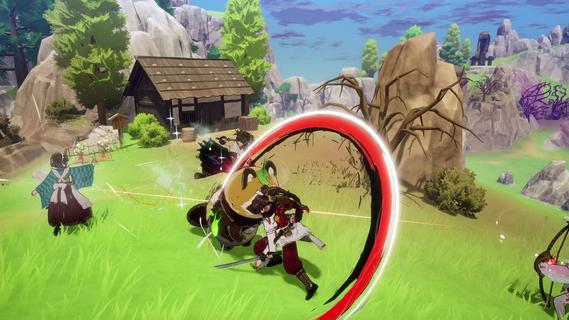
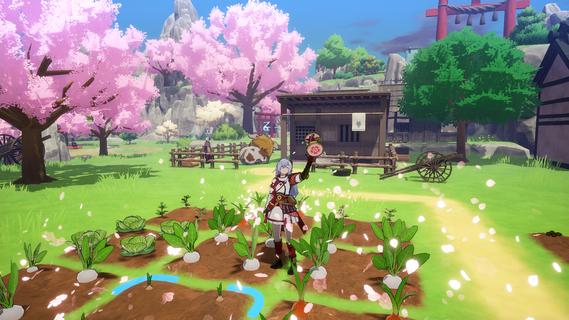
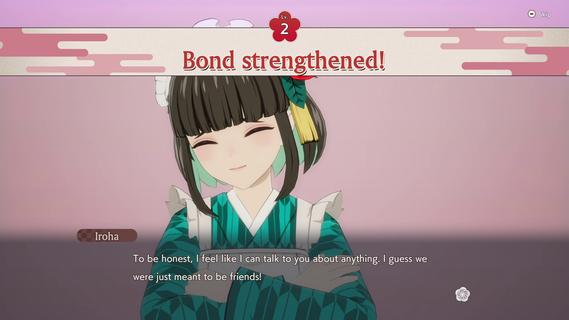
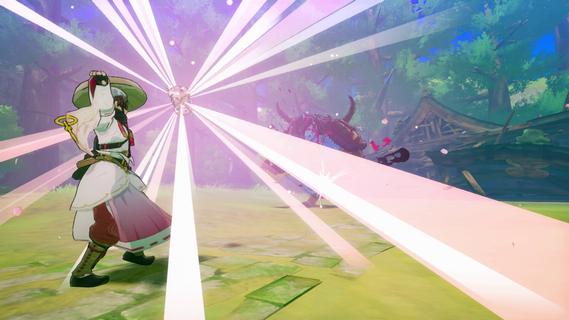
Welcome to Rune Factory: Guardians of Azuma, the latest installment in the beloved Rune Factory series. Set in the vibrant eastern nation of Azuma, this game offers a fresh take on the classic action-RPG and life-simulation gameplay that fans have grown to love. As an Earth Dancer, you are tasked with restoring the land, its people, and even its gods, using the power of dance and sacred treasures to purify the corrupted environment. The Story of AzumaThe world of Azuma has been ravaged by the Celestial Collapse, a catastrophic event that shattered the land and disrupted the flow of runes, causing the disappearance of nature's deities. Amidst the ruins and dwindling hope, you awaken with a mysterious voice guiding you to harness the power of an Earth Dancer. You can choose to play as either Subaru or Kaguya, two protagonists whose destinies are intertwined by mysterious forces. The character not chosen becomes a supporting NPC and a potential romantic interest. Gameplay MechanicsFarming and Village BuildingIn Guardians of Azuma, farming is not just about tending to your crops; it's about rebuilding entire villages. You will manage four distinct towns: Spring, Summer, Autumn, and Winter Villages, each with its own seasonal theme and charm. Using a grid-based interface, you can customize your farms and villages by placing buildings and decorations strategically to attract people back to these areas. The village's "Scenic Score" increases as you enhance its beauty and functionality, providing stat boosts to your character and the village's productivity. Combat and ExplorationCombat in Guardians of Azuma is dynamic and engaging. You will use sacred treasures like the parasol, drum, and flame sword, which serve dual purposes in both combat and farming. These treasures can be used to heal allies, accelerate crop growth, or deal elemental damage to enemies. The game introduces new weapons such as the bow and talisman, allowing for a variety of combat styles. Exploration is also a key part of the game. You will venture into vast landscapes inspired by Japanese culture, discovering new locations and encountering unique creatures. Befriended monsters can be ridden for faster travel, and each character in your party has a unique fighting style, allowing for strategic team composition. Social Interactions and RomanceThe life simulation aspect of Guardians of Azuma is rich and immersive. You can form bonds with the locals, including romance options that are fully voiced. The game supports same-sex relationships, offering a diverse and inclusive experience. Dialogue options with romanceable characters consume in-game time and have associated bond levels, which increase as you adventure together. Visuals and AtmosphereThe game features vibrant visuals with a focus on reds and blacks, creating a stunning contrast to the duller hues of previous titles. The character designs are beautifully crafted, with smooth animations that enhance the overall gaming experience. ConclusionRune Factory: Guardians of Azuma is set to launch on May 30, 2025, for both Nintendo Switch and PC via Steam. This game promises to deliver a captivating blend of farming, combat, and life simulation, all set against the backdrop of a richly detailed Japanese-inspired world. With its innovative gameplay mechanics and engaging storyline, Guardians of Azuma is poised to delight both new and veteran fans of the series. Whether you're exploring the lush landscapes of Azuma, rebuilding its villages, or forming lasting bonds with its inhabitants, this game offers an adventure that will leave you enchanted and eager for more.
مزید دکھائیں

1. MEmu انسٹالر ڈاؤن لوڈ کریں اور سیٹ اپ مکمل کریں

2. MEmu شروع کریں اسکے بعد ڈیسکٹاپ پر Google Play کھولیں

3. Google Play میں Rune Factory: Guardians of Azuma تلاش کریں
Install
4. Rune Factory: Guardians of Azuma ڈاؤن لوڈ کریں اور انسٹال کریں
5. انسٹال مکمل ہونے کے بعد سٹارٹ کرنے کے لیے آئیکن پر کلک کریں

6. MEmu کے ساتھ پی سی پر Rune Factory: Guardians of Azuma کھیلنے کا لطف لیں
MEmu پلے بہترین اینڈرائڈ ایمولیٹر ہے اور 100 ملین لوگ اس کے زبردست اینڈرائڈ گیمنگ تجربہ سے لطف اندوز ہو رہے ہیں۔ MEmu کی ورچولائزیشن ٹیکنالوجی آپ کو اپنے PC پر ہزاروں اینڈرائڈ گیمز یہاں تک کہ انتہائی گرافک والے گیمز باسہولت کھیلنے کی طاقت دیتی ہے۔
بہتر گرافکس کے ساتھ بڑی اسکرین؛ طویل دورانیہ، بیٹری یا لامحدود موبائل ڈیٹا کے بغیر۔
کی بورڈ اور ماؤس یا گیم پیڈ کے عین مطابق کنٹرول کے لیے کی میپنگ کا پورا سپورٹ۔
کثیر مثالی منیجر کے ساتھ بیک وقت ایک پی سی پر متعدد گیم اکاؤنٹس یا ٹاسکس۔
پی سی پر درج ذیل مراحل پر عمل کرتے ہوئے Rune Factory: Guardians of Azuma کھیلیں: