
BGM GFX TOOL - VIP FEATURES
تازہ کاری
موجودہ ورژن
5.0
پیشکش بذریعہ

اپنے موبائل فون پر BGM GFX TOOL - VIP FEATURES کا استعمال کرتے وقت زیادہ چارج ہونے کی فکر نہ کریں، خود کو چھوٹی اسکرین سے آزاد کریں اور ایپ کو زیادہ بڑے ڈسپلے پر استعمال کرنے کا لطف اٹھائیں۔ اس کے بعد سے کی بورڈ اور ماؤس کے ساتھ اپنے ایپ کا فل اسکرین کا تجربہ حاصل کریں۔ MEmu آپ کو وہ تمام حیران کن خصوصیات پیش کرتا ہے جن کی آپ کو توقع کرتے ہیں: فوری انسٹال اور آسان سیٹ اپ، وجدانی کنٹرول، مزید بیٹری، موبائل ڈیٹا کی کوئی حد نہیں اور اب مزید پریشان کن کالز نہیں۔ نئے برانڈ کا MEmu 9 آپ کے کمپیوٹر پر BGM GFX TOOL - VIP FEATURES استعمال کرنے کے لیے بہترین اختیار ہے۔ MEmu کثیر نظیری منیجر بیک وقت 2 یا اس سے زیادہ اکاؤنٹس کھولنا ممکن بناتا ہے۔ اور سب اہم بات، ہمارا خصوصی ایمولیشن انجن آپ کے پی سی کی پوری طاقت ریلیز کرتے ہوئے ہر چیز ہموار اور قابل تفریح بناتا ہے۔
مزید دکھائیں
Download BGM GFX TOOL - VIP FEATURES on PC with MEmu Android Emulator. Enjoy playing on big screen. Experience the ultimate gaming performance with BGM Gfx Tool - VIP features.
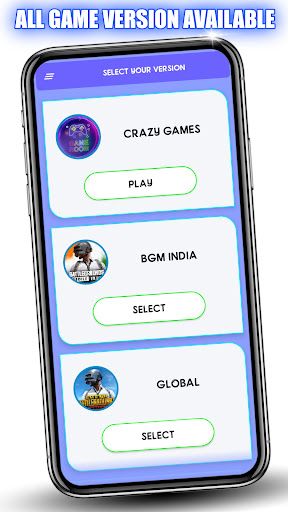
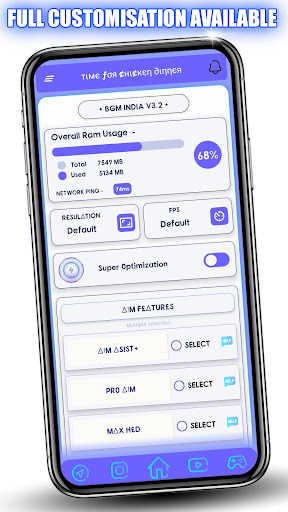
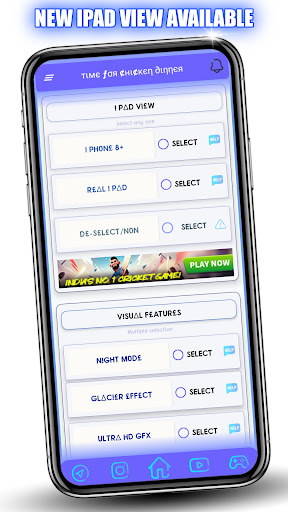
Experience the ultimate gaming performance with BGM Gfx Tool - VIP features.
This app is designed to provide you with the most advanced and exclusive features for Game. With This Tool You can Get 90 FPS, iPad View, HDR graphics, Lag Fix, and many more Useful Features, you can enjoy smooth and stable gaming experience.
Supported versions: BGM, GL, KR, VN, TW
We are 100% safe, app that won't put your game account at any risk.
Key Features of BGM Gfx Tool:
•Change resolution
•Unlocking HDR graphics and various FPS levels
•Full control over anti-aliasing and shadows
•Compatibility with all game versions
•iPad view
•Unlock 90 Fps
•Customizable crosshair
•And many other useful features
How to use BGM GFX Tool
•Download and install the BGM GFX Toolapp from the Google Play Store on your device.
•Once the app is installed, open it and grant the necessary permissions.
Select Your Game Version from the game list in the app.
•Choose the settings that you want to apply to the game. This may include features such as 60 Fps, iPad View, and more.
•Click on the "Activate" button to apply the settings to the game.
•Enjoy enhanced graphics and optimized performance in your game.
Disclaimer
This is an unofficial application for specific games. This application is not associated in any way with other brands and developers.
If you feel that we have violated your intellectual property rights or any other agreement, please contact us by e-mail hitechsachin3@gmail.com, we will immediately take the necessary measures.
• Official Website:- https://bgmgfxtool.com
مزید دکھائیں

1. MEmu انسٹالر ڈاؤن لوڈ کریں اور سیٹ اپ مکمل کریں

2. MEmu شروع کریں اسکے بعد ڈیسکٹاپ پر Google Play کھولیں

3. Google Play میں BGM GFX TOOL - VIP FEATURES تلاش کریں
Install
4. BGM GFX TOOL - VIP FEATURES ڈاؤن لوڈ کریں اور انسٹال کریں
5. انسٹال مکمل ہونے کے بعد سٹارٹ کرنے کے لیے آئیکن پر کلک کریں

6. MEmu کے ساتھ پی سی پر BGM GFX TOOL - VIP FEATURES کھیلنے کا لطف لیں
MEmu پلے بہترین اینڈرائڈ ایمولیٹر ہے اور 100 ملین لوگ اس کے زبردست اینڈرائڈ گیمنگ تجربہ سے لطف اندوز ہو رہے ہیں۔ MEmu کی ورچولائزیشن ٹیکنالوجی آپ کو اپنے PC پر ہزاروں اینڈرائڈ گیمز یہاں تک کہ انتہائی گرافک والے گیمز باسہولت کھیلنے کی طاقت دیتی ہے۔
بہتر گرافکس کے ساتھ بڑی اسکرین؛ طویل دورانیہ، بیٹری یا لامحدود موبائل ڈیٹا کے بغیر۔
کی بورڈ اور ماؤس یا گیم پیڈ کے عین مطابق کنٹرول کے لیے کی میپنگ کا پورا سپورٹ۔
کثیر مثالی منیجر کے ساتھ بیک وقت ایک پی سی پر متعدد گیم اکاؤنٹس یا ٹاسکس۔
پی سی پر درج ذیل مراحل پر عمل کرتے ہوئے پر BGM GFX TOOL - VIP FEATURES استعمال کریں: u003c/p>