CallDO: Voice Call Reminder
تازہ کاری
موجودہ ورژن
1.0.6
پیشکش بذریعہ

اپنے موبائل فون پر CallDO: Voice Call Reminder کا استعمال کرتے وقت زیادہ چارج ہونے کی فکر نہ کریں، خود کو چھوٹی اسکرین سے آزاد کریں اور ایپ کو زیادہ بڑے ڈسپلے پر استعمال کرنے کا لطف اٹھائیں۔ اس کے بعد سے کی بورڈ اور ماؤس کے ساتھ اپنے ایپ کا فل اسکرین کا تجربہ حاصل کریں۔ MEmu آپ کو وہ تمام حیران کن خصوصیات پیش کرتا ہے جن کی آپ کو توقع کرتے ہیں: فوری انسٹال اور آسان سیٹ اپ، وجدانی کنٹرول، مزید بیٹری، موبائل ڈیٹا کی کوئی حد نہیں اور اب مزید پریشان کن کالز نہیں۔ نئے برانڈ کا MEmu 9 آپ کے کمپیوٹر پر CallDO: Voice Call Reminder استعمال کرنے کے لیے بہترین اختیار ہے۔ MEmu کثیر نظیری منیجر بیک وقت 2 یا اس سے زیادہ اکاؤنٹس کھولنا ممکن بناتا ہے۔ اور سب اہم بات، ہمارا خصوصی ایمولیشن انجن آپ کے پی سی کی پوری طاقت ریلیز کرتے ہوئے ہر چیز ہموار اور قابل تفریح بناتا ہے۔
مزید دکھائیں
MEmu Play کے ساتھ PC پر CallDO: Voice Call Reminder استعمال کرنے کے شاندار تجربے سے لطف اٹھائیں۔ یہ ایک طاقتور مفت اینڈرائیڈ ایمولیٹر ہے جو آپ کو ان کے ڈیسک ٹاپ ورژن کے لیے ہزاروں اینڈرائیڈ ایپس فراہم کرتا ہے۔ دوستوں کے ساتھ جڑنے اور اعلی کارکردگی کے ساتھ اپنے کام کو چمکانے کا لطف اٹھائیں! Never forget what matters most.
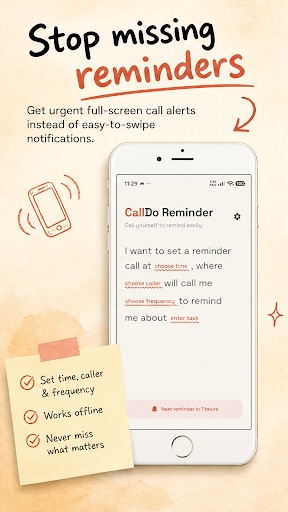
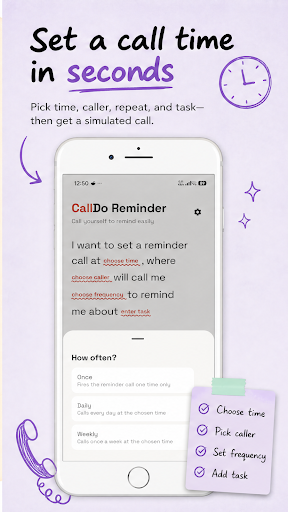
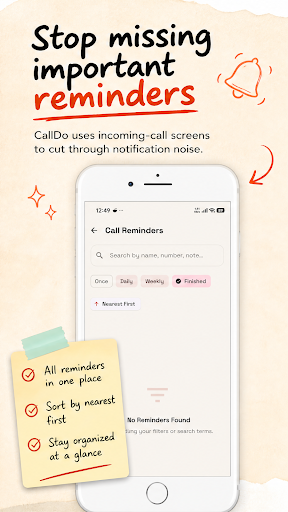
Never forget what matters most. Replace easily missed notifications with CallDo Reminder—the app that literally calls you to help you keep your promises.
Life gets busy, and a tiny, silent push notification is too easy to swipe away and forget. CallDo Reminder changes that by transforming your crucial to-dos into a realistic, full-screen incoming phone call. It creates the immediate urgency you need to stop, pay attention, and take action for yourself and the people you love.
Reminders for Real Life
Care for Your Family: Set a daily simulated call to remind yourself, "Call Mom for her medication," so you never miss an important check-in.
Never Miss a Special Moment: Schedule an exact-minute alert to ensure you are the very first person to call a friend and say "Happy Birthday!"
Prioritize Your Health: Get caught up in work? Let CallDo ring you with an audio note to drink water, take your vitamins, or step away from the screen.
Nail Every Commitment: From time-sensitive client follow-ups to paying the bills on time, ensure your personal and professional tasks get the attention they deserve.
Key Features
Unignorable Call Alerts: Experience interactive, native-looking calling overlays that ring right on time, forcing you to acknowledge your task.
Intuitive Sentence Scheduling: No confusing menus. Set up alerts using a natural, fill-in-the-blanks interface: "I want to set a reminder call at [Time], where [Caller] will call me [Frequency] to remind me about [Task]."
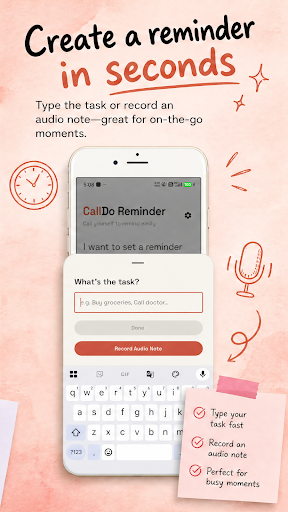
Voice & Text Notes: Quickly type out your to-dos or record your own voice for hands-free audio reminders on the go.
Flexible Recurrence: Schedule one-time tasks, or set up daily and weekly automated routine calls.
Smart Task Dashboard: Easily search your history by name or note, sort by the nearest deadline, and filter by pending or completed tasks.
Smart Call Detection: Built with robust system logic, CallDo runs silently in the background and will never interrupt or interfere with your active carrier phone calls.
100% Private & Offline-First
Your personal life belongs to you. CallDo is fully self-managed and operates entirely offline.
No Cloud Storage: We never upload, collect, or share your tasks, contact data, or voice notes.
Zero Internet Required: Everything stays securely stored on your local device storage.
Safe Permissions: The requested system permissions are utilized strictly to ensure background reliability and prevent overlapping with real telephone calls.
Stop letting important moments slip through the cracks. Download CallDo Reminder today and be there for the people and tasks that matter most!
مزید دکھائیں

1. MEmu انسٹالر ڈاؤن لوڈ کریں اور سیٹ اپ مکمل کریں

2. MEmu شروع کریں اسکے بعد ڈیسکٹاپ پر Google Play کھولیں

3. Google Play میں CallDO: Voice Call Reminder تلاش کریں
Install
4. CallDO: Voice Call Reminder ڈاؤن لوڈ کریں اور انسٹال کریں
5. انسٹال مکمل ہونے کے بعد سٹارٹ کرنے کے لیے آئیکن پر کلک کریں

6. MEmu کے ساتھ پی سی پر CallDO: Voice Call Reminder کھیلنے کا لطف لیں
MEmu پلے بہترین اینڈرائڈ ایمولیٹر ہے اور 100 ملین لوگ اس کے زبردست اینڈرائڈ گیمنگ تجربہ سے لطف اندوز ہو رہے ہیں۔ MEmu کی ورچولائزیشن ٹیکنالوجی آپ کو اپنے PC پر ہزاروں اینڈرائڈ گیمز یہاں تک کہ انتہائی گرافک والے گیمز باسہولت کھیلنے کی طاقت دیتی ہے۔
بہتر گرافکس کے ساتھ بڑی اسکرین؛ طویل دورانیہ، بیٹری یا لامحدود موبائل ڈیٹا کے بغیر۔
کی بورڈ اور ماؤس یا گیم پیڈ کے عین مطابق کنٹرول کے لیے کی میپنگ کا پورا سپورٹ۔
کثیر مثالی منیجر کے ساتھ بیک وقت ایک پی سی پر متعدد گیم اکاؤنٹس یا ٹاسکس۔
پی سی پر درج ذیل مراحل پر عمل کرتے ہوئے پر CallDO: Voice Call Reminder استعمال کریں: u003c/p>