Chores 4 Rewards
تازہ کاری
موجودہ ورژن
6.2.3
پیشکش بذریعہ

اپنے موبائل فون پر Chores 4 Rewards کا استعمال کرتے وقت زیادہ چارج ہونے کی فکر نہ کریں، خود کو چھوٹی اسکرین سے آزاد کریں اور ایپ کو زیادہ بڑے ڈسپلے پر استعمال کرنے کا لطف اٹھائیں۔ اس کے بعد سے کی بورڈ اور ماؤس کے ساتھ اپنے ایپ کا فل اسکرین کا تجربہ حاصل کریں۔ MEmu آپ کو وہ تمام حیران کن خصوصیات پیش کرتا ہے جن کی آپ کو توقع کرتے ہیں: فوری انسٹال اور آسان سیٹ اپ، وجدانی کنٹرول، مزید بیٹری، موبائل ڈیٹا کی کوئی حد نہیں اور اب مزید پریشان کن کالز نہیں۔ نئے برانڈ کا MEmu 9 آپ کے کمپیوٹر پر Chores 4 Rewards استعمال کرنے کے لیے بہترین اختیار ہے۔ MEmu کثیر نظیری منیجر بیک وقت 2 یا اس سے زیادہ اکاؤنٹس کھولنا ممکن بناتا ہے۔ اور سب اہم بات، ہمارا خصوصی ایمولیشن انجن آپ کے پی سی کی پوری طاقت ریلیز کرتے ہوئے ہر چیز ہموار اور قابل تفریح بناتا ہے۔
مزید دکھائیں
Download Chores 4 Rewards on PC with MEmu Android Emulator. Enjoy playing on big screen. Chores 4 Rewards is a modern version of the traditional paper chore chart/ privilege points chore tracker or behavior chart.
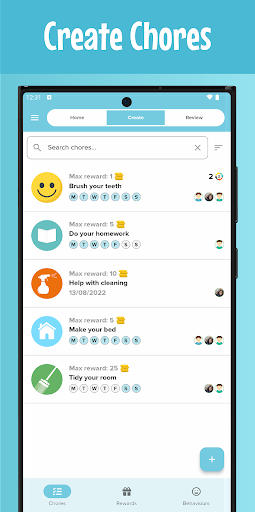
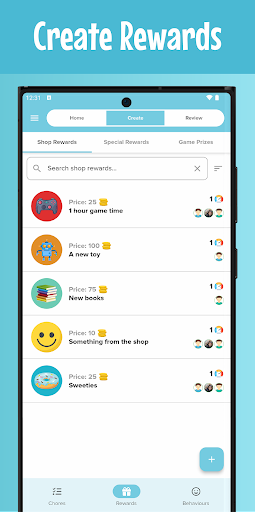
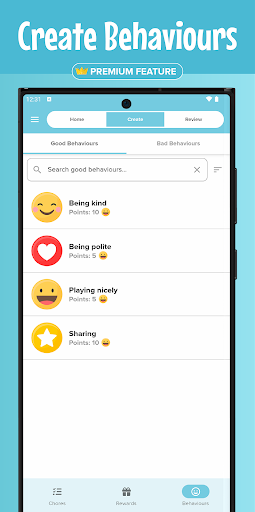
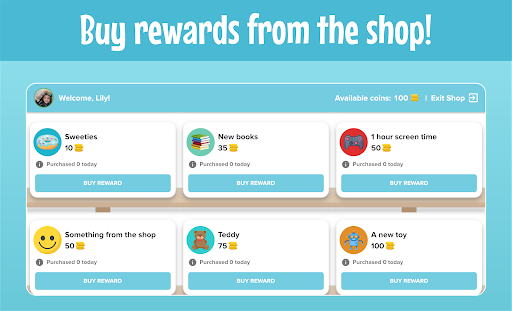
Chores 4 Rewards is a modern version of the traditional paper chore chart/ privilege points chore tracker or behavior chart. This parenting app is designed to work as a motivator to give kids routine and encourage them to complete household chores.
Compared to a paper chore chart/ behavior chart, Chores 4 Rewards makes it easy for your kids to view and complete their assigned household chores, buy rewards and review their behaviors.
If you’re looking for a mom planner organizer/ chores app for adults to create chores for kids, Chores 4 Rewards is here to help!
You can easily create chores, specify the recurrence of the chore and assign it to your kids. You can also create rewards and specify the number of coins required to purchase that reward.
Your kids will be keen to do some work!
You can download and use the Chores 4 Rewards parenting app for free but you will have to take a subscription to access the premium features.
Main features of Chores 4 Rewards:
✔️ Add your children
Take or pick a photo to use as their profile photo. Alternatively, pick from the list of children/monster avatars to use instead.
✔️ Add and assign chores to your children
Specify the recurrence of the chore and set the maximum number of coins available for completing the chore.
✔️ Add shop rewards
Set the price and the maximum daily buying limit of the reward.
✔️ Link devices
Children can access their accounts using the parent device or using their own compatible device. Parents can access the same account by simply signing in with the same account details.
✔️ Push notifications
To keep you updated on purchased rewards and completed chores.
Children can access child mode using the parent’s device or by linking their own compatible device. Child mode is where children can mark chores as completed and buy rewards from the shop.
Review mode is where you approve children’s completed chores and mark purchased rewards as received. Prior to approving a chore, you can reduce the number of coins to award and add feedback to the chore. Children can read the feedback after the chore has been approved.
Chores 4 Rewards premium features:
✔️ Behaviors & points system
With the behaviors & points system, you can create behaviors and specify how many happy/sad points each behavior is worth. Behaviors can be sent to children whilst in parent mode, which will then add the total amount of points to their account.
✔️ Games section
Add at least 6 game prizes to enable the games section. Children can play fun logical games to win prizes that have been set by you. You can specify the number of happy points required for children to play the games.
✔️ Special rewards
Send your children a special one-off reward in the form of ‘scratch to reveal’. Enter the reward name, pick a photo or icon and optionally enter the reason for the reward. The next time your child enters child mode, a surprise reward will be waiting for them!
✔️ Text to speech
Children can tap certain elements within child mode to have them read aloud. For example, children can tap on a chore to have the name of the chore read aloud (Google text-to-speech must be installed on device).
✔️ Detailed statistics
View weekly, monthly & yearly data displaying how many chores your children have completed and how many rewards they have purchased. See your children’s progress within a specified time range.
Download Chores 4 Rewards today and organize your household chores like a pro!
مزید دکھائیں

1. MEmu انسٹالر ڈاؤن لوڈ کریں اور سیٹ اپ مکمل کریں

2. MEmu شروع کریں اسکے بعد ڈیسکٹاپ پر Google Play کھولیں

3. Google Play میں Chores 4 Rewards تلاش کریں
Install
4. Chores 4 Rewards ڈاؤن لوڈ کریں اور انسٹال کریں
5. انسٹال مکمل ہونے کے بعد سٹارٹ کرنے کے لیے آئیکن پر کلک کریں

6. MEmu کے ساتھ پی سی پر Chores 4 Rewards کھیلنے کا لطف لیں
MEmu پلے بہترین اینڈرائڈ ایمولیٹر ہے اور 100 ملین لوگ اس کے زبردست اینڈرائڈ گیمنگ تجربہ سے لطف اندوز ہو رہے ہیں۔ MEmu کی ورچولائزیشن ٹیکنالوجی آپ کو اپنے PC پر ہزاروں اینڈرائڈ گیمز یہاں تک کہ انتہائی گرافک والے گیمز باسہولت کھیلنے کی طاقت دیتی ہے۔
بہتر گرافکس کے ساتھ بڑی اسکرین؛ طویل دورانیہ، بیٹری یا لامحدود موبائل ڈیٹا کے بغیر۔
کی بورڈ اور ماؤس یا گیم پیڈ کے عین مطابق کنٹرول کے لیے کی میپنگ کا پورا سپورٹ۔
کثیر مثالی منیجر کے ساتھ بیک وقت ایک پی سی پر متعدد گیم اکاؤنٹس یا ٹاسکس۔
پی سی پر درج ذیل مراحل پر عمل کرتے ہوئے پر Chores 4 Rewards استعمال کریں: u003c/p>