YouTube Music
تازہ کاری
موجودہ ورژن
1739301712
پیشکش بذریعہ

اپنے موبائل فون پر YouTube Music کا استعمال کرتے وقت زیادہ چارج ہونے کی فکر نہ کریں، خود کو چھوٹی اسکرین سے آزاد کریں اور ایپ کو زیادہ بڑے ڈسپلے پر استعمال کرنے کا لطف اٹھائیں۔ اس کے بعد سے کی بورڈ اور ماؤس کے ساتھ اپنے ایپ کا فل اسکرین کا تجربہ حاصل کریں۔ MEmu آپ کو وہ تمام حیران کن خصوصیات پیش کرتا ہے جن کی آپ کو توقع کرتے ہیں: فوری انسٹال اور آسان سیٹ اپ، وجدانی کنٹرول، مزید بیٹری، موبائل ڈیٹا کی کوئی حد نہیں اور اب مزید پریشان کن کالز نہیں۔ نئے برانڈ کا MEmu 9 آپ کے کمپیوٹر پر YouTube Music استعمال کرنے کے لیے بہترین اختیار ہے۔ MEmu کثیر نظیری منیجر بیک وقت 2 یا اس سے زیادہ اکاؤنٹس کھولنا ممکن بناتا ہے۔ اور سب اہم بات، ہمارا خصوصی ایمولیشن انجن آپ کے پی سی کی پوری طاقت ریلیز کرتے ہوئے ہر چیز ہموار اور قابل تفریح بناتا ہے۔
مزید دکھائیں
Download YouTube Music on PC with MEmu Android Emulator. Enjoy playing on big screen. Connecting you to the world of music:.
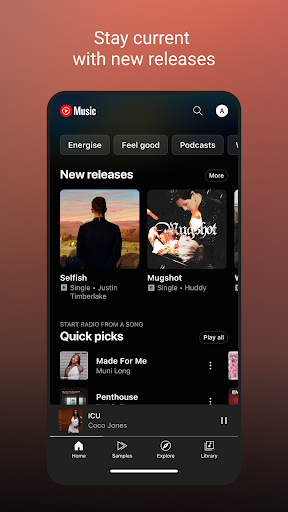
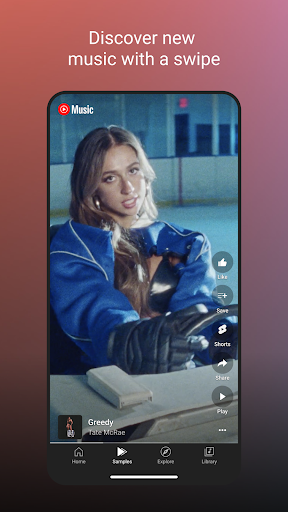
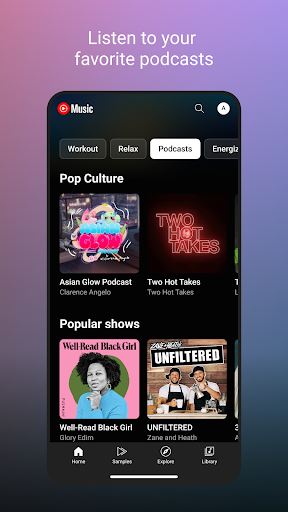
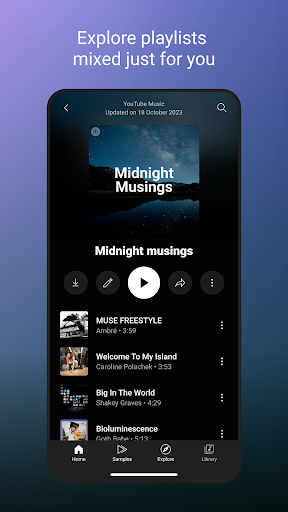
Connecting you to the world of music:
● Music content including live performances, covers, remixes and music content you can’t find elsewhere
● Thousands of curated playlist across many genres and activities
Get personalized music, perfect for every moment:
● Personalized playlists and Mixes made just for you, built around your favorite types of music
● Personalized activity mixes for your Workout, Relax, and Focus sessions
● Create playlists with song suggestions or collaborate with other music fans to create the perfect playlist
● Personalized Library to see all of your liked and added songs, playlists, artists, and albums
Stay on top of the trend and discover new music:
● Check out curated for you mixes such Discover Mix and New Release Mix
● Discover music based genres (Hip Hop, Pop, Country, Dance & Electronic, Blues, Indie & Alternative, Jazz, Kpop, Latin, Rock, and more)
● Discover music based mood (Chill, Feel Good, Energy Booster, Sleep, Focus, Romance, Workout, Commute, Party)
● Explore top charts from all over the world
Enhanced your listening experience with unique features:
● Song lyrics so you can sing along to your favorites
● Switch seamlessly between audio and video
● Listen on your phone, desktop, smart speaker, smart TV, car, smart watch and within your favorite apps.
● Add a Tile on your Wear OS watch to quickly access your music.
● Compatible with Google Maps, Waze, Google Assistant, and more.
Upgrade to Music Premium (available in select countries) to enjoy:
● Listen to music ad-free
● Play music in the background
● Access your music downloads, including smart downloads
● Switch seamlessly between song audio and music videos, only with YouTube Music
----------
Only first-time YouTube Red, Music Premium, YouTube Premium and Google Play Music subscribers are eligible for free trials, introductory offers or promotional pricing.
مزید دکھائیں

1. MEmu انسٹالر ڈاؤن لوڈ کریں اور سیٹ اپ مکمل کریں

2. MEmu شروع کریں اسکے بعد ڈیسکٹاپ پر Google Play کھولیں

3. Google Play میں YouTube Music تلاش کریں
Install
4. YouTube Music ڈاؤن لوڈ کریں اور انسٹال کریں
5. انسٹال مکمل ہونے کے بعد سٹارٹ کرنے کے لیے آئیکن پر کلک کریں

6. MEmu کے ساتھ پی سی پر YouTube Music کھیلنے کا لطف لیں
MEmu پلے بہترین اینڈرائڈ ایمولیٹر ہے اور 100 ملین لوگ اس کے زبردست اینڈرائڈ گیمنگ تجربہ سے لطف اندوز ہو رہے ہیں۔ MEmu کی ورچولائزیشن ٹیکنالوجی آپ کو اپنے PC پر ہزاروں اینڈرائڈ گیمز یہاں تک کہ انتہائی گرافک والے گیمز باسہولت کھیلنے کی طاقت دیتی ہے۔
بہتر گرافکس کے ساتھ بڑی اسکرین؛ طویل دورانیہ، بیٹری یا لامحدود موبائل ڈیٹا کے بغیر۔
کی بورڈ اور ماؤس یا گیم پیڈ کے عین مطابق کنٹرول کے لیے کی میپنگ کا پورا سپورٹ۔
کثیر مثالی منیجر کے ساتھ بیک وقت ایک پی سی پر متعدد گیم اکاؤنٹس یا ٹاسکس۔
پی سی پر درج ذیل مراحل پر عمل کرتے ہوئے پر YouTube Music استعمال کریں: u003c/p>