PdaNet+
تازہ کاری
موجودہ ورژن
5.32
پیشکش بذریعہ

اپنے موبائل فون پر PdaNet+ کا استعمال کرتے وقت زیادہ چارج ہونے کی فکر نہ کریں، خود کو چھوٹی اسکرین سے آزاد کریں اور ایپ کو زیادہ بڑے ڈسپلے پر استعمال کرنے کا لطف اٹھائیں۔ اس کے بعد سے کی بورڈ اور ماؤس کے ساتھ اپنے ایپ کا فل اسکرین کا تجربہ حاصل کریں۔ MEmu آپ کو وہ تمام حیران کن خصوصیات پیش کرتا ہے جن کی آپ کو توقع کرتے ہیں: فوری انسٹال اور آسان سیٹ اپ، وجدانی کنٹرول، مزید بیٹری، موبائل ڈیٹا کی کوئی حد نہیں اور اب مزید پریشان کن کالز نہیں۔ نئے برانڈ کا MEmu 9 آپ کے کمپیوٹر پر PdaNet+ استعمال کرنے کے لیے بہترین اختیار ہے۔ MEmu کثیر نظیری منیجر بیک وقت 2 یا اس سے زیادہ اکاؤنٹس کھولنا ممکن بناتا ہے۔ اور سب اہم بات، ہمارا خصوصی ایمولیشن انجن آپ کے پی سی کی پوری طاقت ریلیز کرتے ہوئے ہر چیز ہموار اور قابل تفریح بناتا ہے۔
مزید دکھائیں
MEmu Play کے ساتھ PC پر PdaNet+ استعمال کرنے کے شاندار تجربے سے لطف اٹھائیں۔ یہ ایک طاقتور مفت اینڈرائیڈ ایمولیٹر ہے جو آپ کو ان کے ڈیسک ٹاپ ورژن کے لیے ہزاروں اینڈرائیڈ ایپس فراہم کرتا ہے۔ دوستوں کے ساتھ جڑنے اور اعلی کارکردگی کے ساتھ اپنے کام کو چمکانے کا لطف اٹھائیں! Version 5.
Version 5.10 has major changes, MUST read below before updating.
1. Windows side also need updating from http://pdanet.co/install
2. Original WiFi Hotspot feature remains in the separate FoxFi app if you still need it, just install from Play Store. You can also find previous (4.19) version of PdaNet+ at http://pdanet.co/install/old
3. New location permission required by Android due to WiFi scan API call.
Please be aware that with no root access there are technical limitations of what an app can do. We try our best to offer the "most convenient solution possible" for sharing phone Internet but it may not be an "ideal" or "universal" solution (e.g. a normal WiFi Hotspot). It may not work for particular devices.
=====WiFi Direct mode (new!) ====
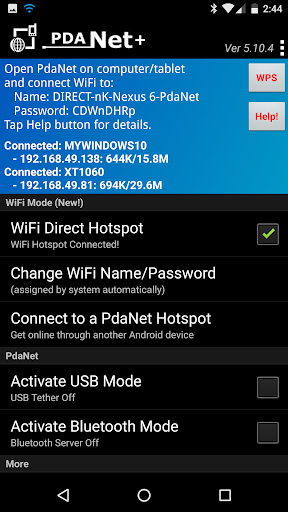
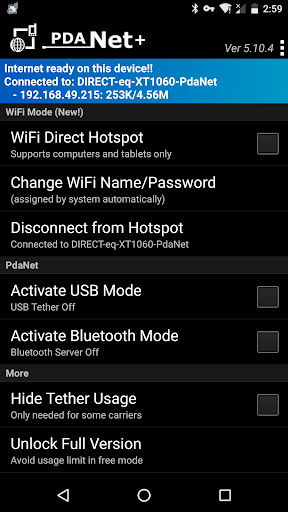
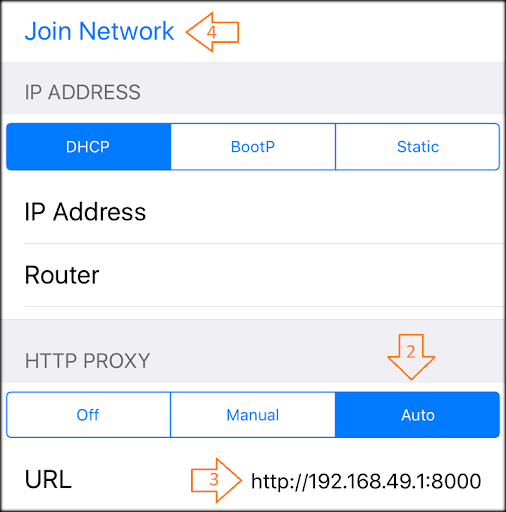
PdaNet+ now comes with a completely new "WiFi Direct Hotspot" feature that works on all Android phones 4.1 or later. It allows you to connect computers and tablets to your phone using WiFi BUT it will require you to either install our client app or setup proxy depending on what device you are connecting to the phone. You can activate "WiFi Direct Hotspot" in PdaNet+ then tap the "Help!" button for detail instructions.
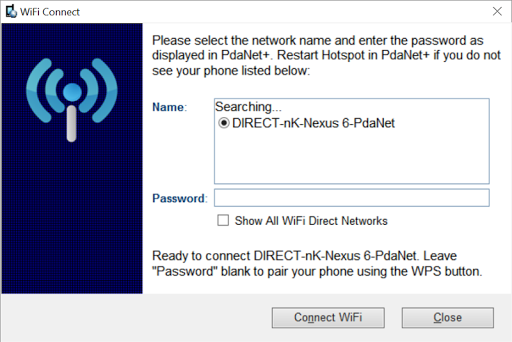
*If your Windows computer does not see the hotspot during pairing please do two things: 1. Restart Hotspot on the phone.
2. Click on "Show All WiFi Direct Hotspot". It will verify if your adapter supports 5Ghz.
====FoxFi/WiFi Hotspot Mode (the old) ====
The original WiFi Hotspot feature remains in the separate FoxFi app if you still need it. It has ceased to function on many newer phone models due to carrier updates. Even when it works, your hotspot usage may still be metered (see plan 2 below). WiFi Direct Hotspot could solve both issues. However the new feature is not meant to support game devices, TVs or TV streaming devices.
=====USB Mode=====
USB mode works on all Android phones (except for some ZTE/Alcatel models). It allows connection from Windows or Mac. In addition, there is a "WiFi Share" feature that can further turn Windows into a WiFi Hotspot so that you share PdaNet Internet with other devices.
*If your phone is not recognized by your computer after connecting USB, please see http://pdanet.co/driver
=====Bluetooth Mode=====
You can use Bluetooth mode to connect Windows. Although WiFi Direct mode is preferred.
=====Do I need this software?=====
The PdaNet software has been around since the first Treo smart phone in 2003. With over 30 million downloads in total, it must be something that everyone needs, right? Well...it really depends on the kind of data plan you have for your phone. There are 4 kinds of data plans from most carriers:
1. Your data plan (limited or unlimited) does not allow you to turn on the mobile hotspot feature on the phone (it prompts you to call your carrier).
2. Your data plan is unlimited and you can turn on mobile hotspot from your phone to use it. But hotspot usage is "metered" against a cap (say 5G/month). After that the speed will be throttled to a crawl. (FoxFi can't avoid this!)
3. Your data plan is unlimited, and you can turn on mobile hotspot from your phone with unlimited LTE usage and no throttling cap. This plan does NOT exist or not intended. But we have seen loopholes on some phone models to allow it.
4. You data plan is limited and it allows you to turn on mobile hotspot from your phone. The mobile hotspot usage goes under the same data plan limit.
If your plan falls under 1 or 2, you will need to use PdaNet+. If your plan belongs to 3 or 4 then PdaNet+ will not make any difference. If you are unsure what plan you have, it won't harm to always use PdaNet+.
=======================
Free edition of PdaNet+ will have timed usage limit, otherwise it is same as full version.
Sprint and AT&T may not allow you to install our app from Play Store, please install the apk file directly from http://pdanet.co/install or install from the computer side.
مزید دکھائیں

1. MEmu انسٹالر ڈاؤن لوڈ کریں اور سیٹ اپ مکمل کریں

2. MEmu شروع کریں اسکے بعد ڈیسکٹاپ پر Google Play کھولیں

3. Google Play میں PdaNet+ تلاش کریں
Install
4. PdaNet+ ڈاؤن لوڈ کریں اور انسٹال کریں
5. انسٹال مکمل ہونے کے بعد سٹارٹ کرنے کے لیے آئیکن پر کلک کریں

6. MEmu کے ساتھ پی سی پر PdaNet+ کھیلنے کا لطف لیں
MEmu پلے بہترین اینڈرائڈ ایمولیٹر ہے اور 100 ملین لوگ اس کے زبردست اینڈرائڈ گیمنگ تجربہ سے لطف اندوز ہو رہے ہیں۔ MEmu کی ورچولائزیشن ٹیکنالوجی آپ کو اپنے PC پر ہزاروں اینڈرائڈ گیمز یہاں تک کہ انتہائی گرافک والے گیمز باسہولت کھیلنے کی طاقت دیتی ہے۔
بہتر گرافکس کے ساتھ بڑی اسکرین؛ طویل دورانیہ، بیٹری یا لامحدود موبائل ڈیٹا کے بغیر۔
کی بورڈ اور ماؤس یا گیم پیڈ کے عین مطابق کنٹرول کے لیے کی میپنگ کا پورا سپورٹ۔
کثیر مثالی منیجر کے ساتھ بیک وقت ایک پی سی پر متعدد گیم اکاؤنٹس یا ٹاسکس۔
پی سی پر درج ذیل مراحل پر عمل کرتے ہوئے پر PdaNet+ استعمال کریں: u003c/p>