
PdaNet+
Güncellendi
Mevcut Sürüm
5.32
Sunan

Cep telefonunda PdaNet+ kullanırken fazla şarjlardan endişelenme, kendini küçük ekrandan kurtar ve uygulamayı çok daha büyük bir ekranda kullanmanın tadını çıkar. Şu andan itibaren, klavye ve fare ile uygulamayı tam ekran da kullanmayı dene. MEmu, beklediğin tüm şaşırtıcı özellikleri sunar: hızlı ve kolay kurulum, sezgisel kontroller, bunun dışında pil sınırı, mobil veri ve rahatsız edici aramalar artık yok. Yepyeni MEmu 9, bilgisayarında PdaNet+ kullanmanın en iyi seçimidir. Emilimimizle kodlanan çok örnekli yönetici, aynı anda 2 veya daha fazla hesap açmayı mümkün kılar. Ve en önemlisi, özel emülasyon motorumuz PC'nin tüm potansiyelini serbest bırakabilir, her şeyi pürüzsüz ve eğlenceli hale getirebilir.
Daha fazla göster
PdaNet+’i MEmu Android Emülatör ile PC’ye indirin. Büyük ekranda oynamanın keyfini çıkarın. Version 5.
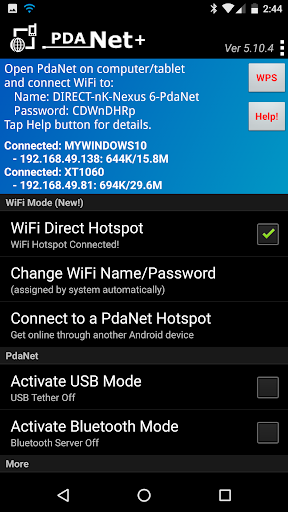
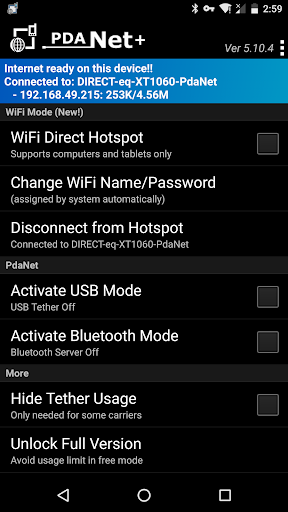
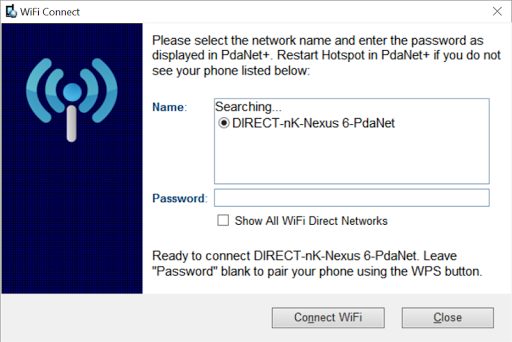
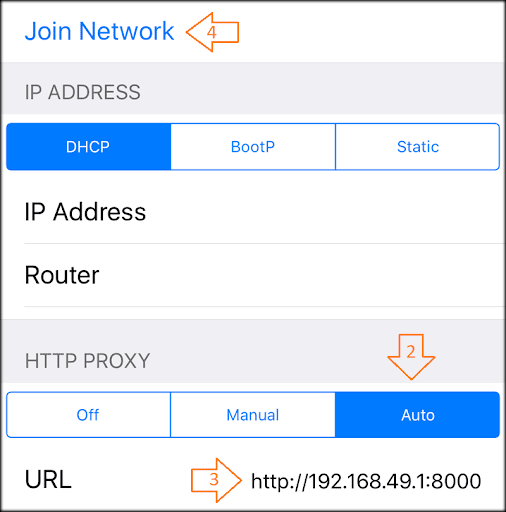
Version 5.10 has major changes, MUST read below before updating.
1. Windows side also need updating from http://pdanet.co/install
2. Original WiFi Hotspot feature remains in the separate FoxFi app if you still need it, just install from Play Store. You can also find previous (4.19) version of PdaNet+ at http://pdanet.co/install/old
3. New location permission required by Android due to WiFi scan API call.
Please be aware that with no root access there are technical limitations of what an app can do. We try our best to offer the "most convenient solution possible" for sharing phone Internet but it may not be an "ideal" or "universal" solution (e.g. a normal WiFi Hotspot). It may not work for particular devices.
=====WiFi Direct mode (new!) ====
PdaNet+ now comes with a completely new "WiFi Direct Hotspot" feature that works on all Android phones 4.1 or later. It allows you to connect computers and tablets to your phone using WiFi BUT it will require you to either install our client app or setup proxy depending on what device you are connecting to the phone. You can activate "WiFi Direct Hotspot" in PdaNet+ then tap the "Help!" button for detail instructions.
*If your Windows computer does not see the hotspot during pairing please do two things: 1. Restart Hotspot on the phone.
2. Click on "Show All WiFi Direct Hotspot". It will verify if your adapter supports 5Ghz.
====FoxFi/WiFi Hotspot Mode (the old) ====
The original WiFi Hotspot feature remains in the separate FoxFi app if you still need it. It has ceased to function on many newer phone models due to carrier updates. Even when it works, your hotspot usage may still be metered (see plan 2 below). WiFi Direct Hotspot could solve both issues. However the new feature is not meant to support game devices, TVs or TV streaming devices.
=====USB Mode=====
USB mode works on all Android phones (except for some ZTE/Alcatel models). It allows connection from Windows or Mac. In addition, there is a "WiFi Share" feature that can further turn Windows into a WiFi Hotspot so that you share PdaNet Internet with other devices.
*If your phone is not recognized by your computer after connecting USB, please see http://pdanet.co/driver
=====Bluetooth Mode=====
You can use Bluetooth mode to connect Windows. Although WiFi Direct mode is preferred.
=====Do I need this software?=====
The PdaNet software has been around since the first Treo smart phone in 2003. With over 30 million downloads in total, it must be something that everyone needs, right? Well...it really depends on the kind of data plan you have for your phone. There are 4 kinds of data plans from most carriers:
1. Your data plan (limited or unlimited) does not allow you to turn on the mobile hotspot feature on the phone (it prompts you to call your carrier).
2. Your data plan is unlimited and you can turn on mobile hotspot from your phone to use it. But hotspot usage is "metered" against a cap (say 5G/month). After that the speed will be throttled to a crawl. (FoxFi can't avoid this!)
3. Your data plan is unlimited, and you can turn on mobile hotspot from your phone with unlimited LTE usage and no throttling cap. This plan does NOT exist or not intended. But we have seen loopholes on some phone models to allow it.
4. You data plan is limited and it allows you to turn on mobile hotspot from your phone. The mobile hotspot usage goes under the same data plan limit.
If your plan falls under 1 or 2, you will need to use PdaNet+. If your plan belongs to 3 or 4 then PdaNet+ will not make any difference. If you are unsure what plan you have, it won't harm to always use PdaNet+.
=======================
Free edition of PdaNet+ will have timed usage limit, otherwise it is same as full version.
Sprint and AT&T may not allow you to install our app from Play Store, please install the apk file directly from http://pdanet.co/install or install from the computer side.
Daha fazla göster

1. MEmu yükleyicisini indirin ve kurulumu tamamlayın

2. MEmu'yu başlatın ve ana sayfada Google Play'i açın

3. Google Play'de PdaNet+ arayın
Install
4. PdaNet+ indirin ve yükleyin
5. Kurulum tamamlandığında başlamak için simgeye tıklayın

6. PdaNet+'i PC'de için MEmu'yu kullanın
MEmu Play, 50 milyon kullanıcısıyla en iyi ücretsiz Android emülatörüdür ve en üst düzey Android uygulama deneyiminin keyfini çıkarır. MEmu'nun sanallaştırma teknolojisi, en zorlu uygulamalar da dahil olmak üzere binlerce uygulamayı bilgisayarınızda sorunsuz bir şekilde çalıştırmanızı sağlar.
Daha büyük ekranla daha iyi grafiklere sahip; Pil veya mobil veri sınırlaması olmaksızın uzun süre.
Keymapping klavye ve fare veya gamepad'in hassas kontrolü için destek verir.
Multi-Instance yöneticisi ile tek bir bilgisayarda aynı anda birden fazla oyun hesabı veya görev gerçekleşilebilir.
Use PdaNet+ on PC by following steps: