Control Center OS 26
تازہ کاری
موجودہ ورژن
2.0.1
پیشکش بذریعہ

اپنے موبائل فون پر Control Center OS 26 کا استعمال کرتے وقت زیادہ چارج ہونے کی فکر نہ کریں، خود کو چھوٹی اسکرین سے آزاد کریں اور ایپ کو زیادہ بڑے ڈسپلے پر استعمال کرنے کا لطف اٹھائیں۔ اس کے بعد سے کی بورڈ اور ماؤس کے ساتھ اپنے ایپ کا فل اسکرین کا تجربہ حاصل کریں۔ MEmu آپ کو وہ تمام حیران کن خصوصیات پیش کرتا ہے جن کی آپ کو توقع کرتے ہیں: فوری انسٹال اور آسان سیٹ اپ، وجدانی کنٹرول، مزید بیٹری، موبائل ڈیٹا کی کوئی حد نہیں اور اب مزید پریشان کن کالز نہیں۔ نئے برانڈ کا MEmu 9 آپ کے کمپیوٹر پر Control Center OS 26 استعمال کرنے کے لیے بہترین اختیار ہے۔ MEmu کثیر نظیری منیجر بیک وقت 2 یا اس سے زیادہ اکاؤنٹس کھولنا ممکن بناتا ہے۔ اور سب اہم بات، ہمارا خصوصی ایمولیشن انجن آپ کے پی سی کی پوری طاقت ریلیز کرتے ہوئے ہر چیز ہموار اور قابل تفریح بناتا ہے۔
مزید دکھائیں
MEmu Play کے ساتھ PC پر Control Center OS 26 استعمال کرنے کے شاندار تجربے سے لطف اٹھائیں۔ یہ ایک طاقتور مفت اینڈرائیڈ ایمولیٹر ہے جو آپ کو ان کے ڈیسک ٹاپ ورژن کے لیے ہزاروں اینڈرائیڈ ایپس فراہم کرتا ہے۔ دوستوں کے ساتھ جڑنے اور اعلی کارکردگی کے ساتھ اپنے کام کو چمکانے کا لطف اٹھائیں! Control Center OS 26 gives you instant access to your most-used tools, settings, and features – all in one place.
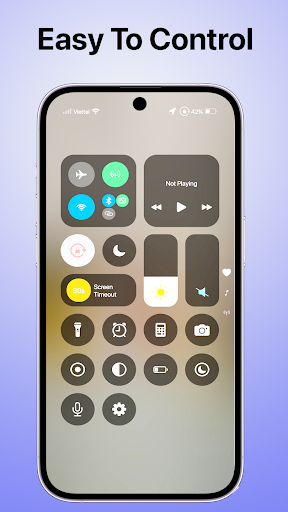
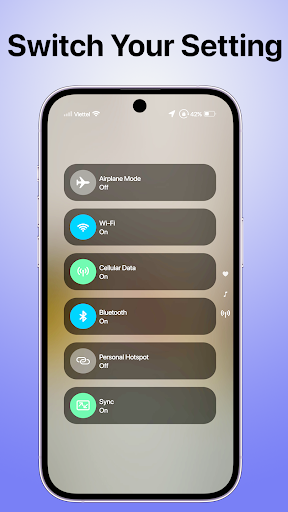
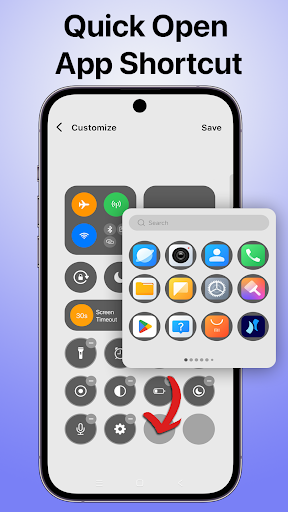
Control Center OS 26 gives you instant access to your most-used tools, settings, and features – all in one place. Whether you want to turn on Wi-Fi, adjust brightness, play music, or control Bluetooth, everything is just a swipe away.
Designed for speed, simplicity, and convenience, this app is the perfect way to enhance your Android experience.
Key Features:
Quick Settings Panel
Easily access Wi-Fi, Bluetooth, Airplane mode, Flashlight, and more.
Simple Design
Experience a clean and modern design inspired, adapted for Android.
Music & Media Controls
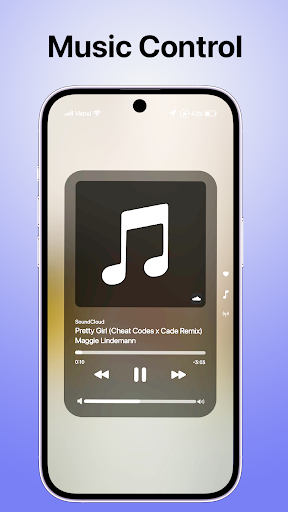
Play, pause, skip tracks, and adjust volume directly from the control panel.
Smart Toggles
Instantly toggle data, GPS, auto-rotate, DND, and screen timeout.
Screen Brightness & Volume Slider
Fine-tune brightness and volume with smooth sliders.
Customizable Layout
Arrange your favorite shortcuts the way you like.
Floating Panel Access
Swipe up or tap to open the control panel from anywhere.
Battery & Device Info
Monitor your battery percentage, RAM, and system info quickly.
Why Use Control Center OS 26?
+ Saves time with one-swipe access to key functions
+ Cleaner and more organized than default Android settings
+ Highly responsive and lightweight – no battery drain
+ Perfect for users who want quick access to phone settings
Fully Customizable
Choose what appears in your panel. Rearrange icons, change themes, and personalize the appearance to fit your style.
Smooth Performance & Compatibility
Works on most Android phones and tablets. Optimized for both old and new devices without slowing down your phone.
Enjoy the power of control at your fingertips. Download Control Center OS 26 now and upgrade your Android experience today!
مزید دکھائیں

1. MEmu انسٹالر ڈاؤن لوڈ کریں اور سیٹ اپ مکمل کریں

2. MEmu شروع کریں اسکے بعد ڈیسکٹاپ پر Google Play کھولیں

3. Google Play میں Control Center OS 26 تلاش کریں
Install
4. Control Center OS 26 ڈاؤن لوڈ کریں اور انسٹال کریں
5. انسٹال مکمل ہونے کے بعد سٹارٹ کرنے کے لیے آئیکن پر کلک کریں

6. MEmu کے ساتھ پی سی پر Control Center OS 26 کھیلنے کا لطف لیں
MEmu پلے بہترین اینڈرائڈ ایمولیٹر ہے اور 100 ملین لوگ اس کے زبردست اینڈرائڈ گیمنگ تجربہ سے لطف اندوز ہو رہے ہیں۔ MEmu کی ورچولائزیشن ٹیکنالوجی آپ کو اپنے PC پر ہزاروں اینڈرائڈ گیمز یہاں تک کہ انتہائی گرافک والے گیمز باسہولت کھیلنے کی طاقت دیتی ہے۔
بہتر گرافکس کے ساتھ بڑی اسکرین؛ طویل دورانیہ، بیٹری یا لامحدود موبائل ڈیٹا کے بغیر۔
کی بورڈ اور ماؤس یا گیم پیڈ کے عین مطابق کنٹرول کے لیے کی میپنگ کا پورا سپورٹ۔
کثیر مثالی منیجر کے ساتھ بیک وقت ایک پی سی پر متعدد گیم اکاؤنٹس یا ٹاسکس۔
پی سی پر درج ذیل مراحل پر عمل کرتے ہوئے پر Control Center OS 26 استعمال کریں: u003c/p>