Popscene
تازہ کاری
موجودہ ورژن
1724319094
پیشکش بذریعہ

Popscene کھیلنے کے اپنے پورے جنون کے دوران آپ کے ہاتھ آپ کے فون کی ایک چھوٹی سی اسکرین تک محدود نہیں ہونے چاہئیں۔ پرو کی طرح کھیلیں اور کی بورڈ اور ماؤس کے سہارے اپنے گیم پر مکمل کنٹرول حاصل کریں۔ MEmu آپ کو وہ تمام چیزیں پیش کرتا ہے جس کی آپ امید کرتے ہیں۔ پی سی پر Popscene ڈاؤن لوڈ کریں اور کھیلیں۔ جتنی دیر تک آپ چاہیں کھیلیں، بیٹری، موبائل ڈیٹا کی کوئی حد نہیں ہے اور پریشان کن کالز نہیں ہیں۔ نئے برانڈ کا MEmu 9 پی سی پر Popscene کھیلنے کا بہترین اختیار ہے۔ ہماری مہارت کی مدد سے تیار کردہ، شاندار پری سیٹ کی میپنگ سسٹم Popscene کو ایک ریئل پی سی گیم بناتا ہے۔ MEmu کثیر نظیری منیجرایک ہی ڈیوائس پر 2 یا زیادہ اکاؤنٹس پلے کرنا ممکن بناتا ہے۔ اور سب سے اہم بات یہ ہے کہ، ہمارا خصوصی ایمولیشن انجن آپ کے پی سی کی مکمل طاقت ریلیز کرتے ہوئے ہر چیز ہموار بنا سکتا ہے۔
مزید دکھائیں
Download Popscene on PC with MEmu Android Emulator. Enjoy playing on big screen. This music industry sim has gone platinum - celebrating over 1 MILLION downloads!
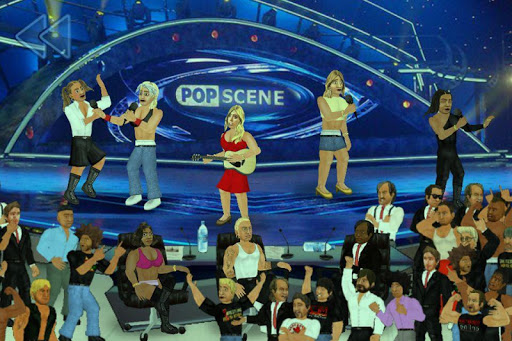
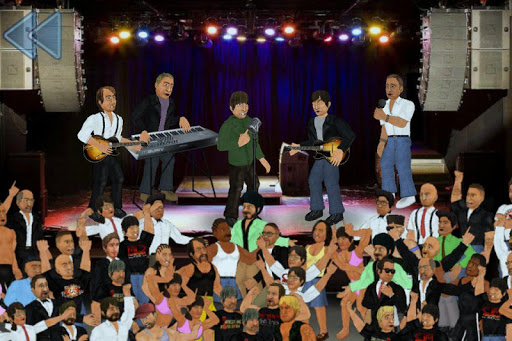
This music industry sim has gone platinum - celebrating over 1 MILLION downloads!
Bring your MP3 collection to life with animated performances as you embark on a career in music. Form your own band by recruiting talent from over 150 artists across 6 unique labels, or enjoy creating your own stars with the editor. Then record hits that will top the charts and take them on the road to over 20 different venues - including authentic reviews and news reports that determine your legacy. Like "A Rockstar At My Hamster" for the 21st century, Popscene leaves no stone unturned to do for music what Wrestling Revolution did for wrestling! The game is free to download, with the option to purchase a "backstage pass" for even more content.
* Please note that the MP3 player function may not be compatible with some devices. If this affects you, consider turning off MP3 music in the options.
PLAYING GUIDE:
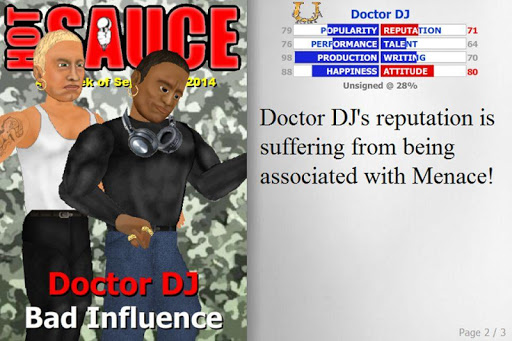
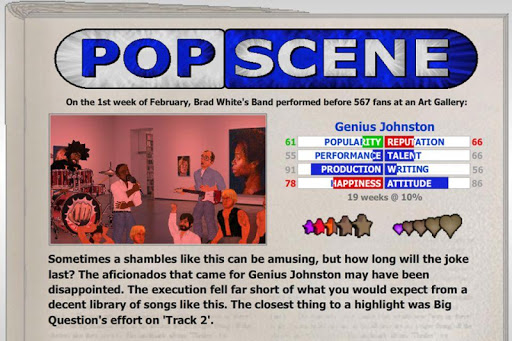
Popscene divides the music making process into entertainment (represented by stars) and artistry (represented by hearts). As in real life, popular music is more likely to shoot up the charts and draw fans - but without substance, the success may be short-lived. Each of the game's many artists has the following attributes that influence this process:
- POPULARITY is the artist's ability to draw fans to entertaining content.
- REPUTATION is their ability to draw fans to artistic content.
- PERFORMANCE is their ability to perform entertaining songs live.
- TALENT is their ability to perform artistic songs live.
- PRODUCTION is their ability to compose entertaining music.
- WRITING is their ability to compose artistic music.
- HAPPINESS is the pleasure they currently get from their work.
- ATTITUDE indicates how likely they are to either contribute or cause trouble.
This is a band management sim, and as a band manager it is your job to recruit stars from the music biz. Each week, depending on the size of your team and their collective attitude, new songs may be recorded. Each member of the team contributes their score to a new song, and whoever scores the highest will be credited with making it. Members who are dedicated backstage staff will contribute twice instead of once - inc the chances of a good song being written.
Once songs exist, it is the on-stage performers who must bring it to life. As with writing, each band member on stage contributes their score and the highest determines how well the song was received in each category. This time, it is the "frontman" who gets to contribute twice instead of once - so consider who is at the forefront.
The overall rating for a show is the average of all the songs performed - albeit slightly more generous so that perfection is not required. This is also true of album reviews. A 5-star performance may consist of consistent 4-star contributions. Reviews are where your performances feed back into the stats that produced them, because each attribute will rise or fall to reflect what just happened.
When booking venues, you must consider how much it will cost versus how much you are likely to recoup. Tickets are sold at $5 per song so it depends how long your set is. You will receive a percentage of this revenue, and must then use that to pay your employees and any other expenses. Singles are sold at $1 each whereas albums are sold at $1 per song for a maximum of $10 (cha-ching!). If you have a week of inactivity, you may find that you make a loss because of the expenses of your lifestyle (which reflects your wealth). On the independent scene, you take a larger chunk of lower revenue so you will have to migrate to a major label eventually.
I regret there is more to this game than I could ever explain here, so enjoy figuring some things out for yourself! Or join the debate over at Facebook to have any curious questions answered:
www.facebook.com/MDickieFans
مزید دکھائیں

1. MEmu انسٹالر ڈاؤن لوڈ کریں اور سیٹ اپ مکمل کریں

2. MEmu شروع کریں اسکے بعد ڈیسکٹاپ پر Google Play کھولیں

3. Google Play میں Popscene تلاش کریں
Install
4. Popscene ڈاؤن لوڈ کریں اور انسٹال کریں
5. انسٹال مکمل ہونے کے بعد سٹارٹ کرنے کے لیے آئیکن پر کلک کریں

6. MEmu کے ساتھ پی سی پر Popscene کھیلنے کا لطف لیں
MEmu پلے بہترین اینڈرائڈ ایمولیٹر ہے اور 100 ملین لوگ اس کے زبردست اینڈرائڈ گیمنگ تجربہ سے لطف اندوز ہو رہے ہیں۔ MEmu کی ورچولائزیشن ٹیکنالوجی آپ کو اپنے PC پر ہزاروں اینڈرائڈ گیمز یہاں تک کہ انتہائی گرافک والے گیمز باسہولت کھیلنے کی طاقت دیتی ہے۔
بہتر گرافکس کے ساتھ بڑی اسکرین؛ طویل دورانیہ، بیٹری یا لامحدود موبائل ڈیٹا کے بغیر۔
کی بورڈ اور ماؤس یا گیم پیڈ کے عین مطابق کنٹرول کے لیے کی میپنگ کا پورا سپورٹ۔
کثیر مثالی منیجر کے ساتھ بیک وقت ایک پی سی پر متعدد گیم اکاؤنٹس یا ٹاسکس۔
پی سی پر درج ذیل مراحل پر عمل کرتے ہوئے Popscene کھیلیں: