DubHUB - AI Video Dubbing
تازہ کاری
موجودہ ورژن
1.0.2
پیشکش بذریعہ

اپنے موبائل فون پر DubHUB - AI Video Dubbing کا استعمال کرتے وقت زیادہ چارج ہونے کی فکر نہ کریں، خود کو چھوٹی اسکرین سے آزاد کریں اور ایپ کو زیادہ بڑے ڈسپلے پر استعمال کرنے کا لطف اٹھائیں۔ اس کے بعد سے کی بورڈ اور ماؤس کے ساتھ اپنے ایپ کا فل اسکرین کا تجربہ حاصل کریں۔ MEmu آپ کو وہ تمام حیران کن خصوصیات پیش کرتا ہے جن کی آپ کو توقع کرتے ہیں: فوری انسٹال اور آسان سیٹ اپ، وجدانی کنٹرول، مزید بیٹری، موبائل ڈیٹا کی کوئی حد نہیں اور اب مزید پریشان کن کالز نہیں۔ نئے برانڈ کا MEmu 9 آپ کے کمپیوٹر پر DubHUB - AI Video Dubbing استعمال کرنے کے لیے بہترین اختیار ہے۔ MEmu کثیر نظیری منیجر بیک وقت 2 یا اس سے زیادہ اکاؤنٹس کھولنا ممکن بناتا ہے۔ اور سب اہم بات، ہمارا خصوصی ایمولیشن انجن آپ کے پی سی کی پوری طاقت ریلیز کرتے ہوئے ہر چیز ہموار اور قابل تفریح بناتا ہے۔
مزید دکھائیں
MEmu Play کے ساتھ PC پر DubHUB - AI Video Dubbing استعمال کرنے کے شاندار تجربے سے لطف اٹھائیں۔ یہ ایک طاقتور مفت اینڈرائیڈ ایمولیٹر ہے جو آپ کو ان کے ڈیسک ٹاپ ورژن کے لیے ہزاروں اینڈرائیڈ ایپس فراہم کرتا ہے۔ دوستوں کے ساتھ جڑنے اور اعلی کارکردگی کے ساتھ اپنے کام کو چمکانے کا لطف اٹھائیں! Reach more viewers without rebuilding every edit.
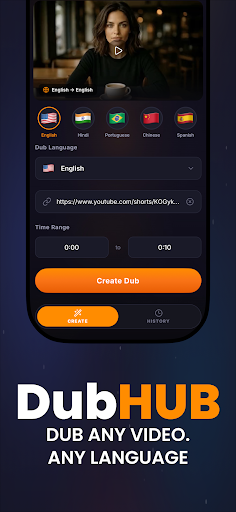

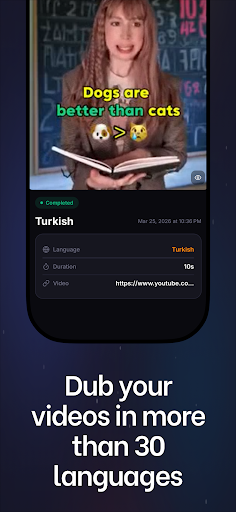
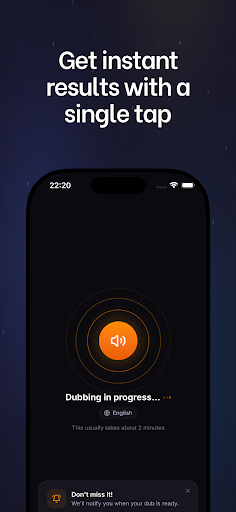
Reach more viewers without rebuilding every edit. DubHUB helps you turn one video into polished multilingual versions with AI dubbing, translated speech, fresh audio, readable captions, and export-ready subtitles.
From reels to lessons, clips to product walkthroughs, DubHUB gives every creator, team, and business a faster way to publish in more languages. Upload your file, choose a voice, review timing, check lip flow, and share localized video built for real social publishing.
What you can do with DubHUB
- Create video dubbing for global publishing.
Generate alternate language tracks from one source video and keep your message clear across markets. DubHUB is built for dubbing workflows that help a creator, educator, or brand reuse content instead of starting over.
- Translate spoken speech into new languages.
Convert dialogue, lessons, demos, and explainers into multilingual versions with AI support. If you need speech translation for training, onboarding, or customer education, DubHUB keeps the process simple.
- Produce natural voiceover audio fast.
Build a new voiceover for each selected language with an AI generator designed for clean listening. The resulting audio works well for tutorials, support media, social posts, and business communication.
- Improve lip timing and sync.
Strong dubbing depends on timing that feels easier to follow, so DubHUB helps align speech with on-screen delivery. Better lip matching and steadier sync can make translated video feel more polished.
- Add captions and subtitles in one place.
Create captions for silent viewing and subtitles for accessibility, retention, and clarity. This is especially useful for reels, clips, and social video where many people watch with the sound off.
- Export ready-to-share localized video.
Move from upload to finished delivery without splitting translation, audio, captions, and subtitles across multiple tools. DubHUB keeps multilingual publishing organized for repeatable output.
- Support creator and team workflows.
A solo creator can adapt short-form posts for new audiences, while internal teams can localize updates, onboarding, and support media. The same workflow can serve education, marketing, and communication.
- Repurpose content for wider reach.
Turn one recording into several market-ready versions for social channels, course libraries, or product education. DubHUB helps reels and clips travel farther without rebuilding the original edit.
- Keep production practical.
Review generated speech, confirm audio flow, inspect captions, and export with fewer manual steps. That makes DubHUB useful for recurring publishing across languages and regions.
- Build clearer learning and support video.
When lessons, demos, and walkthroughs need understandable speech, DubHUB helps deliver cleaner results. Readable subtitles and consistent timing can improve comprehension for viewers everywhere.
Why people choose DubHUB
Creators use DubHUB to grow beyond one language with dubbing, voiceover, captions, and subtitles. Educators use it to share training and lessons with translated speech and reliable audio. Businesses use it to localize onboarding, explainers, and internal communication for distributed teams.
Search-focused users often compare terms like dubxai, audio generator, lip sync, speech tools, social video editor, reels voiceover, or creator publishing apps. DubHUB focuses on practical multilingual video production with captions, subtitles, and smoother export from one workflow.
Whether you publish social clips every day or manage recurring education media, DubHUB helps your video travel farther with less effort. Download now and start creating multilingual content with better speech, cleaner audio, and faster publishing.
Support: https://dublaj.video/contact
Privacy Policy: https://dublaj.video/privacy
Terms of Use (EULA): https://www.apple.com/legal/internet-services/itunes/dev/stdeula/
مزید دکھائیں

1. MEmu انسٹالر ڈاؤن لوڈ کریں اور سیٹ اپ مکمل کریں

2. MEmu شروع کریں اسکے بعد ڈیسکٹاپ پر Google Play کھولیں

3. Google Play میں DubHUB - AI Video Dubbing تلاش کریں
Install
4. DubHUB - AI Video Dubbing ڈاؤن لوڈ کریں اور انسٹال کریں
5. انسٹال مکمل ہونے کے بعد سٹارٹ کرنے کے لیے آئیکن پر کلک کریں

6. MEmu کے ساتھ پی سی پر DubHUB - AI Video Dubbing کھیلنے کا لطف لیں
MEmu پلے بہترین اینڈرائڈ ایمولیٹر ہے اور 100 ملین لوگ اس کے زبردست اینڈرائڈ گیمنگ تجربہ سے لطف اندوز ہو رہے ہیں۔ MEmu کی ورچولائزیشن ٹیکنالوجی آپ کو اپنے PC پر ہزاروں اینڈرائڈ گیمز یہاں تک کہ انتہائی گرافک والے گیمز باسہولت کھیلنے کی طاقت دیتی ہے۔
بہتر گرافکس کے ساتھ بڑی اسکرین؛ طویل دورانیہ، بیٹری یا لامحدود موبائل ڈیٹا کے بغیر۔
کی بورڈ اور ماؤس یا گیم پیڈ کے عین مطابق کنٹرول کے لیے کی میپنگ کا پورا سپورٹ۔
کثیر مثالی منیجر کے ساتھ بیک وقت ایک پی سی پر متعدد گیم اکاؤنٹس یا ٹاسکس۔
پی سی پر درج ذیل مراحل پر عمل کرتے ہوئے پر DubHUB - AI Video Dubbing استعمال کریں: u003c/p>