Equal AI - AI Call Assistant
تازہ کاری
موجودہ ورژن
2026.08.10
پیشکش بذریعہ

اپنے موبائل فون پر Equal AI - AI Call Assistant کا استعمال کرتے وقت زیادہ چارج ہونے کی فکر نہ کریں، خود کو چھوٹی اسکرین سے آزاد کریں اور ایپ کو زیادہ بڑے ڈسپلے پر استعمال کرنے کا لطف اٹھائیں۔ اس کے بعد سے کی بورڈ اور ماؤس کے ساتھ اپنے ایپ کا فل اسکرین کا تجربہ حاصل کریں۔ MEmu آپ کو وہ تمام حیران کن خصوصیات پیش کرتا ہے جن کی آپ کو توقع کرتے ہیں: فوری انسٹال اور آسان سیٹ اپ، وجدانی کنٹرول، مزید بیٹری، موبائل ڈیٹا کی کوئی حد نہیں اور اب مزید پریشان کن کالز نہیں۔ نئے برانڈ کا MEmu 9 آپ کے کمپیوٹر پر Equal AI - AI Call Assistant استعمال کرنے کے لیے بہترین اختیار ہے۔ MEmu کثیر نظیری منیجر بیک وقت 2 یا اس سے زیادہ اکاؤنٹس کھولنا ممکن بناتا ہے۔ اور سب اہم بات، ہمارا خصوصی ایمولیشن انجن آپ کے پی سی کی پوری طاقت ریلیز کرتے ہوئے ہر چیز ہموار اور قابل تفریح بناتا ہے۔
مزید دکھائیں
MEmu Play کے ساتھ PC پر Equal AI - AI Call Assistant استعمال کرنے کے شاندار تجربے سے لطف اٹھائیں۔ یہ ایک طاقتور مفت اینڈرائیڈ ایمولیٹر ہے جو آپ کو ان کے ڈیسک ٹاپ ورژن کے لیے ہزاروں اینڈرائیڈ ایپس فراہم کرتا ہے۔ دوستوں کے ساتھ جڑنے اور اعلی کارکردگی کے ساتھ اپنے کام کو چمکانے کا لطف اٹھائیں! 1,00,000+ ہندوستانیوں میں شامل ہوں جو Equal AI کو ان کے پرسنل سیکرٹری کے طور پر نامعلوم کالوں کے لیے استعمال کرتے ہیں۔.

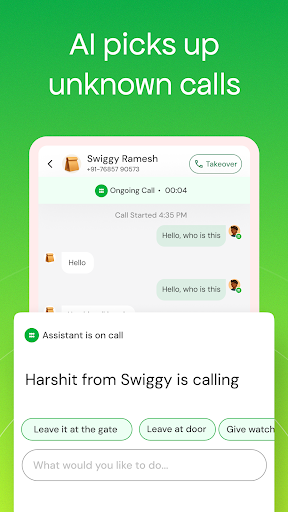
1,00,000+ ہندوستانیوں میں شامل ہوں جو Equal AI کو ان کے پرسنل سیکرٹری کے طور پر نامعلوم کالوں کے لیے استعمال کرتے ہیں۔
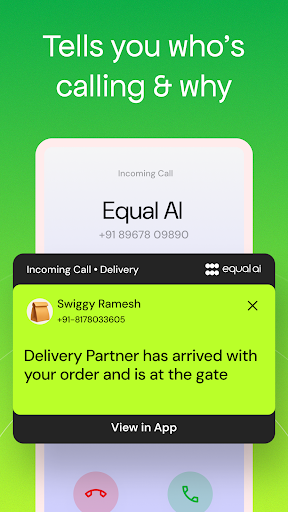
نامعلوم کالوں کا جواب دینے سے پہلے دیکھیں کہ کون کال کر رہا ہے اور کیوں کر رہا ہے۔
جواب دینے کا فیصلہ کرنے سے پہلے ہر نمبر کے پیچھے کا ارادہ جانیں۔ Equal AI ایک ایڈوانسڈ AI کال اسسٹنٹ ہے جو آپ کو لائیو گفتگو اور واضح سیاق و سباق دکھاتے ہوئے آپ کے لیے نامعلوم نمبروں اور ناپسندیدہ کالوں کو اسکرین اور ہینڈل کرتا ہے۔ لہذا آپ صرف اس وقت مشغول ہوتے ہیں جب یہ واقعی اہمیت رکھتا ہے۔
کام کی کالوں سے لے کر ٹیلی مارکیٹنگ تک، ایک وقتی اہم نمبروں تک ڈیلیوری، آپ کا اسسٹنٹ سب کچھ پہلے اسکرین کرتا ہے، بالکل آپ کے پرسنل سیکریٹری کی طرح۔
AI کال اسکریننگ آپ کو سب کچھ دکھاتی ہے۔
Equal AI خود بخود ناپسندیدہ کالوں کا جواب دیتا ہے اور حقیقی AI بات چیت کے ساتھ نامعلوم نمبروں کو اسکرین کرتا ہے۔ جب آپ کا اسسٹنٹ کال کرنے والے سے بات کرتا ہے، تو آپ ریئل ٹائم میں لائیو ٹرانسکرپٹ دیکھتے ہیں اور اس بارے میں فوری سیاق و سباق حاصل کرتے ہیں کہ کون کال کر رہا ہے اور کیوں۔
Equal AI کے ساتھ، آپ یہ کر سکتے ہیں:
* کال اسکریننگ ہوتے ہی لائیو ٹرانسکرپٹس دیکھیں
* فوری کالر کے ارادے کے خلاصے پڑھیں
* ایک نل کے ساتھ کسی بھی کال میں شامل ہوں۔
* کال کے دوران اپنے اسسٹنٹ کے ذریعے پیغامات بھیجیں۔
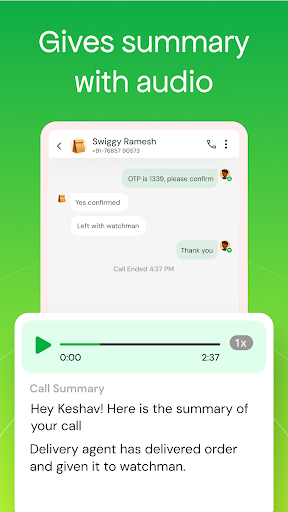
* مکمل کال ریکارڈنگ تک رسائی حاصل کریں۔
* AI کو آپ کے لیے گفتگو کو سنبھالنے دیں۔
آپ کوئی بھی فیصلہ کرنے سے پہلے مکمل سیاق و سباق دیکھتے ہیں، اس لیے نامعلوم نمبروں کے ساتھ مزید اندازہ نہیں لگانا چاہیے۔
آپ کا AI اسسٹنٹ تمام نامعلوم کالوں کو ہینڈل کرتا ہے۔
آپ کے مساوی AI اسسٹنٹ جوابات اور اسکرینیں:
* نامعلوم کام اور کاروباری کالز
* ڈیلیوری اور کورئیر کالز (Swiggy، Zomato، Amazon، Flipkart)
* آٹو رکشہ، کیب، اور رائیڈ شیئر کالز (Ola، Uber، Rapido)
* بینکنگ، OTP، اور تصدیقی کالز
* رئیل اسٹیٹ سے متعلق پوچھ گچھ
* ٹیلی مارکیٹنگ اور پروموشنل کالز
* سیلز اور مارکیٹنگ آؤٹ ریچ
* کسٹمر سروس کال بیکس
* نامعلوم نمبروں سے ایک بار کی اہم کالز
ہر نامعلوم کال کو اسکرین کیا جاتا ہے، لہذا آپ ان کا ارادہ فوری طور پر دیکھ سکتے ہیں۔
اصلی AI بات چیت کے ساتھ کال اسکریننگ
ایک بنیادی کالر ID یا روایتی Truecaller ID ایپ کے برعکس جو صرف نمبر دکھاتی ہے، Equal AI دراصل کال کرنے والوں سے بات کرتا ہے۔ یہ ہر کال کے پیچھے اصل مقصد کو سمجھنے میں مدد کرتا ہے اور یہ فرق کرتا ہے کہ آیا یہ فوری ڈیلیوری اپ ڈیٹ، معمول کی ٹیلی مارکیٹنگ، یا ایک اہم کام کی کال ہے۔
آپ کے اسسٹنٹ کی اسکرینیں بذریعہ:
* ہر کالر کے ساتھ پیشہ ورانہ طور پر مشغول ہونا
* بات چیت کے ذریعے سیاق و سباق کو سمجھنا
* جائز کالوں کو بلاک کیے بغیر ناپسندیدہ کالوں کو فلٹر کرنا
* شمولیت سے پہلے آپ کو مکمل معلومات دینا
ہر نامعلوم کال کو خودکار جواب اور اسکرین کریں۔
Equal AI خود بخود ہر نامعلوم نمبر کا جواب دیتا ہے اور اسکرین کرتا ہے، جب کوئی نامعلوم نمبر آپ کو کال کرتا ہے تو اندازہ لگانے والی گیم کو ختم کر دیتا ہے۔ مستقل ٹیلی مارکیٹرز سے لے کر ایک وقت کی ڈیلیوری اپ ڈیٹس تک، یہ AI کال اسسٹنٹ ابتدائی گفتگو کو سنبھالتا ہے جب آپ دیکھتے ہیں کہ سب کچھ سامنے آتا ہے۔
⏸ جب آپ کو ضرورت ہو اپنے اسسٹنٹ کو روک دیں۔
نامعلوم کالوں کا براہ راست جواب دینے کی ضرورت ہے؟ اپنے اسسٹنٹ کو ایک تھپتھپا کر اسنوز کریں۔ چاہے آپ کسی اہم کال کی توقع کر رہے ہوں یا دستی کنٹرول چاہتے ہو، آپ کسی بھی وقت موقوف اور دوبارہ شروع کر سکتے ہیں۔
کالر ID اور کال بلاکرز سے آگے
روایتی کالر ID ٹولز صرف نمبروں کی شناخت کرتے ہیں۔ وہ آپ کو نہیں بتاتے کہ کوئی کیوں کال کر رہا ہے۔ اس کے علاوہ، یہ اسپام کال بلاکر ایپس آپ کو آپ کے لیے اہم کالز چھوٹ جانے کے خطرے میں ڈال دیتی ہیں۔
Equal AI دونوں میں سے بہترین کو یکجا کرتا ہے:
* کالر آئی ڈی ایپ سے بہتر: نیت جانیں، نہ صرف نمبر
* کال بلاکر ایپ سے بہتر: اہم کالز غائب کیے بغیر ذہانت سے فلٹر کریں۔
⭐ مساوی AI کا انتخاب کیوں کریں؟
* AI خود بخود جواب دیتا ہے اور تمام نامعلوم کالوں کو اسکرین کرتا ہے۔
* ریئل ٹائم میں براہ راست کال اسکریننگ ٹرانسکرپٹس
* جواب دینے سے پہلے کالر کا ارادہ دیکھیں
* اہم ہونے پر شامل ہونے کے لیے ایک بار تھپتھپائیں۔
* ہر کال کے بعد خلاصے صاف کریں۔
* مکمل کال ریکارڈنگ دستیاب ہے۔
* بغیر کسی خطرے کے اسپام کال بلاکر کی طرح اسمارٹ فلٹرنگ
* کوئی اہم کال نہیں چھوٹی۔
ذہنی سکون کے ساتھ پرسکون رہیں کیونکہ Equal AI کال اسسٹنٹ نامعلوم کالوں کو ہینڈل کرتا ہے، لہذا آپ جواب دینے کا فیصلہ کرنے سے پہلے سب کچھ دیکھتے ہیں۔
مساوی AI - پہلے اسکرین، جب اہم ہو تو جواب دیں۔
مزید دکھائیں

1. MEmu انسٹالر ڈاؤن لوڈ کریں اور سیٹ اپ مکمل کریں

2. MEmu شروع کریں اسکے بعد ڈیسکٹاپ پر Google Play کھولیں

3. Google Play میں Equal AI - AI Call Assistant تلاش کریں
Install
4. Equal AI - AI Call Assistant ڈاؤن لوڈ کریں اور انسٹال کریں
5. انسٹال مکمل ہونے کے بعد سٹارٹ کرنے کے لیے آئیکن پر کلک کریں

6. MEmu کے ساتھ پی سی پر Equal AI - AI Call Assistant کھیلنے کا لطف لیں
MEmu پلے بہترین اینڈرائڈ ایمولیٹر ہے اور 100 ملین لوگ اس کے زبردست اینڈرائڈ گیمنگ تجربہ سے لطف اندوز ہو رہے ہیں۔ MEmu کی ورچولائزیشن ٹیکنالوجی آپ کو اپنے PC پر ہزاروں اینڈرائڈ گیمز یہاں تک کہ انتہائی گرافک والے گیمز باسہولت کھیلنے کی طاقت دیتی ہے۔
بہتر گرافکس کے ساتھ بڑی اسکرین؛ طویل دورانیہ، بیٹری یا لامحدود موبائل ڈیٹا کے بغیر۔
کی بورڈ اور ماؤس یا گیم پیڈ کے عین مطابق کنٹرول کے لیے کی میپنگ کا پورا سپورٹ۔
کثیر مثالی منیجر کے ساتھ بیک وقت ایک پی سی پر متعدد گیم اکاؤنٹس یا ٹاسکس۔
پی سی پر درج ذیل مراحل پر عمل کرتے ہوئے پر Equal AI - AI Call Assistant استعمال کریں: u003c/p>