Equal AI - AI Call Assistant
अपडेट किया गया
वर्तमान वर्शन
2026.09.23
संसाधन

Equal AI - AI Call Assistant पर अपनी मोबाइल डेटा सीमा पार करने को अलविदा कहें और छोटी स्क्रीन की सीमाओं से मुक्त होकर बड़े डिस्प्ले के लाभों का अनुभव करें। अब, आप अपने कीबोर्ड और माउस का उपयोग करके फुल-स्क्रीन मोड में टॉपर्स क्लैन की शक्ति का अनुभव कर सकते हैं। MEmu Play में वे सभी बेहतरीन सुविधाएँ हैं जिनकी आप अपेक्षा करते हैं: त्वरित इंस्टॉलेशन और आसान सेटअप, सहज नियंत्रण, बैटरी की आवश्यकता नहीं, और कोई डेटा या कॉल समय सीमा नहीं। नया MEmu 9 आपके कंप्यूटर पर Equal AI - AI Call Assistant का उपयोग करने के लिए सबसे अच्छा विकल्प है। हमारा मालिकाना मल्टी-इंस्टेंस मैनेजर एक साथ दो या अधिक खातों को चलाने का समर्थन करता है। इससे भी महत्वपूर्ण बात यह है कि हमारा अनूठा इम्यूलेशन इंजन आपके कंप्यूटर के प्रदर्शन का पूरा उपयोग करता है, जिससे एक सहज और निर्बाध अनुभव मिलता है।
और दिखाएं
MEmu Play के साथ PC पर Equal AI - AI Call Assistant इस्तेमाल करने के शानदार अनुभव का आनंद लें। यह एक शक्तिशाली मुफ़्त Android एमुलेटर है जो आपको डेस्कटॉप वर्ज़न के लिए हज़ारों Android ऐप्स उपलब्ध कराता है। दोस्तों से जुड़ने और अपने काम को और भी बेहतर बनाने का आनंद लें! इक्वल एआई कॉल और अन्य कामों के लिए आपका निजी एआई सहायक है। यह कॉल उठाता है, बातचीत करता है और आपको बताता है कि वास्तव में क्या हुआ, ताकि आप केवल ज़रूरी कॉलों पर ही समय बिता सकें। पूरे भारत में लोग इस पर भरोसा करते हैं।.
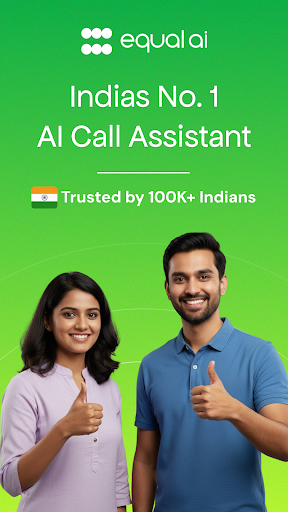
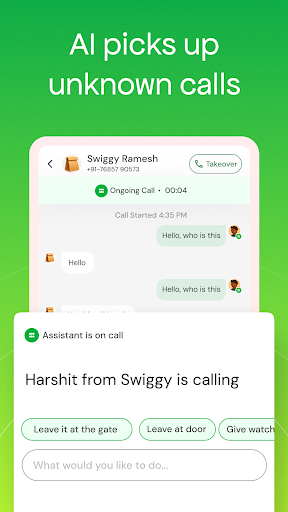
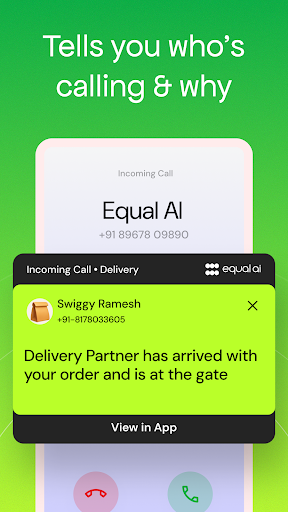
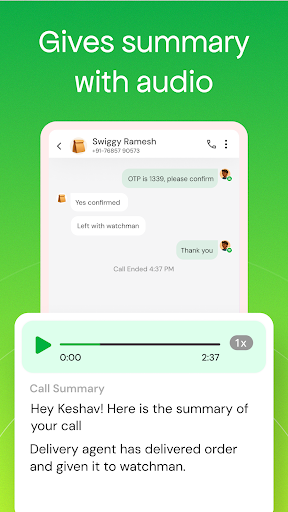
इक्वल एआई कॉल और अन्य कामों के लिए आपका निजी एआई सहायक है। यह कॉल उठाता है, बातचीत करता है और आपको बताता है कि वास्तव में क्या हुआ, ताकि आप केवल ज़रूरी कॉलों पर ही समय बिता सकें। पूरे भारत में लोग इस पर भरोसा करते हैं।
क्या आप कॉल उठाना नहीं चाहते? क्या आपको नहीं पता कि कौन कॉल कर रहा है? आपका इक्वल एआई बीच में आकर कॉल करने वाले से बात करता है और आपको बताता है कि किसने कॉल किया, क्यों किया और क्या बातचीत हुई।
आपको क्या मिलेगा
आपका AI आपके लिए बातचीत शुरू करेगा और संभालेगा
कॉल के दौरान लाइव ट्रांसक्रिप्ट
कॉल समाप्त होते ही तुरंत कॉल सारांश
आपकी ओर से AI द्वारा की गई हर बातचीत की रिकॉर्डिंग
कॉल के बाद की कार्रवाई, ताकि आपके लिए निर्णय लेना आसान हो जाए
एक टैप से किसी भी कॉल में शामिल हों और जब चाहें तब नियंत्रण अपने हाथ में लें
सेव किए गए संपर्कों और अज्ञात नंबरों के साथ काम करता है
आप तय करते हैं कि आपका Equal AI किन कॉलों को देखेगा
यह कैसे काम करता है
एक कॉल आती है। उसे अस्वीकार करें, और आपका Equal AI आगे बढ़ता है। यह कॉलर से बात करता है और आपको बताता है कि उन्होंने क्यों कॉल किया है, ताकि आप तय कर सकें कि कॉल खुद उठानी है या अपने Equal AI को इसे संभालने देना है। कॉल समाप्त होते ही रिकॉर्डिंग और सारांश आपको मिल जाता है।
यह हिंदी, तमिल, तेलुगु, कन्नड़, मराठी, गुजराती और अन्य कई भारतीय भाषाओं में काम करता है।
इन सबके लिए बेहतरीन:
ऐसी मीटिंग्स जिनमें आप बाहर नहीं निकल सकते
ऐसे अनजान नंबर जिन्हें आप आमतौर पर नज़रअंदाज़ कर देते हैं
डिलीवरी या कूरियर की ऐसी कॉल जिन्हें आप मिस नहीं करना चाहते
गाड़ी चलाते समय जब आपको अपना फ़ोन नहीं देखना चाहिए
बिक्री और प्रमोशनल कॉल्स से भरे दिन
और दिखाएं

1. MEmu इंस्टॉलर को डाउनलोड करें और इंस्टॉलेशन को पूरा करें

2. MEmu शुरू करें फिर होमपेज पर Google Play खोलें

3. Google Play में Equal AI - AI Call Assistant खोजें
Install
4. Equal AI - AI Call Assistant डाउनलोड कर इंस्टॉल करें
5. इंस्टॉल पूरा होने पर आइकन दबाएं

6. MEmu का उपयोग करके अपने कंप्यूटर पर Equal AI - AI Call Assistant का अनुभव करें
MEmu Play सबसे बेहतरीन मुफ़्त Android एमुलेटर है और 5 करोड़ लोग पहले ही इसके शानदार Android ऐप अनुभव का आनंद ले चुके हैं। MEmu 9 वर्चुअलाइज़ेशन तकनीक आपको अपने PC पर हज़ारों Android ऐप्स, यहाँ तक कि सबसे ज़्यादा ग्राफ़िक्स वाले ऐप्स भी, आसानी से चलाने की सुविधा देती है।
असीमित बैटरी या मोबाइल डेटा के साथ बेहतर ग्राफिक्स के साथ बड़ी स्क्रीन; लंबी अवधि।
कीबोर्ड और माउस या गेमपैड के उत्तम नियंत्रण के लिए संपूर्ण कीमैपिंग का समर्थन करता हैं।
एक ही पीसी पर मल्टी-इंस्टेंस मैनेजर के साथ एक समय में कई गेम खाते या कार्य कर सकते हैं।
Use Equal AI - AI Call Assistant on PC by following steps: