Google AI Edge Gallery
تازہ کاری
موجودہ ورژن
پیشکش بذریعہ

اپنے موبائل فون پر Google AI Edge Gallery کا استعمال کرتے وقت زیادہ چارج ہونے کی فکر نہ کریں، خود کو چھوٹی اسکرین سے آزاد کریں اور ایپ کو زیادہ بڑے ڈسپلے پر استعمال کرنے کا لطف اٹھائیں۔ اس کے بعد سے کی بورڈ اور ماؤس کے ساتھ اپنے ایپ کا فل اسکرین کا تجربہ حاصل کریں۔ MEmu آپ کو وہ تمام حیران کن خصوصیات پیش کرتا ہے جن کی آپ کو توقع کرتے ہیں: فوری انسٹال اور آسان سیٹ اپ، وجدانی کنٹرول، مزید بیٹری، موبائل ڈیٹا کی کوئی حد نہیں اور اب مزید پریشان کن کالز نہیں۔ نئے برانڈ کا MEmu 9 آپ کے کمپیوٹر پر Google AI Edge Gallery استعمال کرنے کے لیے بہترین اختیار ہے۔ MEmu کثیر نظیری منیجر بیک وقت 2 یا اس سے زیادہ اکاؤنٹس کھولنا ممکن بناتا ہے۔ اور سب اہم بات، ہمارا خصوصی ایمولیشن انجن آپ کے پی سی کی پوری طاقت ریلیز کرتے ہوئے ہر چیز ہموار اور قابل تفریح بناتا ہے۔
مزید دکھائیں
MEmu Play کے ساتھ PC پر Google AI Edge Gallery استعمال کرنے کے شاندار تجربے سے لطف اٹھائیں۔ یہ ایک طاقتور مفت اینڈرائیڈ ایمولیٹر ہے جو آپ کو ان کے ڈیسک ٹاپ ورژن کے لیے ہزاروں اینڈرائیڈ ایپس فراہم کرتا ہے۔ دوستوں کے ساتھ جڑنے اور اعلی کارکردگی کے ساتھ اپنے کام کو چمکانے کا لطف اٹھائیں! AI Edge Gallery is the premier destination for running the world's most powerful open-source Large Language Models (LLMs) on your mobile device.
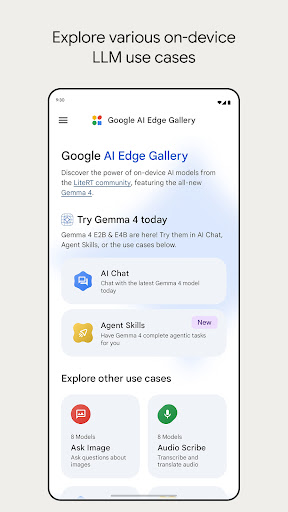
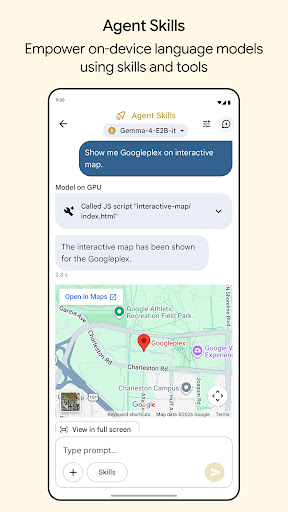
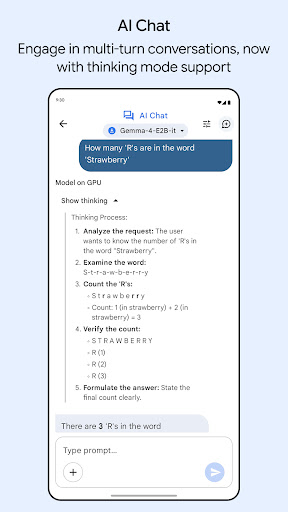
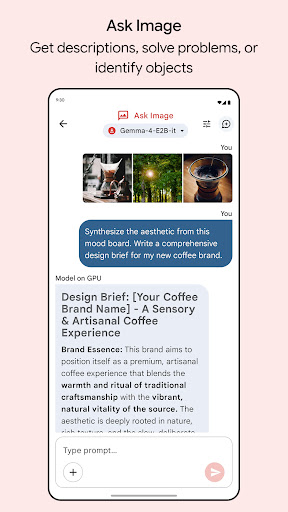
AI Edge Gallery is the premier destination for running the world's most powerful open-source Large Language Models (LLMs) on your mobile device. Experience high-performance Generative AI directly on your hardware—fully offline, private, and lightning-fast.
Now Featuring: Gemma 4
This update brings official support for the newly released Gemma 4 family. As the centerpiece of this release, Gemma 4 allows you to test the cutting edge of on-device AI. Experience advanced reasoning, logic, and creative capabilities without ever sending your data to a server.
Core Features
- Agent Skills: Transform your LLM from a conversationalist into a proactive assistant. Use the Agent Skills tile to augment model capabilities with tools like Wikipedia for fact-grounding, interactive maps, and rich visual summary cards. You can even load modular skills from a URL or browse community contributions on GitHub Discussions.
- AI Chat with Thinking Mode: Engage in fluid, multi-turn conversations and toggle the new Thinking Mode to peek "under the hood." This feature allows you to see the model's step-by-step reasoning process, which is perfect for understanding complex problem-solving. Note: Thinking Mode currently works with supported models, starting with the Gemma 4 family.
- Ask Image: Use multimodal power to identify objects, solve visual puzzles, or get detailed descriptions using your device's camera or photo gallery.
- Audio Scribe: Transcribe and translate voice recordings into text in real-time using high-efficiency on-device language models.
Prompt Lab: A dedicated workspace to test different prompts and single-turn use cases with granular control over model parameters like temperature and top-k.
- Mobile Actions: Unlock offline device controls and automated tasks powered entirely by a finetune of FuntionGemma 270m.
- Tiny Garden: A fun, experimental mini-game that uses natural language to plant and harvest a virtual garden using a finetune of FunctionGemma 270m.
- Model Management & Benchmark: Gallery is a flexible sandbox for a wide variety of open-source models. Easily download models from the list or load your own custom models. Manage your model library effortlessly and run benchmark tests to understand exactly how each model performs on your specific hardware.
- 100% On-Device Privacy: All model inferences happen directly on your device hardware. No internet is required, ensuring total privacy for your prompts, images, and sensitive data.
Built for the Community
AI Edge Gallery is an open-source project designed for the developer community and AI enthusiasts alike. Explore our example features, contribute your own skills, and help shape the future of the on-device agent ecosystem.
Check out the source code on GitHub:
https://github.com/google-ai-edge/gallery
Note: This app is in active development. Performance is dependent on your device's hardware (CPU/GPU). For support or feedback, contact us at google-ai-edge-gallery-android-feedback@google.com
مزید دکھائیں

1. MEmu انسٹالر ڈاؤن لوڈ کریں اور سیٹ اپ مکمل کریں

2. MEmu شروع کریں اسکے بعد ڈیسکٹاپ پر Google Play کھولیں

3. Google Play میں Google AI Edge Gallery تلاش کریں
Install
4. Google AI Edge Gallery ڈاؤن لوڈ کریں اور انسٹال کریں
5. انسٹال مکمل ہونے کے بعد سٹارٹ کرنے کے لیے آئیکن پر کلک کریں

6. MEmu کے ساتھ پی سی پر Google AI Edge Gallery کھیلنے کا لطف لیں
MEmu پلے بہترین اینڈرائڈ ایمولیٹر ہے اور 100 ملین لوگ اس کے زبردست اینڈرائڈ گیمنگ تجربہ سے لطف اندوز ہو رہے ہیں۔ MEmu کی ورچولائزیشن ٹیکنالوجی آپ کو اپنے PC پر ہزاروں اینڈرائڈ گیمز یہاں تک کہ انتہائی گرافک والے گیمز باسہولت کھیلنے کی طاقت دیتی ہے۔
بہتر گرافکس کے ساتھ بڑی اسکرین؛ طویل دورانیہ، بیٹری یا لامحدود موبائل ڈیٹا کے بغیر۔
کی بورڈ اور ماؤس یا گیم پیڈ کے عین مطابق کنٹرول کے لیے کی میپنگ کا پورا سپورٹ۔
کثیر مثالی منیجر کے ساتھ بیک وقت ایک پی سی پر متعدد گیم اکاؤنٹس یا ٹاسکس۔
پی سی پر درج ذیل مراحل پر عمل کرتے ہوئے پر Google AI Edge Gallery استعمال کریں: u003c/p>