
Google AI Edge Gallery
更新日期
当前版本
提供者

想体验Google AI Edge Gallery,可是手机屏幕太小,用一会就变烫,怎么办?使用逍遥模拟器,在电脑的大屏幕上畅快体验!在电脑上下载安装Google AI Edge Gallery,不用担心电量问题,想体验多久就多久,顺畅用一天~全新的逍遥模拟器9,绝对是您体验Google AI Edge Gallery电脑版的好选择。完美的按键映射系统让Google AI Edge Gallery如PC端般运行;强大的多开功能可同时使用多个应用;独家虚拟化技术更能彻底发挥电脑效能,保障长时间稳定运作。我们致力于不让设备限制您的体验,用起来轻松高效,畅快无比!
更多
使用逍遙模擬器在電腦上享受Google AI Edge Gallery的卓越體驗。這是一款功能強大的免費安卓模擬器,為您提供數千款安卓應用程式的桌面版本。與好友互動,有效率完成工作,盡情享受! AI Edge Gallery is the premier destination for running the world's most powerful open-source Large Language Models (LLMs) on your mobile device.
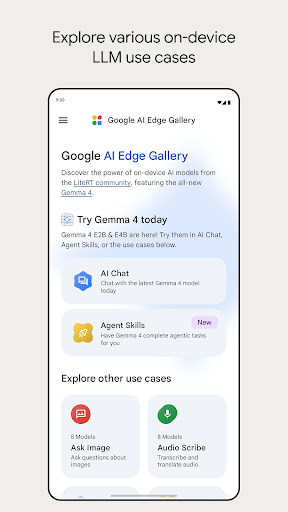
AI Edge Gallery is the premier destination for running the world's most powerful open-source Large Language Models (LLMs) on your mobile device. Experience high-performance Generative AI directly on your hardware—fully offline, private, and lightning-fast.
Now Featuring: Gemma 4
This update brings official support for the newly released Gemma 4 family. As the centerpiece of this release, Gemma 4 allows you to test the cutting edge of on-device AI. Experience advanced reasoning, logic, and creative capabilities without ever sending your data to a server.
Core Features
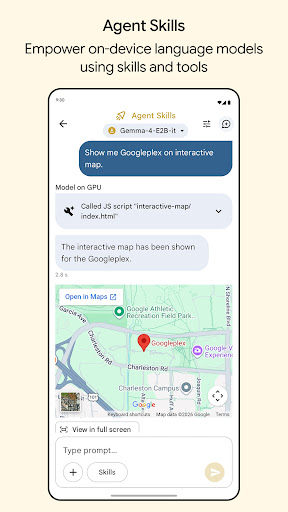
- Agent Skills: Transform your LLM from a conversationalist into a proactive assistant. Use the Agent Skills tile to augment model capabilities with tools like Wikipedia for fact-grounding, interactive maps, and rich visual summary cards. You can even load modular skills from a URL or browse community contributions on GitHub Discussions.
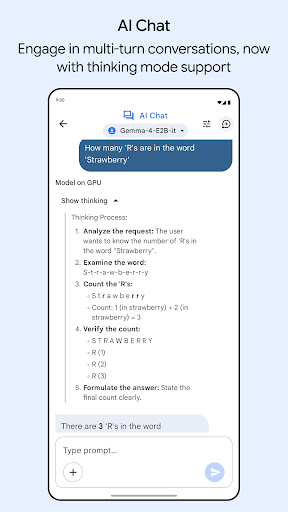
- AI Chat with Thinking Mode: Engage in fluid, multi-turn conversations and toggle the new Thinking Mode to peek "under the hood." This feature allows you to see the model's step-by-step reasoning process, which is perfect for understanding complex problem-solving. Note: Thinking Mode currently works with supported models, starting with the Gemma 4 family.
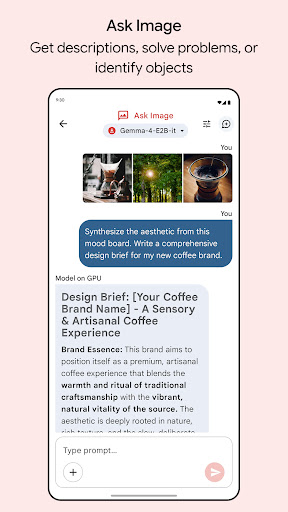
- Ask Image: Use multimodal power to identify objects, solve visual puzzles, or get detailed descriptions using your device's camera or photo gallery.
- Audio Scribe: Transcribe and translate voice recordings into text in real-time using high-efficiency on-device language models.
Prompt Lab: A dedicated workspace to test different prompts and single-turn use cases with granular control over model parameters like temperature and top-k.
- Mobile Actions: Unlock offline device controls and automated tasks powered entirely by a finetune of FuntionGemma 270m.
- Tiny Garden: A fun, experimental mini-game that uses natural language to plant and harvest a virtual garden using a finetune of FunctionGemma 270m.
- Model Management & Benchmark: Gallery is a flexible sandbox for a wide variety of open-source models. Easily download models from the list or load your own custom models. Manage your model library effortlessly and run benchmark tests to understand exactly how each model performs on your specific hardware.
- 100% On-Device Privacy: All model inferences happen directly on your device hardware. No internet is required, ensuring total privacy for your prompts, images, and sensitive data.
Built for the Community
AI Edge Gallery is an open-source project designed for the developer community and AI enthusiasts alike. Explore our example features, contribute your own skills, and help shape the future of the on-device agent ecosystem.
Check out the source code on GitHub:
https://github.com/google-ai-edge/gallery
Note: This app is in active development. Performance is dependent on your device's hardware (CPU/GPU). For support or feedback, contact us at google-ai-edge-gallery-android-feedback@google.com
更多

1. 下载逍遥安装器并完成设置

2. 启动逍遥后打开位于桌面上的谷歌商店

3. 在谷歌商店中搜索Google AI Edge Gallery
Install
4. 下载并安装Google AI Edge Gallery
5. 下载完成后点击图标来启动

6. 通过逍遥在电脑上享受Google AI Edge Gallery
逍遥安卓是优秀的安卓模拟器,全球超过5000万用户的优先选择。逍遥安卓以虚拟化技术为核心,为用户打造突破手机配置局限的游戏平台!
大屏精细展示;无限待机,超越电池和流量限制
键鼠、手把操作全面支持,操作更精准
用逍遥多开同时运行多个游戏、应用。
Use Google AI Edge Gallery on PC by following steps: