Habidapp
تازہ کاری
موجودہ ورژن
1.8
پیشکش بذریعہ

اپنے موبائل فون پر Habidapp کا استعمال کرتے وقت زیادہ چارج ہونے کی فکر نہ کریں، خود کو چھوٹی اسکرین سے آزاد کریں اور ایپ کو زیادہ بڑے ڈسپلے پر استعمال کرنے کا لطف اٹھائیں۔ اس کے بعد سے کی بورڈ اور ماؤس کے ساتھ اپنے ایپ کا فل اسکرین کا تجربہ حاصل کریں۔ MEmu آپ کو وہ تمام حیران کن خصوصیات پیش کرتا ہے جن کی آپ کو توقع کرتے ہیں: فوری انسٹال اور آسان سیٹ اپ، وجدانی کنٹرول، مزید بیٹری، موبائل ڈیٹا کی کوئی حد نہیں اور اب مزید پریشان کن کالز نہیں۔ نئے برانڈ کا MEmu 9 آپ کے کمپیوٹر پر Habidapp استعمال کرنے کے لیے بہترین اختیار ہے۔ MEmu کثیر نظیری منیجر بیک وقت 2 یا اس سے زیادہ اکاؤنٹس کھولنا ممکن بناتا ہے۔ اور سب اہم بات، ہمارا خصوصی ایمولیشن انجن آپ کے پی سی کی پوری طاقت ریلیز کرتے ہوئے ہر چیز ہموار اور قابل تفریح بناتا ہے۔
مزید دکھائیں
Download Habidapp on PC with MEmu Android Emulator. Enjoy playing on big screen. Habidapp helps you create healthy habits or eliminate bad habits, track your daily progress and check your statistics every day to reach your long-term goals.
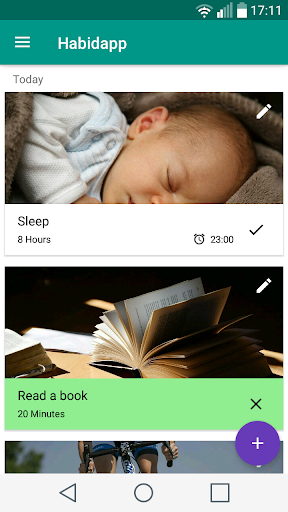
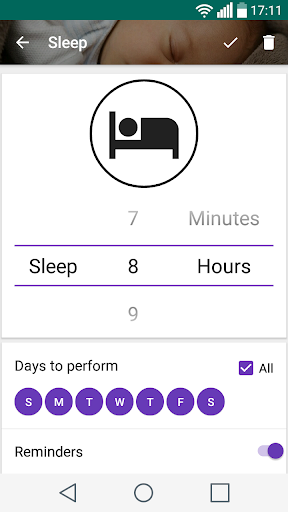
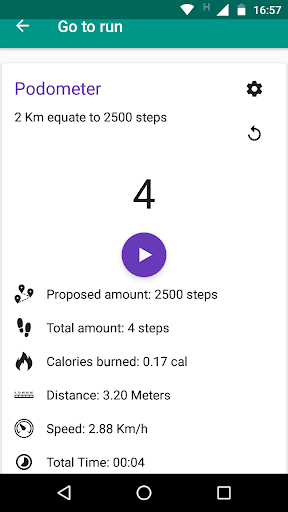
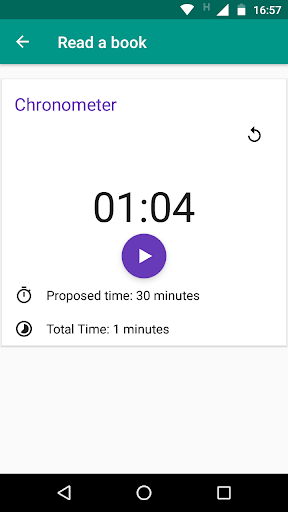
Habidapp helps you create healthy habits or eliminate bad habits, track your daily progress and check your statistics every day to reach your long-term goals. You want to quit smoking, read a book, go for a walk or dance zumba create the habit and start doing it.
The application features:
Simple and intuitive interface: the application was created with the principle of material design
Preset habits: you can perform preloaded habits which have specific actions or create new ones.
Tools: the application has
- Pedometer: to measure distances together with a calorie counter.
- Timer: to measure the time in the corresponding habits, those that present time.
- Blood pressure diary: when the habit is carried out, the diary is activated, allowing to load a measurement per day, see the graph of the evolution over time of the pressure and statistics with filters by week, month, quarter and year.
Statistics: the application has daily progress statistics, showing the good and bad gusts in the realization of habits
Reminders: create a habit reminder for a time of day, postpone or mark the habit as done directly from notification
Widget: on the home screen for faster access to habits.
Backup: export and import a file with your progress so you don't lose it and restart it at any time
Operation:
1. Establishes habits to perform
2. Mark habits when you have made them
3. Perform daily habits and monitor your progress
مزید دکھائیں

1. MEmu انسٹالر ڈاؤن لوڈ کریں اور سیٹ اپ مکمل کریں

2. MEmu شروع کریں اسکے بعد ڈیسکٹاپ پر Google Play کھولیں

3. Google Play میں Habidapp تلاش کریں
Install
4. Habidapp ڈاؤن لوڈ کریں اور انسٹال کریں
5. انسٹال مکمل ہونے کے بعد سٹارٹ کرنے کے لیے آئیکن پر کلک کریں

6. MEmu کے ساتھ پی سی پر Habidapp کھیلنے کا لطف لیں
MEmu پلے بہترین اینڈرائڈ ایمولیٹر ہے اور 100 ملین لوگ اس کے زبردست اینڈرائڈ گیمنگ تجربہ سے لطف اندوز ہو رہے ہیں۔ MEmu کی ورچولائزیشن ٹیکنالوجی آپ کو اپنے PC پر ہزاروں اینڈرائڈ گیمز یہاں تک کہ انتہائی گرافک والے گیمز باسہولت کھیلنے کی طاقت دیتی ہے۔
بہتر گرافکس کے ساتھ بڑی اسکرین؛ طویل دورانیہ، بیٹری یا لامحدود موبائل ڈیٹا کے بغیر۔
کی بورڈ اور ماؤس یا گیم پیڈ کے عین مطابق کنٹرول کے لیے کی میپنگ کا پورا سپورٹ۔
کثیر مثالی منیجر کے ساتھ بیک وقت ایک پی سی پر متعدد گیم اکاؤنٹس یا ٹاسکس۔
پی سی پر درج ذیل مراحل پر عمل کرتے ہوئے پر Habidapp استعمال کریں: u003c/p>