KidsNanny Parental Control App
تازہ کاری
موجودہ ورژن
1.0.32
پیشکش بذریعہ

اپنے موبائل فون پر KidsNanny Parental Control App کا استعمال کرتے وقت زیادہ چارج ہونے کی فکر نہ کریں، خود کو چھوٹی اسکرین سے آزاد کریں اور ایپ کو زیادہ بڑے ڈسپلے پر استعمال کرنے کا لطف اٹھائیں۔ اس کے بعد سے کی بورڈ اور ماؤس کے ساتھ اپنے ایپ کا فل اسکرین کا تجربہ حاصل کریں۔ MEmu آپ کو وہ تمام حیران کن خصوصیات پیش کرتا ہے جن کی آپ کو توقع کرتے ہیں: فوری انسٹال اور آسان سیٹ اپ، وجدانی کنٹرول، مزید بیٹری، موبائل ڈیٹا کی کوئی حد نہیں اور اب مزید پریشان کن کالز نہیں۔ نئے برانڈ کا MEmu 9 آپ کے کمپیوٹر پر KidsNanny Parental Control App استعمال کرنے کے لیے بہترین اختیار ہے۔ MEmu کثیر نظیری منیجر بیک وقت 2 یا اس سے زیادہ اکاؤنٹس کھولنا ممکن بناتا ہے۔ اور سب اہم بات، ہمارا خصوصی ایمولیشن انجن آپ کے پی سی کی پوری طاقت ریلیز کرتے ہوئے ہر چیز ہموار اور قابل تفریح بناتا ہے۔
مزید دکھائیں
Download KidsNanny Parental Control App on PC with MEmu Android Emulator. Enjoy playing on big screen. The KidsNanny Parental Control App is the perfect tool for promoting healthy digital habits and ensuring online safety for your children.
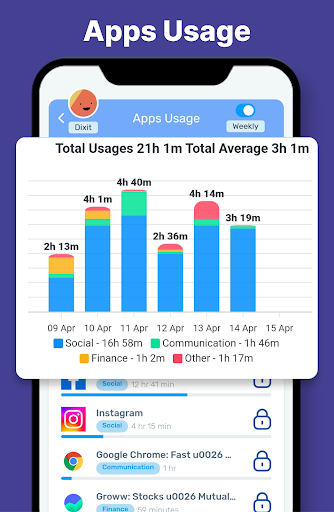
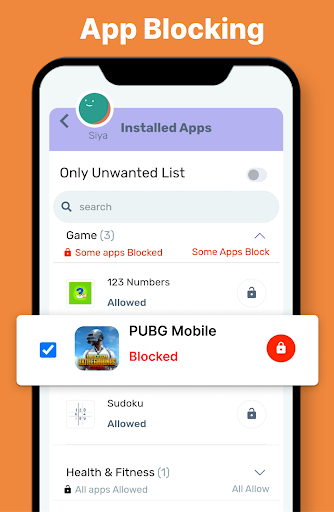
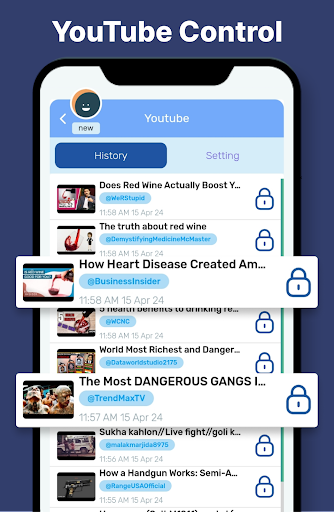
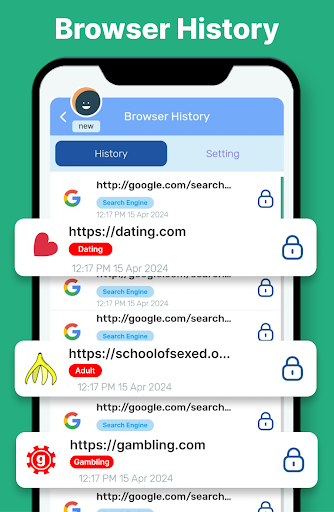
The KidsNanny Parental Control App is the perfect tool for promoting healthy digital habits and ensuring online safety for your children. With advanced AI-powered parenting feature like real-time monitoring, content filtering, GPS location tracking, screen time management, app and game blocking, and detailed activity reports, you can easily manage and ensure a balanced, safe, and secure digital environment for your kids.
How can KidsNanny App help to protect your child?
◆ Screen Time Management
Set limits using downtime and control phone utilization by defining daily app or category usage duration. Customize these settings based on specific weekdays to foster healthy device habits.
◆ Check-In
Stay connected with your kids' whereabouts through our Check-In feature. Allow them to send their current location, providing you with peace of mind and enhancing their safety.
◆ Location tracker & Alert
A highly accurate GPS location tracker helps you to create virtual boundaries and receive real-time notifications when your child enters or exits specific geo locations.
◆ App Blocker & Usage Limit
Monitor and manage your child's app usage with detailed app Statistics, block inappropriate apps like Social media and dating apps, and ensure a safe digital environment by staying informed about new apps and potential risks.
◆ Web History
View a list of visited websites to ensure they engage in safe, responsible online behavior.
◆ Web Blocking & Content Filter
Safeguard your child's browsing experience by blocking websites based on domain name or category. Enable safe browsing, protecting them from harmful content like porn or cyberbullying.
◆ Instant Lock
Instantly lock your child's device remotely when needed.
◆ Screen Scanner
AI-powered monitors analyze screen activity in real time, detecting harmful content such as dangers, pornography, cyberbullying, drugs, and self-harm.
◆ Monitor YouTube
Tracks videos watched on YouTube, YouTube Kids, and browsers.. Easily block or allow specific channels.
KidsNanny offers a 7 day free trial when you sign up. No need to pay until you decide we’re right for you. Download now and empower yourself to create a safe and secure digital environment for your child.
KidsNanny does not contain any advertisement.
Note: Certain feature may require additional permission and device compatibility.
Required Permissions for KidsNanny:
• Location: To keep the track of all geo-fence events, Location permission is required. Make sure you turn on device Location Service after that, it will be running in the background for accurate locations.
• Photos & Media: To scan and identify objectional photos & videos stored inside kid's device.
• App Usage Access: KidsNanny requires app usage permission to get phone usage reports and show to parents. This permission can show you all the installed applications in child device and usage history of all the applications. Make sure you enable this permission to use special features like Screen Time, App Blocking and App Usage Request.
• Draw Over Other Apps: This draw over other apps permission helps KidsNanny to show alert message when usage limit reached.
• Accessibility: To limit screen time and break phone addiction of kids, Accessibility permission is required. We collect app data and interactions for screen time management. Web browsing history is collected for web blocking.
• Notification Access: To block notifications of blocked applications.
• VPN Service: To enable website blocking and restrict internet for blocked applications, the KidsNanny app requires the use of a VPN. It collects browsing data to ensure effective web blocking and enhance your child’s online safety.
If you have any query or suggestion, please contact us at mailto:support@kidsnanny.ca
- Find copies of our privacy policy on below link:
https://kidsnanny.com.au/privacy-policy/
- Find copies of our terms and conditions on below link:
https://kidsnanny.com.au/terms-conditions/
مزید دکھائیں

1. MEmu انسٹالر ڈاؤن لوڈ کریں اور سیٹ اپ مکمل کریں

2. MEmu شروع کریں اسکے بعد ڈیسکٹاپ پر Google Play کھولیں

3. Google Play میں KidsNanny Parental Control App تلاش کریں
Install
4. KidsNanny Parental Control App ڈاؤن لوڈ کریں اور انسٹال کریں
5. انسٹال مکمل ہونے کے بعد سٹارٹ کرنے کے لیے آئیکن پر کلک کریں

6. MEmu کے ساتھ پی سی پر KidsNanny Parental Control App کھیلنے کا لطف لیں
MEmu پلے بہترین اینڈرائڈ ایمولیٹر ہے اور 100 ملین لوگ اس کے زبردست اینڈرائڈ گیمنگ تجربہ سے لطف اندوز ہو رہے ہیں۔ MEmu کی ورچولائزیشن ٹیکنالوجی آپ کو اپنے PC پر ہزاروں اینڈرائڈ گیمز یہاں تک کہ انتہائی گرافک والے گیمز باسہولت کھیلنے کی طاقت دیتی ہے۔
بہتر گرافکس کے ساتھ بڑی اسکرین؛ طویل دورانیہ، بیٹری یا لامحدود موبائل ڈیٹا کے بغیر۔
کی بورڈ اور ماؤس یا گیم پیڈ کے عین مطابق کنٹرول کے لیے کی میپنگ کا پورا سپورٹ۔
کثیر مثالی منیجر کے ساتھ بیک وقت ایک پی سی پر متعدد گیم اکاؤنٹس یا ٹاسکس۔
پی سی پر درج ذیل مراحل پر عمل کرتے ہوئے پر KidsNanny Parental Control App استعمال کریں: u003c/p>