Kwai - download & share video
تازہ کاری
موجودہ ورژن
13.8.20.646502
پیشکش بذریعہ

اپنے موبائل فون پر Kwai - download & share video کا استعمال کرتے وقت زیادہ چارج ہونے کی فکر نہ کریں، خود کو چھوٹی اسکرین سے آزاد کریں اور ایپ کو زیادہ بڑے ڈسپلے پر استعمال کرنے کا لطف اٹھائیں۔ اس کے بعد سے کی بورڈ اور ماؤس کے ساتھ اپنے ایپ کا فل اسکرین کا تجربہ حاصل کریں۔ MEmu آپ کو وہ تمام حیران کن خصوصیات پیش کرتا ہے جن کی آپ کو توقع کرتے ہیں: فوری انسٹال اور آسان سیٹ اپ، وجدانی کنٹرول، مزید بیٹری، موبائل ڈیٹا کی کوئی حد نہیں اور اب مزید پریشان کن کالز نہیں۔ نئے برانڈ کا MEmu 9 آپ کے کمپیوٹر پر Kwai - download & share video استعمال کرنے کے لیے بہترین اختیار ہے۔ MEmu کثیر نظیری منیجر بیک وقت 2 یا اس سے زیادہ اکاؤنٹس کھولنا ممکن بناتا ہے۔ اور سب اہم بات، ہمارا خصوصی ایمولیشن انجن آپ کے پی سی کی پوری طاقت ریلیز کرتے ہوئے ہر چیز ہموار اور قابل تفریح بناتا ہے۔
مزید دکھائیں
Download Kwai - download & share video on PC with MEmu Android Emulator. Enjoy playing on big screen. WHAT IS KWAI?


WHAT IS KWAI?
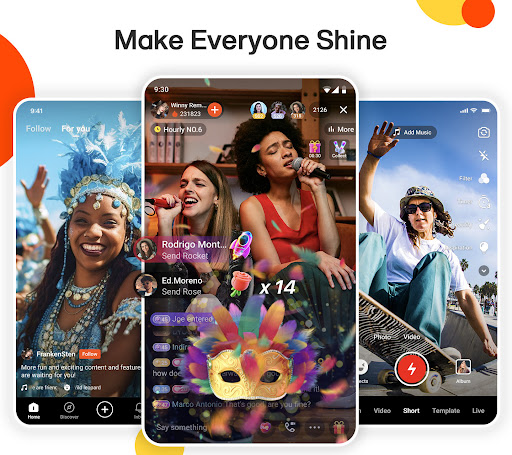
Kwai is a dynamic short video app that brings your creativity to life! Join a global community where you can discover, create, and share entertaining and inspirational videos. From funny clips to heartfelt moments, Kwai offers a platform for everyone to express themselves and connect with others. Whether you’re a casual viewer or a content creator, dive into endless possibilities and let your creativity shine on Kwai!
TikTok Style
Just like TikTok, Kwai offers an intuitive platform for users to express themselves and connect with others around the globe. Whether you're looking to entertain or be entertained like TikTok, Kwai is your go-to app for endless fun and creativity!
JOIN THE COMMUNITY
Find new friends and have fun with them. We have private messages. Enjoy the community and social network that has all the memes, trends and short videos that you could wish for.
TRENDS AND CHALLENGES!
Find the best trends from around world with challenges, challenges, and competitions every day. Who will be the most most? Follow your favorite creators. Everything funny, fun and cool is here.
SEE WHAT YOU LIKE MOST
Choose your favorite content: Memes, Dance, Music, Humor, Blog, Beauty, Makeup, Fashion, Sports, Pets and much more. Find new friends who like the same content.
FOLLOW YOUR FAVORITE CREATORS
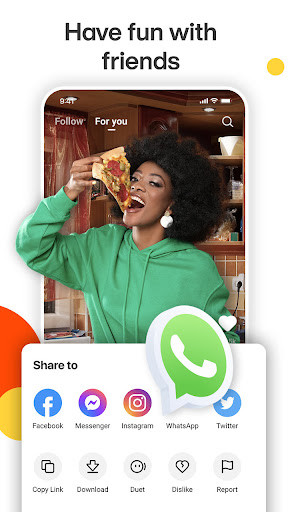
The best creators are in Kwai. Make a Duet with your favorite creator. Download and save your videos to watch them when you are offline. Share videos on other platforms such as WhatsApp, Instagram, Twitter among others.
CREATE ORIGINAL CONTENT ON KWAI
In Kwai you can both watch and create videos. Become a creator by producing and uploading your own content to our community. These can be funny videos, music videos, or anything else you can think of. In other words, this is your space to shine and set trends, all while making extra money while having fun.
THE BEST EFFECTS
Get creative and have fun. Kwai has the best magic effects to use in your short videos.
FOR LAUGHING
Have a happy time watching short videos, memes and the most popular trends in the world. The funniest are all in Kwai. Among the videos on the social network, there are all kinds of content to entertain you.
مزید دکھائیں

1. MEmu انسٹالر ڈاؤن لوڈ کریں اور سیٹ اپ مکمل کریں

2. MEmu شروع کریں اسکے بعد ڈیسکٹاپ پر Google Play کھولیں

3. Google Play میں Kwai - download & share video تلاش کریں
Install
4. Kwai - download & share video ڈاؤن لوڈ کریں اور انسٹال کریں
5. انسٹال مکمل ہونے کے بعد سٹارٹ کرنے کے لیے آئیکن پر کلک کریں

6. MEmu کے ساتھ پی سی پر Kwai - download & share video کھیلنے کا لطف لیں
MEmu پلے بہترین اینڈرائڈ ایمولیٹر ہے اور 100 ملین لوگ اس کے زبردست اینڈرائڈ گیمنگ تجربہ سے لطف اندوز ہو رہے ہیں۔ MEmu کی ورچولائزیشن ٹیکنالوجی آپ کو اپنے PC پر ہزاروں اینڈرائڈ گیمز یہاں تک کہ انتہائی گرافک والے گیمز باسہولت کھیلنے کی طاقت دیتی ہے۔
بہتر گرافکس کے ساتھ بڑی اسکرین؛ طویل دورانیہ، بیٹری یا لامحدود موبائل ڈیٹا کے بغیر۔
کی بورڈ اور ماؤس یا گیم پیڈ کے عین مطابق کنٹرول کے لیے کی میپنگ کا پورا سپورٹ۔
کثیر مثالی منیجر کے ساتھ بیک وقت ایک پی سی پر متعدد گیم اکاؤنٹس یا ٹاسکس۔
پی سی پر درج ذیل مراحل پر عمل کرتے ہوئے پر Kwai - download & share video استعمال کریں: u003c/p>