MH Physique: Hypertrophy App
تازہ کاری
موجودہ ورژن
1.31.9
پیشکش بذریعہ

اپنے موبائل فون پر MH Physique: Hypertrophy App کا استعمال کرتے وقت زیادہ چارج ہونے کی فکر نہ کریں، خود کو چھوٹی اسکرین سے آزاد کریں اور ایپ کو زیادہ بڑے ڈسپلے پر استعمال کرنے کا لطف اٹھائیں۔ اس کے بعد سے کی بورڈ اور ماؤس کے ساتھ اپنے ایپ کا فل اسکرین کا تجربہ حاصل کریں۔ MEmu آپ کو وہ تمام حیران کن خصوصیات پیش کرتا ہے جن کی آپ کو توقع کرتے ہیں: فوری انسٹال اور آسان سیٹ اپ، وجدانی کنٹرول، مزید بیٹری، موبائل ڈیٹا کی کوئی حد نہیں اور اب مزید پریشان کن کالز نہیں۔ نئے برانڈ کا MEmu 9 آپ کے کمپیوٹر پر MH Physique: Hypertrophy App استعمال کرنے کے لیے بہترین اختیار ہے۔ MEmu کثیر نظیری منیجر بیک وقت 2 یا اس سے زیادہ اکاؤنٹس کھولنا ممکن بناتا ہے۔ اور سب اہم بات، ہمارا خصوصی ایمولیشن انجن آپ کے پی سی کی پوری طاقت ریلیز کرتے ہوئے ہر چیز ہموار اور قابل تفریح بناتا ہے۔
مزید دکھائیں
MEmu Play کے ساتھ PC پر MH Physique: Hypertrophy App استعمال کرنے کے شاندار تجربے سے لطف اٹھائیں۔ یہ ایک طاقتور مفت اینڈرائیڈ ایمولیٹر ہے جو آپ کو ان کے ڈیسک ٹاپ ورژن کے لیے ہزاروں اینڈرائیڈ ایپس فراہم کرتا ہے۔ دوستوں کے ساتھ جڑنے اور اعلی کارکردگی کے ساتھ اپنے کام کو چمکانے کا لطف اٹھائیں! MH Physique is a hypertrophy coaching app built on Menno Henselmans' evidence-based methodology.
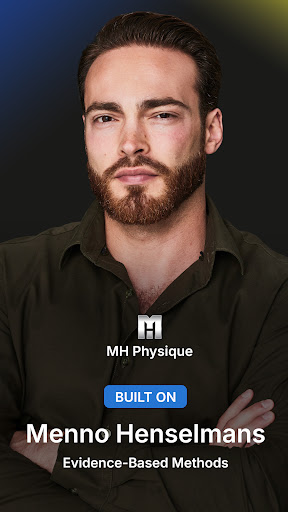
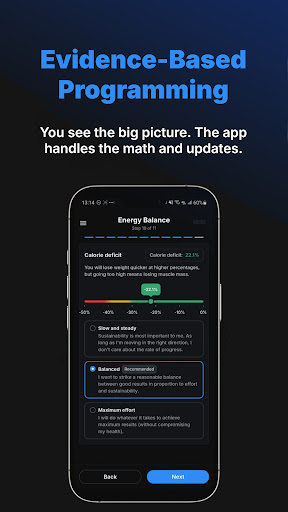
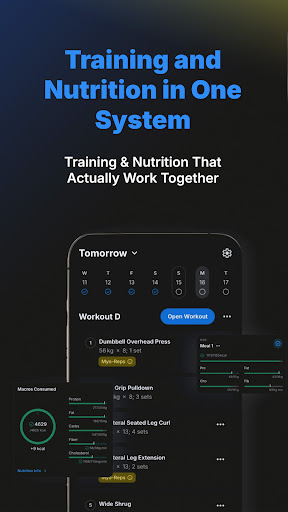
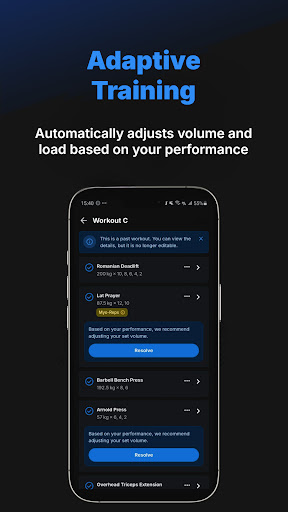
MH Physique is a hypertrophy coaching app built on Menno Henselmans' evidence-based methodology. Unlike other muscle building apps, it builds your plan and updates training and nutrition targets each week based on your real performance, recovery, and adherence data.
Training and Nutrition That Actually Work Together
Most hypertrophy apps adjust your training. MH Physique adjusts both. When your training load increases, your nutrition targets update. When recovery drops, volume is reduced. Every weekly check-in feeds both systems so your training and nutrition always stay aligned, not managed separately across different apps.
Evidence-Based Progression, Not Templates
Every recommendation is built on Menno Henselmans' real coaching models: evidence-based volume landmarks, performance-driven progression, and recovery-informed intensity management. Volume and intensity adjust automatically based on your results. If you are progressing well, training stress increases. If performance drops, the system adjusts before a plateau sets in. You approve changes and can adjust anything. The system handles the calculations, not the decisions.
What the App Does for You
- Personalised training and nutrition plan built from your schedule, training level, goal, frequency, appetite, stress, sleep, lifestyle, and equipment.
- Volume and intensity adjust automatically based on your performance and recovery. Training stress increases when you progress, reduces when you stall.
- Reactive deload suggestions when your performance and fatigue data show you need a break. You always choose whether to apply it.
- Plateau-breaking logic. When progress stalls the app adjusts volume, intensity, rep schemes, or exercise selection to restart progress.
- Training plan customisation. Add or remove days, change your split, swap exercises, adjust order, and set your exact equipment including specific machines.
- Workout logging with set history and performance trends. Fast and structured with notes per session.
- Progress graphs for load, volume, and performance per exercise and muscle group over time.
- Nutrition plan synced to your training load. Macros and calories update each week based on your performance and body composition data.
- Meal plan generator with full weekly or monthly plans from the recipe library, matched to your macros with exact ingredient amounts.
- Body composition tracking for bodyweight, skinfolds, or waist measurements with long-term trend data.
- Flexible nutrition. Choose fixed macros or min and max ranges to fit your lifestyle.
- Optional nutrition logging. Use Quick Macros, log externally, or turn tracking off without breaking the coaching logic.
- Barcode scanner to pull in macros from common food products instantly.
AI label scanner. Point your camera at any nutrition label, take three photos, and the app reads and logs all macros and nutritional data automatically.
- Weekly check-in system reviewing training, nutrition, and adherence. The app uses this to update your plan for the following week.
- Exercise library with detailed instructions and demo videos. Add unlimited custom exercises and machines.
- Community access to connect with other evidence-based lifters using the same system.
Built for Lifters Who Care About Being Right
MH Physique is not built for casual gym-goers. It is built for lifters who train 3 to 7 times per week, track their sets, and care about being right. If you are tired of static programs, spreadsheets that need constant updates, or muscle building apps that handle training but ignore nutrition, this is built for you. The system handles progression, volume, deloads, and macros. You train. You approve. You stay in control.
Try Free for 14 Days
Start your free trial and run your first complete training week. See how training and nutrition work together as one system before you commit.
مزید دکھائیں

1. MEmu انسٹالر ڈاؤن لوڈ کریں اور سیٹ اپ مکمل کریں

2. MEmu شروع کریں اسکے بعد ڈیسکٹاپ پر Google Play کھولیں

3. Google Play میں MH Physique: Hypertrophy App تلاش کریں
Install
4. MH Physique: Hypertrophy App ڈاؤن لوڈ کریں اور انسٹال کریں
5. انسٹال مکمل ہونے کے بعد سٹارٹ کرنے کے لیے آئیکن پر کلک کریں

6. MEmu کے ساتھ پی سی پر MH Physique: Hypertrophy App کھیلنے کا لطف لیں
MEmu پلے بہترین اینڈرائڈ ایمولیٹر ہے اور 100 ملین لوگ اس کے زبردست اینڈرائڈ گیمنگ تجربہ سے لطف اندوز ہو رہے ہیں۔ MEmu کی ورچولائزیشن ٹیکنالوجی آپ کو اپنے PC پر ہزاروں اینڈرائڈ گیمز یہاں تک کہ انتہائی گرافک والے گیمز باسہولت کھیلنے کی طاقت دیتی ہے۔
بہتر گرافکس کے ساتھ بڑی اسکرین؛ طویل دورانیہ، بیٹری یا لامحدود موبائل ڈیٹا کے بغیر۔
کی بورڈ اور ماؤس یا گیم پیڈ کے عین مطابق کنٹرول کے لیے کی میپنگ کا پورا سپورٹ۔
کثیر مثالی منیجر کے ساتھ بیک وقت ایک پی سی پر متعدد گیم اکاؤنٹس یا ٹاسکس۔
پی سی پر درج ذیل مراحل پر عمل کرتے ہوئے پر MH Physique: Hypertrophy App استعمال کریں: u003c/p>