
Suna: Parental Online Tracker
تازہ کاری
موجودہ ورژن
1.0.0
پیشکش بذریعہ

اپنے موبائل فون پر Suna: Parental Online Tracker کا استعمال کرتے وقت زیادہ چارج ہونے کی فکر نہ کریں، خود کو چھوٹی اسکرین سے آزاد کریں اور ایپ کو زیادہ بڑے ڈسپلے پر استعمال کرنے کا لطف اٹھائیں۔ اس کے بعد سے کی بورڈ اور ماؤس کے ساتھ اپنے ایپ کا فل اسکرین کا تجربہ حاصل کریں۔ MEmu آپ کو وہ تمام حیران کن خصوصیات پیش کرتا ہے جن کی آپ کو توقع کرتے ہیں: فوری انسٹال اور آسان سیٹ اپ، وجدانی کنٹرول، مزید بیٹری، موبائل ڈیٹا کی کوئی حد نہیں اور اب مزید پریشان کن کالز نہیں۔ نئے برانڈ کا MEmu 9 آپ کے کمپیوٹر پر Suna: Parental Online Tracker استعمال کرنے کے لیے بہترین اختیار ہے۔ MEmu کثیر نظیری منیجر بیک وقت 2 یا اس سے زیادہ اکاؤنٹس کھولنا ممکن بناتا ہے۔ اور سب اہم بات، ہمارا خصوصی ایمولیشن انجن آپ کے پی سی کی پوری طاقت ریلیز کرتے ہوئے ہر چیز ہموار اور قابل تفریح بناتا ہے۔
مزید دکھائیں
Download Suna: Parental Online Tracker on PC with MEmu Android Emulator. Enjoy playing on big screen. In an era where digital connectivity defines our interactions, especially for the younger generation, the paramount importance of ensuring a safe online environment for children cannot be overstated.
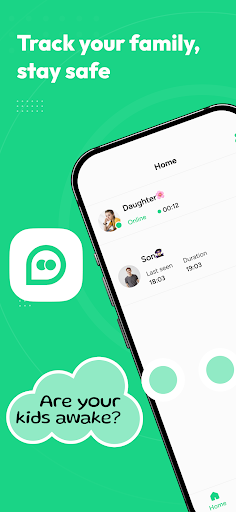
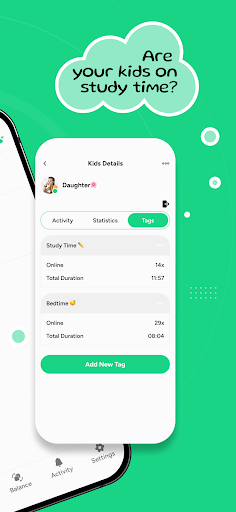
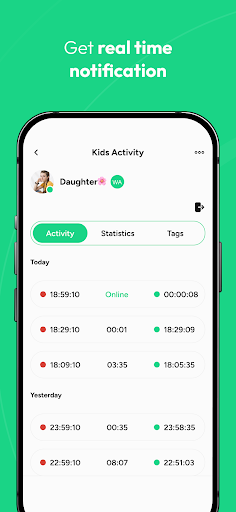
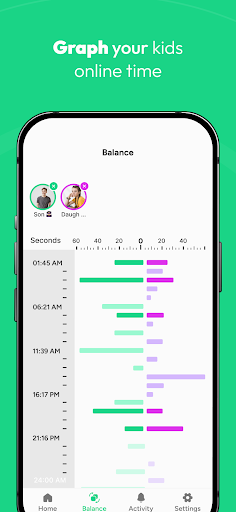
In an era where digital connectivity defines our interactions, especially for the younger generation, the paramount importance of ensuring a safe online environment for children cannot be overstated. This is where SUNA steps in, embodying the role of a digital guardian angel, meticulously crafted to oversee and safeguard your child's engagements within messaging applications. SUNA is not just an app; it's a commitment to digital safety, designed with a keen understanding of the nuanced needs of modern parenting in a hyper-connected world.
Key Features
- Real-time Vigilance: SUNA stands as a vigilant overseer, providing instant notifications about your child's digital presence, ensuring you're always in the loop, whether they are online or offline. This feature is crucial in today's fast-paced digital landscape, where timely information is the key to effective monitoring.
- Family-Centric Approach: Recognizing the diversity and complexity of family dynamics, SUNA allows for the monitoring of up to 10 family profiles. This inclusivity fosters a digitally secure environment, embracing the concept of collective safety within the digital sphere, ensuring that no family member is left unprotected.
- Insightful Reports: The app delves deep into the digital footprints left by your child's interactions within messaging apps, offering detailed reports. These reports are not mere data points but a window into your child's digital behavior, session durations, and overall engagement with the online world, providing a foundation for informed parenting decisions.
- Customized Monitoring: SUNA acknowledges the uniqueness of each child's online journey, offering personalized monitoring through time tags. This allows parents to zero in on specific time frames, offering insights into their child's online patterns, thereby enabling more targeted and effective monitoring strategies.
- Data Privacy Assurance: In an age where data privacy is a significant concern, SUNA empowers users with absolute control over their data. With the ease of a single touch, information can be deleted, underscoring the app's commitment to reinforcing user privacy and trust.
- Comparative Analysis: Understanding the need for a broader perspective, SUNA provides the functionality to compare the online behaviors of two children. This comparative analysis extends to viewing session durations and examining all time intervals, offering a holistic view of digital engagements within the family.
- Accessible Support: SUNA's commitment to its users is exemplified by its round-the-clock customer service. This ensures that assistance is just a call away, providing a safety net that parents can rely on at any time.
SUNA's Holistic Approach
Enhanced Monitoring Experience: SUNA transcends basic monitoring, offering an enriched experience through detailed statistics and behavioral visualizations available in the Tags and Balance tabs. This approach allows for a deeper understanding of online habits, encouraging proactive rather than reactive parenting strategies.
User-Friendly Features: SUNA is designed with the user's convenience in mind, offering a range of features such as language flexibility, Dark Mode and Light Mode options, a 'Share App' feature, and a 'Restore Subscription' option. These features ensure a seamless and personalized user experience, catering to the diverse preferences and needs of its users.
A Safer Digital Experience Awaits
Download SUNA today for a worry-free parenting experience. Empower yourself with the tools to ensure your child's digital journey is not just connected but secure.
مزید دکھائیں

1. MEmu انسٹالر ڈاؤن لوڈ کریں اور سیٹ اپ مکمل کریں

2. MEmu شروع کریں اسکے بعد ڈیسکٹاپ پر Google Play کھولیں

3. Google Play میں Suna: Parental Online Tracker تلاش کریں
Install
4. Suna: Parental Online Tracker ڈاؤن لوڈ کریں اور انسٹال کریں
5. انسٹال مکمل ہونے کے بعد سٹارٹ کرنے کے لیے آئیکن پر کلک کریں

6. MEmu کے ساتھ پی سی پر Suna: Parental Online Tracker کھیلنے کا لطف لیں
MEmu پلے بہترین اینڈرائڈ ایمولیٹر ہے اور 100 ملین لوگ اس کے زبردست اینڈرائڈ گیمنگ تجربہ سے لطف اندوز ہو رہے ہیں۔ MEmu کی ورچولائزیشن ٹیکنالوجی آپ کو اپنے PC پر ہزاروں اینڈرائڈ گیمز یہاں تک کہ انتہائی گرافک والے گیمز باسہولت کھیلنے کی طاقت دیتی ہے۔
بہتر گرافکس کے ساتھ بڑی اسکرین؛ طویل دورانیہ، بیٹری یا لامحدود موبائل ڈیٹا کے بغیر۔
کی بورڈ اور ماؤس یا گیم پیڈ کے عین مطابق کنٹرول کے لیے کی میپنگ کا پورا سپورٹ۔
کثیر مثالی منیجر کے ساتھ بیک وقت ایک پی سی پر متعدد گیم اکاؤنٹس یا ٹاسکس۔
پی سی پر درج ذیل مراحل پر عمل کرتے ہوئے پر Suna: Parental Online Tracker استعمال کریں: u003c/p>