Trade W - Investment & Trading
تازہ کاری
موجودہ ورژن
1.9.28
پیشکش بذریعہ

اپنے موبائل فون پر Trade W - Investment & Trading کا استعمال کرتے وقت زیادہ چارج ہونے کی فکر نہ کریں، خود کو چھوٹی اسکرین سے آزاد کریں اور ایپ کو زیادہ بڑے ڈسپلے پر استعمال کرنے کا لطف اٹھائیں۔ اس کے بعد سے کی بورڈ اور ماؤس کے ساتھ اپنے ایپ کا فل اسکرین کا تجربہ حاصل کریں۔ MEmu آپ کو وہ تمام حیران کن خصوصیات پیش کرتا ہے جن کی آپ کو توقع کرتے ہیں: فوری انسٹال اور آسان سیٹ اپ، وجدانی کنٹرول، مزید بیٹری، موبائل ڈیٹا کی کوئی حد نہیں اور اب مزید پریشان کن کالز نہیں۔ نئے برانڈ کا MEmu 9 آپ کے کمپیوٹر پر Trade W - Investment & Trading استعمال کرنے کے لیے بہترین اختیار ہے۔ MEmu کثیر نظیری منیجر بیک وقت 2 یا اس سے زیادہ اکاؤنٹس کھولنا ممکن بناتا ہے۔ اور سب اہم بات، ہمارا خصوصی ایمولیشن انجن آپ کے پی سی کی پوری طاقت ریلیز کرتے ہوئے ہر چیز ہموار اور قابل تفریح بناتا ہے۔
مزید دکھائیں
Download Trade W - Investment & Trading on PC with MEmu Android Emulator. Enjoy playing on big screen. Trade W - Choice for Beginners and Pros in Trading and Investment, MT4/MT5 trading platform, Start trading like a Pro.
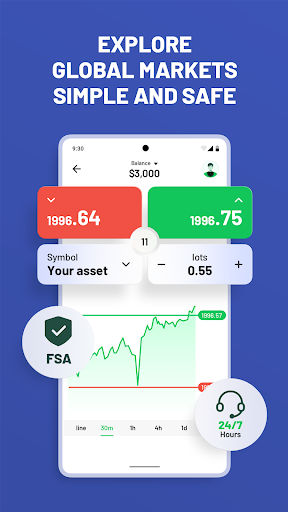
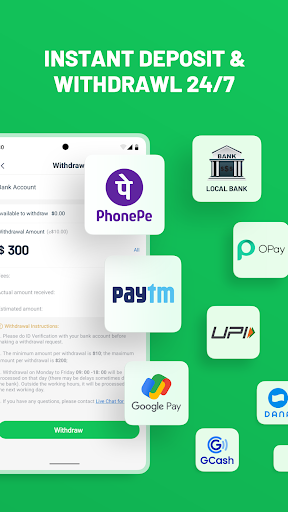
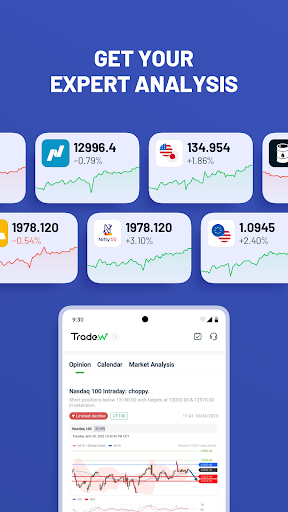

Trade W - Choice for Beginners and Pros in Trading and Investment, MT4/MT5 trading platform, Start trading like a Pro.
Start with a virtual trading account of $10,000. Trading is the future, and the future is already here.
Trade with international brokers under leading market conditions:
● Low, competitive spreads
● Fast and secure deposits and withdrawals
● Localized 24/7 customer support
● Multiple charting and technical analysis indicators
● Order execution speed of 0.03s
● Free demo account to test and practice your trading skills (virtual funds range from $50 to $20,000)
● Economic calendar and market analysis, trading sentiment index
● 100% negative balance protection
● Global popular assets including gold, indices, stocks, and more. Market open year-round.
About Trade W:
Trade W is a flagship application of TradeWill Global LLC, a multi-regulated broker. We are committed to providing clients with a fast, secure, and stable trading environment. With over 5 million clients and over 8 years of industry service experience, we operate in multiple countries.
Contact email: info@tradewill.com.
Registration number: 1365LLC 2021
Registered address: VC0100, Euro House, Richmond Hill Road Kingstown, St Vincent and the Grenadines.
Tradewill Global Limited is a securities dealer registered in Seychelles, regulated by the Seychelles Financial Services Authority (FSA).
Registration number :8430716-1
Legal address: Room 3, Attic Suites, 3rd Floor, Oliver Maradan Building, Victoria, Mahe, Seychelles.
The above entities are officially authorized to conduct business activities under the Tradewill brand and trademark.
Risk Warning: Trading involves High risks, and you should consider your risk tolerance.
Start with a Demo account with $10,000, explore global financial markets anytime, anywhere with 0 risk. Go with real account by depositing real funds and buy sell invest popular global assets.
مزید دکھائیں

1. MEmu انسٹالر ڈاؤن لوڈ کریں اور سیٹ اپ مکمل کریں

2. MEmu شروع کریں اسکے بعد ڈیسکٹاپ پر Google Play کھولیں

3. Google Play میں Trade W - Investment & Trading تلاش کریں
Install
4. Trade W - Investment & Trading ڈاؤن لوڈ کریں اور انسٹال کریں
5. انسٹال مکمل ہونے کے بعد سٹارٹ کرنے کے لیے آئیکن پر کلک کریں

6. MEmu کے ساتھ پی سی پر Trade W - Investment & Trading کھیلنے کا لطف لیں
MEmu پلے بہترین اینڈرائڈ ایمولیٹر ہے اور 100 ملین لوگ اس کے زبردست اینڈرائڈ گیمنگ تجربہ سے لطف اندوز ہو رہے ہیں۔ MEmu کی ورچولائزیشن ٹیکنالوجی آپ کو اپنے PC پر ہزاروں اینڈرائڈ گیمز یہاں تک کہ انتہائی گرافک والے گیمز باسہولت کھیلنے کی طاقت دیتی ہے۔
بہتر گرافکس کے ساتھ بڑی اسکرین؛ طویل دورانیہ، بیٹری یا لامحدود موبائل ڈیٹا کے بغیر۔
کی بورڈ اور ماؤس یا گیم پیڈ کے عین مطابق کنٹرول کے لیے کی میپنگ کا پورا سپورٹ۔
کثیر مثالی منیجر کے ساتھ بیک وقت ایک پی سی پر متعدد گیم اکاؤنٹس یا ٹاسکس۔
پی سی پر درج ذیل مراحل پر عمل کرتے ہوئے پر Trade W - Investment & Trading استعمال کریں: u003c/p>