Vibration Notifier
تازہ کاری
موجودہ ورژن
2.4.2
پیشکش بذریعہ

اپنے موبائل فون پر Vibration Notifier کا استعمال کرتے وقت زیادہ چارج ہونے کی فکر نہ کریں، خود کو چھوٹی اسکرین سے آزاد کریں اور ایپ کو زیادہ بڑے ڈسپلے پر استعمال کرنے کا لطف اٹھائیں۔ اس کے بعد سے کی بورڈ اور ماؤس کے ساتھ اپنے ایپ کا فل اسکرین کا تجربہ حاصل کریں۔ MEmu آپ کو وہ تمام حیران کن خصوصیات پیش کرتا ہے جن کی آپ کو توقع کرتے ہیں: فوری انسٹال اور آسان سیٹ اپ، وجدانی کنٹرول، مزید بیٹری، موبائل ڈیٹا کی کوئی حد نہیں اور اب مزید پریشان کن کالز نہیں۔ نئے برانڈ کا MEmu 9 آپ کے کمپیوٹر پر Vibration Notifier استعمال کرنے کے لیے بہترین اختیار ہے۔ MEmu کثیر نظیری منیجر بیک وقت 2 یا اس سے زیادہ اکاؤنٹس کھولنا ممکن بناتا ہے۔ اور سب اہم بات، ہمارا خصوصی ایمولیشن انجن آپ کے پی سی کی پوری طاقت ریلیز کرتے ہوئے ہر چیز ہموار اور قابل تفریح بناتا ہے۔
مزید دکھائیں
MEmu Play کے ساتھ PC پر Vibration Notifier استعمال کرنے کے شاندار تجربے سے لطف اٹھائیں۔ یہ ایک طاقتور مفت اینڈرائیڈ ایمولیٹر ہے جو آپ کو ان کے ڈیسک ٹاپ ورژن کے لیے ہزاروں اینڈرائیڈ ایپس فراہم کرتا ہے۔ دوستوں کے ساتھ جڑنے اور اعلی کارکردگی کے ساتھ اپنے کام کو چمکانے کا لطف اٹھائیں! Maybe you know this situation: Your phones lays on your desk, you're in the kitchen and you get called.
Maybe you know this situation: Your phones lays on your desk, you're in the kitchen and you get called. You do not hear your ring and when you come back to your desk, you don't notice that you were called because your device has no notification LED or you don't notice that little blinking...
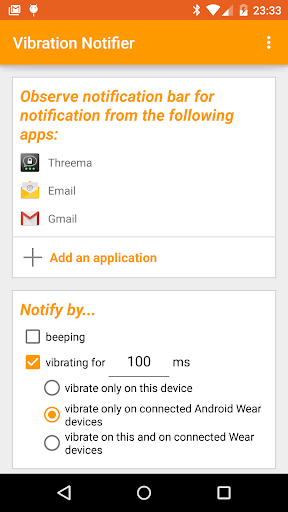
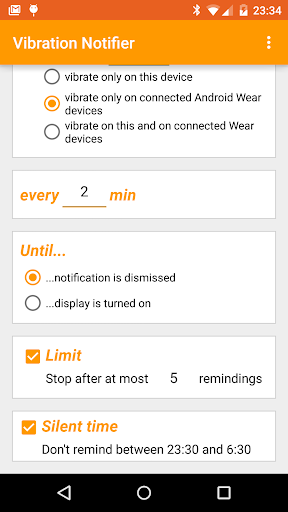
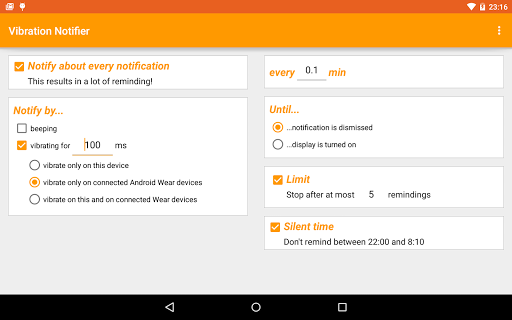
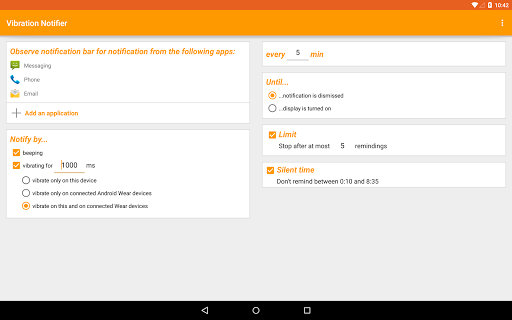
Vibration Notifier offers a solution to this scenario: When you have a missed call, unread SMS or any other event*, the app keeps vibrating every X minutes for Y times or until you turn on the display of your device.
Troubleshooting: The app won't beep if your device is set to silent mode etc. Please note that the app does not change the vibration setting of the other apps, it will only do additional vibrations/beeps if you don't turn on your display before!
An optional feature is available as an in-app purchase (0.99 EUR) with which you'll get these repeating vibrations on your Android Wear smartwatch!
* all apps which notify you about new events by showing a notification in the Android status bar are supported, like WhatsApp, GoogleTalk, Twitter, facebook, etc. Note that this require access to your notification bar
---------
If the app doesn't work: Please check if your device manufacturer implemented a "feature" which prevents apps from running, like Samsung's "Battery Optimizer", Sony's "Stamina", Huawei's "Protected Apps" or anything like that.
---------
Silent hours: Please note that when you set up a silent hours interval in the app, only Vibration Notifier itself won't vibrate or beep. It does not mute other apps so if you receive a new mail, your Gmail app might still beep!
Initial vibration: The app vibrates/beeps after the time set in the app - it does not vibrate/beep immediatelly when you receive a notification (the notifying app is responsible for that vibration)! However, there is an option in the app to get the initial vibration on the connected Android Wear device.
---------
The "vibrate on connected Android Wear devices" requires an "Android Wear" smartwatch. It does not work on a Pebble or a Samsung Tizen watch. You can use the option to send a test command to the watch to check if you're having a compatible device.
---------
This app uses Accessibility services. The accessibility service is necessary on Android versions prior to 4.3 to be notified about new notifications. The accessilibty service is not needed on newer versions of Android.
Permissions:
VIBRATE - obviously necessary to enable the "vibrate every X min" feature
READ_PHONE_STATE - needed to detect missed calls
RECEIVE_SMS & READ_SMS - needed to detect unread SMS
WAKE_LOCK - seems like this is needed on some device to avoid infinite vibrating
READ_CALL_LOG & READ_CONTACTS - needed to differentiate between missed & rejected calls
READ_CONTENT_PROVIDER & GET_ACCOUNTS - necessary for new method to get unread Gmails
WRITE_EXTERNAL_STORAGE - Android Wear communication
مزید دکھائیں

1. MEmu انسٹالر ڈاؤن لوڈ کریں اور سیٹ اپ مکمل کریں

2. MEmu شروع کریں اسکے بعد ڈیسکٹاپ پر Google Play کھولیں

3. Google Play میں Vibration Notifier تلاش کریں
Install
4. Vibration Notifier ڈاؤن لوڈ کریں اور انسٹال کریں
5. انسٹال مکمل ہونے کے بعد سٹارٹ کرنے کے لیے آئیکن پر کلک کریں

6. MEmu کے ساتھ پی سی پر Vibration Notifier کھیلنے کا لطف لیں
MEmu پلے بہترین اینڈرائڈ ایمولیٹر ہے اور 100 ملین لوگ اس کے زبردست اینڈرائڈ گیمنگ تجربہ سے لطف اندوز ہو رہے ہیں۔ MEmu کی ورچولائزیشن ٹیکنالوجی آپ کو اپنے PC پر ہزاروں اینڈرائڈ گیمز یہاں تک کہ انتہائی گرافک والے گیمز باسہولت کھیلنے کی طاقت دیتی ہے۔
بہتر گرافکس کے ساتھ بڑی اسکرین؛ طویل دورانیہ، بیٹری یا لامحدود موبائل ڈیٹا کے بغیر۔
کی بورڈ اور ماؤس یا گیم پیڈ کے عین مطابق کنٹرول کے لیے کی میپنگ کا پورا سپورٹ۔
کثیر مثالی منیجر کے ساتھ بیک وقت ایک پی سی پر متعدد گیم اکاؤنٹس یا ٹاسکس۔
پی سی پر درج ذیل مراحل پر عمل کرتے ہوئے پر Vibration Notifier استعمال کریں: u003c/p>